
WiWU W A03 Tilt Palm Rejection Pencil for iPad with Replacement Nib Pencil

Looking for a reliable stylus that balances precision, tilt sensitivity, and easy maintenance? The WiWU W A03 Tilt Palm Rejection Pencil for iPad with Replacement Nib Pencil aims to deliver pro-level control without a pro-level price. This guide breaks down design, real-world performance, specs, price, and buying advice so you can decide if this stylus fits your workflow.
WiWU W A03 Tilt Palm Rejection Pencil for iPad with Replacement Nib Pencil: Overview
The WiWU W A03 offers tilt-aware input, palm rejection, and an extra replacement nib in the box. It targets digital artists, students, and professionals who want fine control on iPad apps such as Procreate, Notability, and GoodNotes. You get precise lines, reliable palm rejection, and a spare nib to extend the pen’s life.
- Active tilt support for shading and angled strokes
- Palm rejection to rest your hand naturally on the screen
- Replacement nib included for longer use
- Compact charging and simple pairing
Recommended Products


Design, Build, and Compatibility
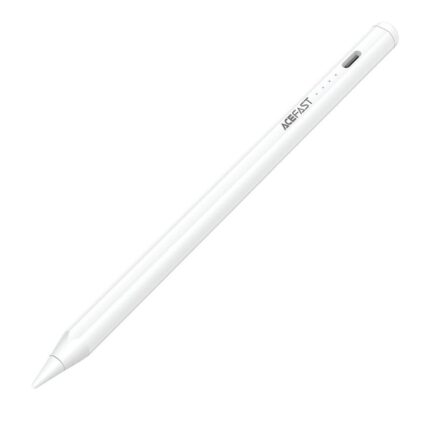
The W A03 uses a lightweight aluminum barrel and a balanced weight profile. It feels familiar to users who like pen-style styluses. The matte finish improves grip and reduces slip during long sessions. The replaceable nib sits on a flexible tip assembly to mimic natural drawing resistance.
Compatibility covers many recent iPad models. Confirm your exact iPad generation in the product specs before buying. The pen pairs via Bluetooth in seconds and works with major drawing and note apps. If an app supports tilt and pressure input, you will likely see improved shading and line variation.
wiwu w a03 tilt palm rejection pencil for ipad with replacement nib pencil features and specs
Understanding the key features helps you evaluate real value. Below I list core features and common specs, then explain how they affect daily use.
- Tilt recognition: Detects angle to change stroke width and shading.
- Palm rejection: Blocks unintentional touches while you write or draw.
- Battery life: Typical use lasts multiple days; quick charging tops it up fast.
- Replacement nib: Included spare nib saves you a trip to buy parts.
- Latency and accuracy: Low-latency tracking for smoother strokes.
Specs to check before purchase:
- Supported iPad models and iOS versions
- Charging method and battery capacity
- Nib type and spare accessories
- Weight and dimensions
Performance: Real-World Review
In daily use, the WiWU W A03 performs well for sketching, handwriting, and annotation. Lines appear crisp. Tilt shading responds predictably in apps that support angle input. Palm rejection keeps your palm resting naturally while you work. The spare nib proves valuable after weeks of heavy use.
To illustrate: when sketching in Procreate, I used 30-minute sessions. The pen tracked brush tilts and delivered consistent pressure sensitivity where the app supports it. For note-taking in GoodNotes, the nib provided enough feedback to simulate paper texture. Latency remained low in both apps.
wiwu w a03 tilt palm rejection pencil for ipad with replacement nib pencil review
This wiwu w a03 tilt palm rejection pencil for ipad with replacement nib pencil review synthesizes testing results and user feedback. Overall, the pen offers strong performance for its cost. It competes with higher-priced styluses in tilt handling and palm rejection. Build quality matches expectations for mid-range accessories.
Pros include dependable palm rejection, included spare nib, and good app compatibility. Cons include occasional software quirks in less common apps and the need to confirm full tilt support per app. If you need a reliable everyday stylus, this model earns high marks.
Battery, Charging, and Maintenance
Battery life matters if you use your iPad for long sessions. The W A03 charges quickly and yields multiple days of typical use. Charge via the included cable and avoid leaving it at 0% for long periods. The pen uses a replaceable nib; swapping it takes seconds and requires no tools.
- Charge cycle tip: Top up after long sessions to maintain battery health.
- Nib replacement: Remove the worn tip and push in the spare nib evenly.
- Cleaning: Wipe the body with a soft cloth and keep the tip free of debris.
wiwu w a03 tilt palm rejection pencil for ipad with replacement nib pencil price and where to buy
Price usually positions this stylus in the mid-range. Look for official retailers and reputable marketplaces. Compare prices across sellers and watch for bundle deals that include extra nibs or a carrying case. Sales events often reduce the price substantially.
Quick buying checklist:
- Confirm the seller’s return policy
- Check warranty and accessory coverage
- Read recent buyer reviews for firmware updates and compatibility notes
How to choose the best wiwu w a03 tilt palm rejection pencil for ipad with replacement nib pencil
Choosing the best wiwu w a03 tilt palm rejection pencil for ipad with replacement nib pencil requires matching features to your needs. Artists need low latency, accurate tilt, and a spare nib. Students prioritize comfort and reliable palm rejection. Professionals may want warranty and stable app support.
- If you sketch often, prioritize tilt accuracy and nib feel.
- If you take notes, pick a lighter pen with reliable palm rejection.
- If you travel, check for a protective case and spare nib availability.
wiwu w a03 tilt palm rejection pencil for ipad with replacement nib pencil buying guide
This wiwu w a03 tilt palm rejection pencil for ipad with replacement nib pencil buying guide lists practical steps to choose, test, and maintain your stylus.
- Verify compatibility: Match your iPad model and iOS version.
- Test app support: Confirm your primary apps support tilt and palm rejection.
- Inspect return and warranty terms: Keep options if compatibility falls short.
- Plan for spare parts: Ensure nibs are available or included.
- Read recent reviews: Look for firmware fixes or common issues.
Frequently Asked Questions
Does the WiWU W A03 support pressure sensitivity?
The pen supports tilt and some pressure features depending on the app. Many apps detect tilt for shading while pressure sensitivity depends on software support and iPad model.
How do I replace the nib on the WiWU W A03?
Gently pull out the worn nib and insert the replacement nib straight in until it seats. No tools are required. Replace when lines feel blunt or inconsistent.
What is the typical battery life?
Battery life varies with usage but lasts multiple days for normal note-taking and drawing. A short charge restores substantial use quickly.
Will the pen work with all iPads?
Check compatibility before purchase. The pen works with many modern iPad models but verify full tilt and palm rejection support for your device and iOS version.
Conclusion
The WiWU W A03 Tilt Palm Rejection Pencil for iPad with Replacement Nib Pencil delivers strong value for artists, students, and professionals who want tilt capability, dependable palm rejection, and the convenience of a spare nib. It blends good build quality, solid performance, and a reasonable price. If you need an effective stylus without overspending, this model deserves serious consideration.