
WiWU Smart Stand Sleeve For 13.3? & 15.4” MacBook/Laptop

The WiWU Smart Stand Sleeve For 13.3? & 15.4” MacBook/Laptop offers protection and a built-in stand in one compact design. If you travel, work from cafes, or use your laptop at a desk, this sleeve aims to improve comfort and safety. This review breaks down features, specs, price considerations, and buying guidance so you can decide with confidence.
WiWU Smart Stand Sleeve For 13.3? & 15.4” MacBook/Laptop review
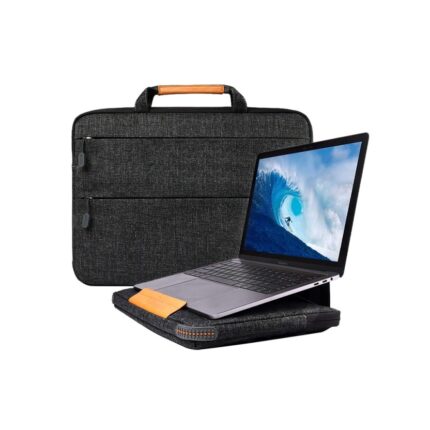
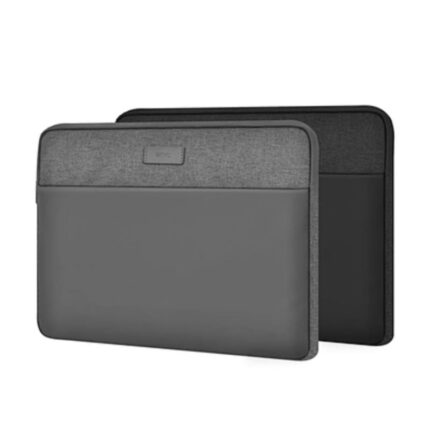
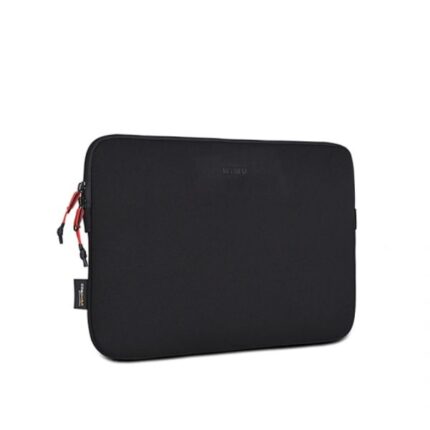
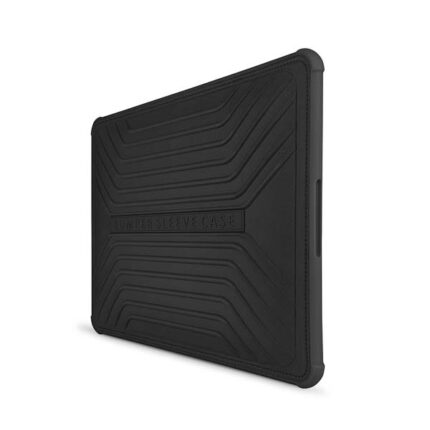
This review examines build quality, ergonomics, protection level, and daily use. The sleeve uses a firm outer shell and soft interior lining to prevent scratches. A built-in foldable stand allows angled typing and better airflow. The design targets 13.3-inch and 15.4-inch MacBooks and similar laptops. Users report easy folding and stable support on flat surfaces.
- Compact protection for travel and daily use
- Integrated stand reduces neck strain
Recommended Products
Key features of the WiWU Smart Stand Sleeve For 13.3? & 15.4” MacBook/Laptop
The sleeve blends several practical features into a slim package. Each feature targets a specific user need.
- Built-in adjustable stand: raises screen angle for typing and viewing.
- Shock-absorbent padding: protects against bumps and light drops.
- Soft interior lining: prevents scratches on the laptop finish.
- Water-resistant exterior: repels light spills and rain.
- Secure closure: magnetic or zipper options for safe storage.
WiWU Smart Stand Sleeve For 13.3? & 15.4” MacBook/Laptop specs
Below are the typical specs for this model. Confirm details with the seller for specific versions.
- Compatibility: 13.3-inch and 15.4-inch MacBook models and most laptops of similar size.
- Materials: water-resistant PU or nylon exterior, memory foam padding, microfiber lining.
- Stand type: foldable, built into the sleeve body, supports multiple angles.
- Closure: zipper or magnetic flap depending on variant.
- Weight: lightweight design for easy transport, typically under 400g.
How the stand works and why it matters
The stand folds from the sleeve’s back and locks into place. It lifts the laptop to create a better viewing angle and improves airflow under the device. Better airflow helps thermal performance during heavier workloads. The angled position also reduces wrist strain when typing. For remote work or long editing sessions, a stable stand can offer measurable ergonomic benefits.
Performance in real use
Users find the sleeve practical for commuting and short work sessions. The stand performs well on solid surfaces such as tables. It may feel less stable on uneven seats or soft laps. The padding absorbs minor bumps well. The sleeve keeps a laptop snug and limits internal movement during transport.
WiWU Smart Stand Sleeve For 13.3? & 15.4” MacBook/Laptop price
Price varies by retailer, material choice, and region. Expect a mid-range price point that balances protection with added stand functionality. Sales and seasonal discounts often reduce the effective cost. If you want premium material options, expect a higher price. Compare prices across authorized sellers and marketplaces to find the best deal.
Pros and cons
Here are the main strengths and limitations to consider.
- Pros: integrated stand, slim profile, protective padding, water resistance, lightweight design.
- Cons: may not support very heavy loads, stability decreases on soft surfaces, limited storage for accessories.
Best WiWU Smart Stand Sleeve For 13.3? & 15.4” MacBook/Laptop: who should buy
This sleeve suits commuters, students, and remote workers who value portability and quick setup. Choose this model if you often shift between locations and need a fast way to raise your laptop screen. Avoid it if you require extra pockets for chargers or heavy daily protection against major drops.
Comparison with other sleeves
Compared to traditional sleeves, the WiWU Smart Stand Sleeve adds ergonomic value. Compared to rigid laptop cases, it weighs less and fits more easily into bags. Compared to full docking accessories, it offers less adjustability but far greater portability. Match the sleeve to your workflow to determine whether it fits your needs.
WiWU Smart Stand Sleeve For 13.3? & 15.4” MacBook/Laptop features to check before buying
When selecting a specific variant, pay attention to construction and functionality. These checks reduce returns and buyer regret.
- Material type and durability
- Stand angle options and stability
- Closure security and ease of use
- Compatibility with your exact laptop dimensions
- Warranty or return policy from the seller
Maintenance and care tips
Keep the sleeve clean to extend its life. Wipe the exterior with a damp cloth for light dirt. For deeper cleaning, follow the manufacturer’s instructions. Avoid machine washing unless the product label allows it. Check the seams and closures periodically. Replace the sleeve if padding compresses significantly.
WiWU Smart Stand Sleeve For 13.3? & 15.4” MacBook/Laptop buying guide
Use this buying guide to make a practical choice. Start by measuring your laptop to confirm fit. Next, decide which features matter most: lightweight design, maximum protection, or extra pockets. Read user reviews for real-world durability and stand stability feedback. Compare prices across sellers and factor in warranty terms. Finally, inspect return policies to protect against sizing issues.
Frequently Asked Questions
Is the WiWU Smart Stand Sleeve For 13.3? & 15.4” MacBook/Laptop compatible with non‑Mac laptops?
The sleeve fits many non‑Mac laptops if their dimensions match the listed 13.3-inch or 15.4-inch sizes. Measure your device before purchase for a secure fit.
How stable is the built-in stand?
The stand is stable on flat, hard surfaces. It may wobble slightly on soft or uneven surfaces. For desk work, it works well and improves typing angle and airflow.
Does the sleeve protect against drops?
The sleeve offers padding that protects against minor bumps and light drops. It does not replace a rugged, shockproof case for heavy impact protection.
Can I use the WiWU sleeve while the laptop charges?
Yes. The sleeve design usually allows access to ports while the laptop sits on the stand or inside the sleeve. Confirm port clearance for your specific laptop model.
Where can I find wiwu smart stand sleeve for 13.3? & 15.4” macbook/laptop price details?
Check official WiWU retailers, large e-commerce marketplaces, and local electronics stores for current wiwu smart stand sleeve for 13.3? & 15.4” macbook/laptop price listings and promotions.
What are the main wiwu smart stand sleeve for 13.3? & 15.4” macbook/laptop features?
Main features include the integrated stand, padded protection, soft lining, water resistance, and secure closure. These wiwu smart stand sleeve for 13.3? & 15.4” macbook/laptop features target portability and comfort.
How do I choose the best wiwu smart stand sleeve for 13.3? & 15.4” macbook/laptop?
Decide based on material, stand stability, and storage needs. Read reviews for real-world feedback. Compare options to find the best wiwu smart stand sleeve for 13.3? & 15.4” macbook/laptop for your workflow and budget.
Conclusion
The WiWU Smart Stand Sleeve For 13.3? & 15.4” MacBook/Laptop combines protection with a functional stand, making it a strong choice for mobile professionals and students. It balances slim design and daily protection while improving ergonomics for short to moderate work sessions. Check specs, compare wiwu smart stand sleeve for 13.3? & 15.4” macbook/laptop price and features, and read user feedback before buying to ensure you get the best fit for your needs.