
WiWU 11-in-1 Cyber Multifunctional Type-C Hub Docking Station

The WiWU 11-in-1 Cyber Multifunctional Type-C Hub Docking Station transforms a single USB-C port into a compact workstation. If you juggle multiple devices, external displays, fast data transfers, and power delivery, this dock aims to simplify your setup. This guide reviews real-world performance, breaks down the specs, and offers practical buying advice so you can decide whether the WiWU 11-in-1 Cyber Multifunctional Type-C Hub Docking Station fits your needs.
Key Features of WiWU 11-in-1 Cyber Multifunctional Type-C Hub Docking Station
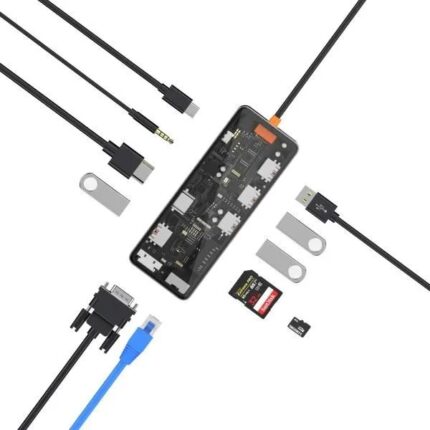
This hub packs 11 ports into a slim unit designed for laptops, tablets, and phones with USB-C. It targets professionals, students, and creators who need more connectivity without a bulky docking station. The key selling points focus on versatility, display support, fast charging, and stable data transfer.
- Multiple video outputs for dual or single external displays
- Gigabit Ethernet for stable wired networking
- USB-A ports with fast data transfer and device charging
- SD and microSD card readers for photographers and content creators
- USB-C Power Delivery passthrough so your laptop can charge while using peripherals
Recommended Products


Design, Build, and Port Layout
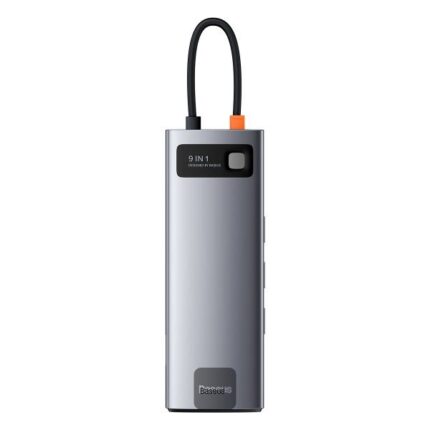
The WiWU hub uses an aluminum alloy chassis that balances durability with portability. Its brushed finish resists fingerprints and helps dissipate heat. The cable is short but sturdy, and the connector locks into modern laptops snugly. Port placement aims for tidy cable management: display outputs grouped together, data ports on one side, and card readers on the other. This layout reduces clutter on a desk or while traveling.
- Sleek, compact form factor
- Aluminum body for heat control
- Thoughtful port grouping for cable management
Performance and Real-World Review
The wiwu 11-in-1 cyber multifunctional type-c hub docking station review feedback highlights dependable video output and fast file transfers. Users report reliable 4K@30Hz and 1080p@60Hz outputs depending on host device limits. When connected to a USB-C laptop that supports DisplayPort Alt Mode, the hub mirrors or extends displays with minimal lag. Data transfer via USB-A 3.0 ports reaches near-spec speeds for external SSDs and flash drives.
Network performance is solid thanks to the Gigabit Ethernet port, which provides low-latency, high-throughput connections ideal for video calls or large file uploads. PD passthrough supports common laptop charging wattages, but confirm your device’s maximum power draw to avoid charging slowdowns during heavy workloads.
WiWU 11-in-1 Cyber Multifunctional Type-C Hub Docking Station Specs
Knowing the specs helps match the hub to your hardware. Below are the typical specifications you can expect. Verify the exact model details from the vendor when buying.
- Ports: HDMI, DisplayPort (or dual HDMI), USB-C PD input, 2–3 USB-A 3.0 ports, SD/microSD readers, Gigabit Ethernet, 3.5mm audio jack
- Video Support: Up to 4K@30Hz (single display) or 1080p@60Hz for dual displays depending on host capability
- Power Delivery: Up to 60W–100W passthrough depending on model
- Data Transfer: USB-A 3.0 up to 5 Gbps
- Compatibility: Windows, macOS, Linux, and many USB-C tablets and phones with DP Alt Mode
WiWU 11-in-1 Cyber Multifunctional Type-C Hub Docking Station Price and Value
Price is a major factor. The wiwu 11-in-1 cyber multifunctional type-c hub docking station price varies by retailer and whether the unit includes extra features such as higher PD wattage or additional video outputs. Typical market prices position this hub as a mid-range option that balances functionality with portability. Look for seasonal discounts or bundle deals that include a protective pouch or USB-C cable.
- Mid-range pricing for full-featured docks
- Watch for discounts during sales events
- Consider warranty and return policy when evaluating value
Comparison: Best WiWU 11-in-1 Cyber Multifunctional Type-C Hub Docking Station Alternatives
When shopping, compare the WiWU hub against similarly spec’d rivals. Check competing brands for higher PD wattage, native dual-4K support, or Thunderbolt 3/4 compatibility if you need maximum bandwidth. The WiWU hub often wins on price-to-feature balance, while premium docks may offer more robust cooling and higher sustained throughput.
- Choose WiWU for a balance of ports and portability
- Choose a Thunderbolt dock for 4K@60Hz dual displays and greater bandwidth
- Consider brand reputation and warranty length
Setup, Compatibility, and Troubleshooting Tips
Setting up the hub is usually plug-and-play, but small compatibility checks can prevent frustration. Update your laptop’s OS and drivers first. If a display does not appear, check the host’s USB-C port supports DP Alt Mode. For charging issues, verify the PD wattage of the adapter and the hub’s PD rating. If the Ethernet connection drops, try switching cables or toggling adapter settings in your OS. For persistent problems, a firmware update or alternate cable often resolves issues.
- Confirm host supports DisplayPort Alt Mode for external displays
- Use a high-quality USB-C cable rated for PD if charging is unstable
- Install drivers on older Windows or Linux distributions when needed
WiWU 11-in-1 Cyber Multifunctional Type-C Hub Docking Station Buying Guide
Use this checklist when evaluating the wiwu 11-in-1 cyber multifunctional type-c hub docking station buying guide recommendations. The goal is to match features to your workflow so you avoid paying for extras you won’t use.
- Identify essential ports: Do you need Ethernet, card readers, or multiple displays?
- Check PD wattage: Ensure the hub can pass enough power to charge your laptop under load.
- Confirm video needs: Single 4K or dual 1080p? Base your choice on the host GPU and port bandwidth.
- Read user reviews for long-term reliability insights.
- Verify warranty and customer support policies.
Practical Uses and Example Setups
Here are practical setups that highlight the hub’s utility. A freelance photographer can offload SD cards, tether a camera, and preview images on an external monitor while charging a laptop. A remote worker can connect to a wired network, run dual monitors for productivity, and power a laptop from a single wall charger. A student can use the hub to expand USB ports for accessories and connect to campus displays for presentations.
- Photographer: SD card reader + external monitor + SSD backup via USB-A
- Remote worker: Gigabit Ethernet + one or two monitors + USB peripherals
- Student: HDMI output for presentations + charging + mouse/keyboard
Frequently Asked Questions
Is the WiWU hub compatible with my MacBook or Windows laptop?
The hub supports most modern macOS and Windows systems with a USB-C port that supports DisplayPort Alt Mode. For full compatibility, check PD wattage and the video output limits of your laptop.
Can the WiWU hub drive two 4K monitors at once?
Most models support a single 4K@30Hz output or dual 1080p displays. Dual 4K@60Hz requires Thunderbolt 3/4 bandwidth, which this USB-C hub typically cannot provide. Verify the specific model specs for exact display capabilities.
Conclusion
The WiWU 11-in-1 Cyber Multifunctional Type-C Hub Docking Station offers a practical way to expand connectivity for laptops and tablets without sacrificing portability. It combines display outputs, Ethernet, fast USB-A ports, and PD passthrough in a compact package that suits professionals, creators, and students. Use the buying guide and specs above to confirm compatibility with your system and to ensure you get the best wiwu 11-in-1 cyber multifunctional type-c hub docking station for your workflow.