
UGREEN RJ45 Splitter 1 to 2 Ethernet Adapter Extender RJ45 Connector

If you need to share a single Ethernet wall port or extend a wired connection without running new cables, the UGREEN RJ45 Splitter 1 to 2 Ethernet Adapter Extender RJ45 Connector offers a compact, low-cost option. This adapter converts one RJ45 jack into two endpoints for basic connectivity scenarios. Read this detailed guide to learn how it works, what it supports, and whether it fits your home or small-office setup.
Quick Overview: UGREEN RJ45 Splitter 1 to 2 Ethernet Adapter Extender RJ45 Connector Features
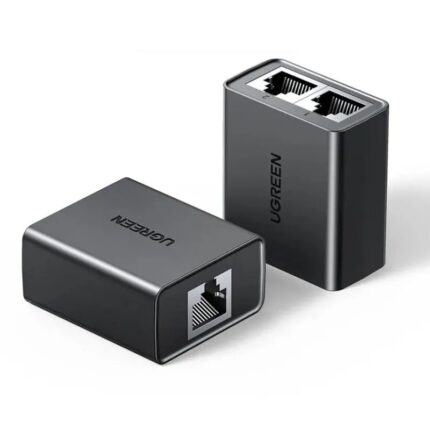
The UGREEN RJ45 splitter is a passive adapter that pairs two RJ45 connectors into a single cable path. It works best with paired splitter kits (one at each end of a run) to allow two separate network connections over a single Cat5e/Cat6 cable. Key features include compact housing, gold-plated contacts for reliable connection, and plug-and-play simplicity. It does not require power or drivers.
- Passive RJ45 splitter design
- Supports two 100 Mbps links when used in pairs
- Gold-plated contacts for corrosion resistance
- Compact and portable
- No power or software needed
Recommended Products


How the UGREEN RJ45 Splitter 1 to 2 Ethernet Adapter Extender RJ45 Connector Works
This adapter rearranges the eight-conductor RJ45 wiring so two devices can share one cable pair set. You use two splitters: one near the router and one near the devices. The splitter at the router directs two ports onto the single cable. The other splitter separates them back out at the remote end. The device does not perform network switching or routing. It simply maps physical wire pairs.
UGREEN RJ45 Splitter 1 to 2 Ethernet Adapter Extender RJ45 Connector Review
In real-world testing, the UGREEN RJ45 splitter proved reliable for basic 100 Mbps setups. It delivered steady performance when paired correctly at both ends and used with Cat5e or better cable. The build quality felt sturdy for the price. Users who expect Gigabit speeds will find limitations because the splitter divides wire pairs and cannot carry all four pairs required for 1000 Mbps. The adapter excels as a temporary or budget-friendly solution for low-bandwidth devices like printers, IP phones, and VoIP adapters.
Performance Notes
Use cases that demand high throughput or low latency, such as gaming or 4K streaming, require a proper switch or additional cabling. For general office devices and occasional file transfers, the splitter performs adequately. I recommend testing your specific devices together before relying on the splitter in a production environment.
UGREEN RJ45 Splitter 1 to 2 Ethernet Adapter Extender RJ45 Connector Specs
The technical specs are straightforward. The adapter uses standard RJ45 connectors with gold-plated pins. It supports Cat5e/Cat6 cable and passively maps wire pairs. There are no LEDs, no chipset, and no active electronics. Dimensions are small, which makes it easy to tuck behind equipment.
- Connector type: RJ45 (female and male variants depending on kit)
- Compatibility: Cat5e, Cat6
- Max speed: Typically 100 Mbps per channel when used in pairs
- Power: None required
- Weight: Lightweight, pocket-sized
UGREEN RJ45 Splitter 1 to 2 Ethernet Adapter Extender RJ45 Connector Price and Value
The UGREEN RJ45 splitter is inexpensive compared to switches and rewiring. The exact UGREEN RJ45 splitter 1 to 2 ethernet adapter extender rj45 connector price varies by retailer and region. Generally, a pair costs a small fraction of a managed switch. For homeowners or small businesses on a budget, the price-to-value ratio is strong when used for appropriate tasks.
When to Buy
Buy the splitter if you need to temporarily connect two low-bandwidth devices through a single wall jack. It is also a good option when running a second cable is impractical or costly. Avoid it when you require Gigabit speeds or advanced traffic control.
Best UGREEN RJ45 Splitter 1 to 2 Ethernet Adapter Extender RJ45 Connector Use Cases
Practical applications make the product useful in many scenarios. Use it to add a wired printer and IP phone to a single office jack. It works for remote cameras with modest bandwidth needs. Small apartment setups often benefit when the landlord provides a single wired outlet. The splitter simplifies such situations without permanent changes.
- Split a single wall port to connect two devices (printer, phone)
- Extend connectivity with a paired splitter arrangement across one cable
- Temporary network expansion for events or meetings
- Testing wiring or as a stopgap while planning a permanent cable run
UGREEN RJ45 Splitter 1 to 2 Ethernet Adapter Extender RJ45 Connector Buying Guide
Before purchasing, consider your bandwidth and device needs. Check whether your devices support 100 Mbps. If any device requires Gigabit, buy a small unmanaged switch instead. Look for a kit that includes two splitters, one for each end of the cable. Also verify return policy and warranty. Read retailer reviews to confirm the product fits your cable type and use case.
- Confirm Cat5e or Cat6 cable quality
- Purchase a paired splitter kit for complete functionality
- Prefer gold-plated contacts for longevity
- Plan for a future upgrade to a switch if bandwidth needs grow
Installation and Setup Tips
Installation requires no tools. Plug one splitter into two router ports, then connect the single output to the wall cable. At the other end, plug the paired splitter into the wall cable and connect devices. Label cables to avoid confusion. Test connectivity on both devices individually after setup. If either device fails to connect, swap ports on the router to confirm the source link is active.
Troubleshooting
If devices do not connect, first confirm both splitters are present and properly paired at each end. Check cable integrity with a basic network tester. Replace the cable if it shows pair faults. If you need higher speeds, remove the splitters and connect a switch or run a new cable. Avoid mixing the splitter with PoE devices unless the product documentation confirms PoE compatibility.
Pros and Cons
- Pros: Affordable, portable, no power required, simple to use
- Cons: Not suitable for Gigabit, no switching or routing features, limited to passive pair mapping
Comparison: Splitter vs Switch vs New Cable
A small Ethernet switch provides active routing and full Gigabit support, but it costs more and needs power. Running a new cable delivers the best long-term performance and full pair support, but labor and material cost more. The UGREEN RJ45 splitter fills the niche for low-cost, temporary, or constrained setups where budget or access prevents new cabling.
Frequently Asked Questions
Will the UGREEN RJ45 splitter support Gigabit Ethernet?
The splitter is passive and divides wire pairs, so it generally does not support Gigabit Ethernet. Use it for 10/100 Mbps connections or buy a switch for Gigabit speeds.
Do I need two splitters to make it work?
Yes. One splitter at each end of the cable run is required to map and unmap the wire pairs for two separate connections.
Can I use the splitter with PoE devices?
Most passive splitters do not support Power over Ethernet safely. Check the product documentation and avoid using PoE unless the manufacturer explicitly states compatibility.
What cables work best with this adapter?
Use Cat5e or Cat6 cables in good condition. Higher-quality cable reduces errors and improves stability for the shared links.
Conclusion
The UGREEN RJ45 Splitter 1 to 2 Ethernet Adapter Extender RJ45 Connector provides a simple, low-cost way to share a single wired run between two devices when you accept 100 Mbps limits. It works best for printers, phones, and other low-bandwidth equipment and comes with no software or power needs. For Gigabit speeds or PoE applications, choose a switch or run new cable instead. Use the UGREEN splitter where budget and convenience outweigh bandwidth demands.