
(Ugreen Nexode USB C Wall Charger: Review & Buying Guide)

When you need fast and reliable charging for a laptop, phone, or tablet, the Ugreen Nexode USB C Wall Charger stands out. This charger brings GaN efficiency and compact design to everyday use. It supports modern power delivery standards and often replaces bulky adapters. This review explains features, specs, price considerations, and a practical buying guide so you can pick the best Ugreen Nexode USB C Wall Charger for your needs.
Ugreen Nexode USB C Wall Charger Features
The Ugreen Nexode line focuses on power, safety, and portability. Common features include power delivery (PD), multiple ports, and GaN (gallium nitride) technology for smaller size and better thermal performance. Ugreen also builds smart power management into these chargers. That lets attached devices draw the most efficient voltage and current.
- GaN technology for reduced size and improved efficiency
- USB-C Power Delivery for fast charging of laptops and phones
- Multiple port options on some models for charging several devices simultaneously
- Built-in safety: over-voltage, over-current, over-temperature protections
- Compact form factor suitable for travel
Recommended Products


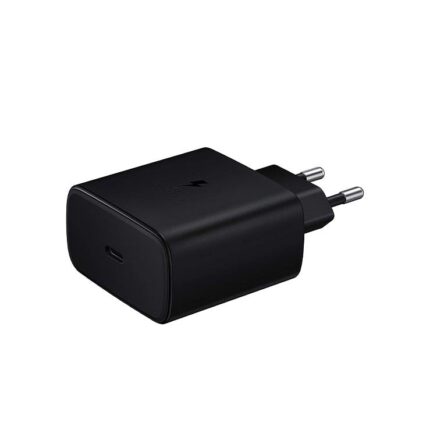
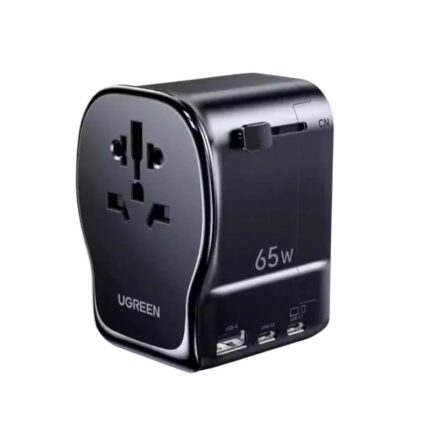
Ugreen Nexode USB C Wall Charger Specs and Performance
The specific specs vary by model, but you can expect high-wattage options and modern charging standards. Popular models typically support USB Power Delivery and may offer programmable power supply (PPS) for improved charging efficiency on supported phones.
- Power output: models commonly start around 30W and can reach 65W or 100W for laptop charging
- Ports: single USB-C or multiple ports (USB-C + USB-A or dual USB-C)
- Efficiency: high conversion rates due to GaN, which reduces heat and energy loss
- Compatibility: works with USB-C laptops, phones, tablets, and many USB-C accessories
In real-world use, a 65W Nexode can fully charge many ultrabooks and charge phones rapidly. A 100W model can support larger laptops and charge two devices effectively when wattage splits intelligently across ports. When comparing models, check peak output per port and whether the charger offers dynamic distribution to optimize multiple-device charging.
Ugreen Nexode USB C Wall Charger Review: What Users Notice
Users often praise the Nexode series for its compact size relative to output. Many note consistent charging speeds and stable thermal behavior during extended use. The charger usually stays cooler than older silicon-based adapters thanks to GaN technology. Buyers also appreciate the durable build and folding plug options on travel-friendly models.
- Fast, stable charging for phones and laptops
- Compact design that fits in travel bags
- Good thermal control under typical loads
- Solid safety feature set that protects devices
Ugreen Nexode USB C Wall Charger Price and Value
Price varies by wattage and port configuration. Single-port 30W options sit at lower price points, while 65W and 100W multi-port chargers cost more. Expect to pay more for higher-wattage and multi-port units, but the price often reflects real value. A well-chosen Nexode replaces multiple chargers and reduces clutter. That can justify a higher upfront cost compared to cheap, low-output alternatives.
Look for seasonal discounts and bundle deals that include a quality USB-C cable. A certified cable makes a noticeable difference in charging speed and safety. When comparing price, consider build quality, warranty, and included protections. These factors increase long-term value.
How to Choose the Best Ugreen Nexode USB C Wall Charger: Buying Guide
Choosing the right Nexode model requires matching charger capability to your devices. Use these practical criteria to decide.
- Wattage needs: Check your laptop or device charger rating. Choose a Nexode that meets or exceeds that wattage for fastest charging.
- Number of ports: Buy a multi-port model if you often charge phone and laptop at once. Ensure the charger splits power intelligently.
- Port types: Prefer USB-C PD ports for modern devices. USB-A still helps with older accessories.
- Compatibility: Confirm PD and PPS support if you rely on fast charging standards for phones like Samsung or Google Pixel.
- Form factor and travel: If you travel often, choose a model with a folding plug and compact footprint.
- Safety and warranty: Verify certifications and warranty length. Ugreen typically provides robust safety features.
For example, choose a 65W single-port Nexode if you carry a lightweight laptop and want compactness. Pick a 100W dual-port model if you need to charge a laptop and a tablet simultaneously without sacrificing speed.
Real-World Tips: Using Your Ugreen Nexode USB C Wall Charger
Maximize performance and longevity with a few simple habits. Always use quality USB-C cables rated for your charger’s wattage. Avoid cheap, unmarked cables that can bottleneck charging or pose safety risks. Place the charger in a ventilated area during heavy charging. Continuous charging at high wattages benefits from good airflow.
- Use certified USB-C cables capable of carrying the required wattage.
- Unplug the charger when not in use to save energy and reduce heat stress.
- Keep firmware and device software updated to ensure compatibility with PD and PPS features.
- Test charging with different devices to confirm power distribution when using multiple ports.
When you travel internationally, verify voltage compatibility and consider a lightweight power strip if you need to charge many devices in one wall outlet.
Comparisons: Ugreen Nexode vs Competitors
The Nexode line competes well on price-to-performance. Compared with some premium rivals, Nexode chargers deliver similar charging speeds at lower cost. They often trade some brand cachet for value. When you compare, look beyond brand names. Check real output per port and real-world heat management. Many users prioritize reliable charging over brand alone.
- Ugreen Nexode: strong value, solid protections, compact GaN design
- Premium competitors: sometimes offer additional accessories or higher-end finishes
- Budget chargers: may lack safety features and proper PD implementation
Frequently Asked Questions
Is the Ugreen Nexode USB C Wall Charger safe to use with laptops?
The charger offers built-in protections for voltage, current, and temperature. Choose a model rated for your laptop wattage. Using the correct wattage ensures safe, efficient charging.
How fast does the Nexode charge phones and laptops?
Charging speed depends on the model wattage and device capability. A 65W Nexode can fast-charge most phones and many laptops. A 100W model supports heavier laptops and better multi-device charging.
Does the Nexode support PPS and PD fast-charging standards?
Many Nexode models support Power Delivery and some include PPS for compatible phones. Check the specific model specs to confirm PPS support if you rely on it.
What is the typical Ugreen Nexode USB C Wall Charger price range?
Prices vary by model and wattage. Lower-watt models cost less, while high-watt multi-port versions cost more. Watch for sales and bundled cable offers to get better value.
Can I use a Nexode charger to charge two devices at once?
Yes. Multi-port Nexode chargers distribute power across ports. Performance depends on total wattage and how the charger divides power. High-watt models maintain good speeds for two devices simultaneously.
Does the charger get hot during use?
GaN technology reduces heat compared to older chargers, but the unit can warm under heavy loads. Ensure good airflow and avoid covering the charger during extended high-power charging.
Conclusion
The Ugreen Nexode USB C Wall Charger balances strong power delivery, compact design, and safety to serve phones, tablets, and many laptops. When you match the model wattage and port layout to your devices, the Nexode offers reliable, efficient charging and good value. Use the buying guide above to select the best Ugreen Nexode USB C Wall Charger for your needs and pair it with quality cables to get peak performance.