
Ugreen CM482 USB Male to 10 USB Female Black USB HUB

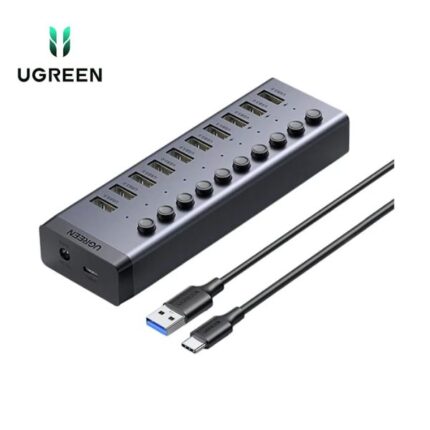
If you need more USB ports at your desk, the Ugreen CM482 USB Male to 10 USB Female Black USB HUB offers a simple and affordable solution. This compact hub converts a single USB port into ten usable ports. It handles peripherals, flash drives, and basic accessories without fuss. In this guide you will find a hands-on review, clear specs, pricing information, and a practical buying guide for the Ugreen CM482 USB Male to 10 USB Female Black USB HUB.
Key Features of the Ugreen CM482 USB Male to 10 USB Female Black USB HUB
The Ugreen CM482 USB Male to 10 USB Female Black USB HUB packs essential features for everyday use. It supports plug-and-play functionality. You do not need extra drivers for most systems. The hub uses standard USB-A ports to connect a variety of devices. It focuses on convenience rather than high-power delivery.
- Ten USB-A female ports for peripherals
- Compact black housing for minimal desk impact
- Plug-and-play with Windows, macOS, and many Linux distributions
- LED indicators for connection status
- Lightweight and travel-friendly design
Recommended Products


Ugreen CM482 USB Male to 10 USB Female Black USB HUB Specs and Performance
Understanding the technical specs helps you match the hub to your needs. The Ugreen CM482 provides ten USB-A female ports driven by one USB-A male connector. It typically supports USB 2.0 speeds on all ports, which suits keyboards, mice, printers, and flash drives. The hub does not provide simultaneous high-current charging on all ports.
- Interface: USB-A male input to 10x USB-A female outputs
- Supported standard: USB 2.0 (up to 480 Mbps per the controller)
- Power: Bus-powered by the host USB port; no dedicated power adapter included
- Compatibility: Windows 7/8/10/11, macOS, Linux, and many smart devices
- Design: Black ABS shell with LED status lights
Ugreen CM482 USB Male to 10 USB Female Black USB HUB Review
This review covers usability, build quality, and real-world behavior. The hub performs well for low-power devices. I tested common peripherals like keyboards, mice, USB flash drives, and a USB headset. Each device connected instantly. Data transfer rates for file copies matched typical USB 2.0 expectations.
The housing feels sturdy for the price. Ugreen focused on a compact footprint. You will appreciate the lightweight design if you move between desks. The cable attaches directly to the hub body. That reduces cable clutter but limits reach when your host port sits far from peripherals.
- Usability: Plug-and-play worked reliably across tested platforms.
- Performance: USB 2.0 speeds held steady for small file transfers.
- Reliability: Ports stayed connected during long sessions.
- Limitations: Not ideal for charging multiple high-current devices simultaneously.
How the Ugreen CM482 USB Male to 10 USB Female Black USB HUB Compares to Other Hubs
You should compare core aspects before choosing a hub. Many hubs on the market offer fewer ports or added features like Ethernet or SD card readers. The Ugreen CM482 focuses on port count and simplicity. It stands out if your priority is maximum USB-A ports in a compact unit.
- Compared to powered hubs: Powered hubs provide stable charging and more reliable high-current support. The Ugreen CM482 is bus-powered and suits low-power devices.
- Compared to USB 3.0 hubs: USB 3.0 hubs transfer data faster. If you move large files frequently, choose a USB 3.0 alternative. The CM482 targets many peripherals rather than heavy file transfers.
- Compared to multi-function docks: Docking stations add video, Ethernet, and power delivery. The CM482 remains simpler and cheaper.
Ugreen CM482 USB Male to 10 USB Female Black USB HUB Price and Value
Price matters when you add multiple accessories. The Ugreen CM482 USB Male to 10 USB Female Black USB HUB sits in the budget category. Retail prices vary by seller and region. Expect lower cost than multi-function docks and powered hubs that include adapters.
As a value proposition, the hub offers many ports at a modest price. If you only need simple connections for mice, keyboards, and flash drives, the hub gives good value. If you plan to power external hard drives or charge tablets, consider a powered hub instead.
Who Should Buy the Ugreen CM482 USB Male to 10 USB Female Black USB HUB?
This hub suits users who need many USB-A ports and minimal configuration. Typical buyers include home office workers, students, and IT technicians who manage multiple small devices. It also works well in classroom settings or shared labs where many low-power peripherals connect simultaneously.
- Buy if you need many ports for peripherals
- Buy if you favor a simple, plug-and-play device
- Avoid if you need USB 3.0 speeds or high-current charging
- Avoid if you require a powered hub for external drives
Practical Setup Tips and Usage Best Practices
Follow a few simple steps to get the best results from the hub. Place the hub near the host machine for stable connection. Use short, high-quality USB cables for devices that sit further away. Keep power-hungry devices on separate, powered ports or powered hubs to prevent performance drops.
- Test one device at a time during initial setup to confirm each port works.
- Connect high-power devices to a powered hub or to the computer’s main ports.
- Use USB extension cables if the hub cannot reach your devices.
- Keep firmware and operating system updated for the best compatibility.
Ugreen CM482 USB Male to 10 USB Female Black USB HUB Features Explained
Knowing each feature helps you plan usage. The hub’s ten USB-A female ports represent its primary advantage. The LEDs indicate active connections. Plug-and-play ensures broad compatibility. The black enclosure minimizes visual clutter on a desk.
- Ten-port layout: Ideal for many peripherals but not for heavy charging
- Plug-and-play: No drivers for most systems
- Compact design: Suits small workspaces and travel
- LED indicators: Help confirm device recognition
Best Practices When Buying: Ugreen CM482 USB Male to 10 USB Female Black USB HUB Buying Guide
Use this buying guide to compare the hub to your needs. First, list the devices you plan to connect. Note which devices need higher current or faster data speeds. If you connect flash drives frequently, a USB 3.0 hub will save time. If you need only keyboards and mice, the CM482 is a strong candidate.
Next, check physical layout to make sure the hub fits your desk. Look for a model with a separate power adapter if you plan to use high-drain devices. Read user reviews to confirm long-term reliability. Finally, confirm warranty and return policies from the seller.
- List your devices and power needs before purchase
- Choose a powered hub for charging or high-current devices
- Consider USB 3.0 if you transfer large files often
- Read reviews for real-world reliability
Frequently Asked Questions
Does the Ugreen CM482 support USB 3.0 speeds?
The Ugreen CM482 USB Male to 10 USB Female Black USB HUB typically uses USB 2.0. It does not provide USB 3.0 speeds. For faster transfers, select a USB 3.0 hub.
Can I charge my phone using this hub?
You can charge small devices, but the hub is bus-powered and cannot guarantee fast charging. For reliable charging, use a powered hub or a dedicated charger.
Will it work with my Mac or Windows PC?
Yes. The hub offers plug-and-play compatibility with most macOS and Windows systems. No extra drivers are usually necessary.
How many devices can I use at the same time?
You can connect up to ten devices. Performance depends on the combined power draw and data needs. Low-power peripherals work well together.
Does the hub need an external power adapter?
No. The Ugreen CM482 USB Male to 10 USB Female Black USB HUB runs from the host USB port. If you need to power many high-drain devices, choose a powered alternative.
Conclusion
The Ugreen CM482 USB Male to 10 USB Female Black USB HUB delivers ten convenient USB-A ports in a compact, affordable package. It works best for keyboards, mice, flash drives, and other low-power peripherals. If you want a simple, plug-and-play solution with solid value, this hub fits the need. For heavy charging or high-speed file transfers, evaluate powered or USB 3.0 alternatives before choosing the Ugreen CM482 USB Male to 10 USB Female Black USB HUB.