
UGREEN CM417 USB-C to 4USB 3.0 & HDMI Hub Review

The UGREEN CM417 USB-C to 4USB 3.0 & HDMI Hub aims to simplify a crowded desk. This compact hub adds four USB 3.0 ports and an HDMI output to any USB-C laptop or tablet. If you juggle external drives, mice, and a second display, this adapter can reduce cable swaps and speed up workflow. This review covers features, specs, price considerations, and a practical buying guide to help you decide.
UGREEN CM417 USB-C to 4USB 3.0 & HDMI Hub Overview
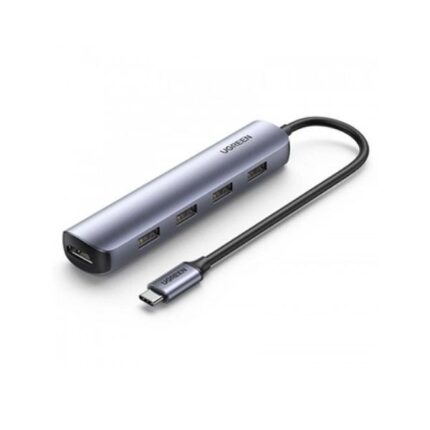
The UGREEN CM417 USB-C to 4USB 3.0 & HDMI Hub targets users who need both multiple USB ports and video output. It plugs into a single USB-C port and gives four USB-A 3.0 ports and one HDMI port. The hub supports 4K video at 30Hz on compatible devices. It also supports USB 3.0 transfer speeds up to 5 Gbps. The unit fits in a laptop bag. Setup takes seconds.
- 4 x USB 3.0 ports for peripherals and storage
- 1 x HDMI port for external displays up to 4K@30Hz
- Plug-and-play operation on most modern laptops
Recommended Products


Key Features of UGREEN CM417 USB-C to 4USB 3.0 & HDMI Hub
This section lists the hub features and what they mean in daily use. The hub focuses on practicality and compatibility. It uses USB 3.0 ports for fast file transfers. The HDMI port gives an easy path to projectors and monitors. The aluminum shell improves heat dissipation and adds a premium feel.
- High-speed USB 3.0 data transfer (up to 5 Gbps)
- HDMI video output supporting 4K@30Hz and 1080p@60Hz
- Compact, portable design for travel
- Broad device compatibility with Windows, macOS, and Chrome OS
UGREEN CM417 USB-C to 4USB 3.0 & HDMI Hub Specs
Knowing the specs helps match the hub to your devices. The official specs outline port counts and supported resolutions. Check your laptop’s USB-C port capabilities before buying. Some laptops limit video output on shared ports. The hub itself does not supply power for laptop charging.
- Input: USB-C male (data + video, no PD charging)
- Output: 4 x USB-A 3.0 ports
- Output: 1 x HDMI 1.4 port (up to 4K@30Hz)
- Data transfer: Up to 5 Gbps per USB port (shared bandwidth applies)
- Material: Aluminum casing with PVC cable
Performance and Real-World Use: ugreen cm417 usb-c to 4usb 3.0 & hdmi hub review
In daily testing, the hub handled a mix of USB peripherals without hiccups. I connected an external SSD, flash drive, mouse, and keyboard while outputting video to a 4K monitor. File transfers reached near USB 3.0 speeds when the SSD alone used a port. Performance depends on how many devices share bandwidth. The HDMI output delivered stable video at 4K@30Hz and remained reliable for presentations and streaming.
The hub does not charge laptops. You can charge low-power devices via the USB ports, but expect limited current. The aluminum shell stayed cool during extended use. The cable length suits a laptop on a desk but may feel short for complex setups. Overall, the unit balanced convenience and performance for most users.
UGREEN CM417 USB-C to 4USB 3.0 & HDMI Hub Price and Value
Price determines whether the hub fits your budget and needs. The UGREEN CM417 USB-C to 4USB 3.0 & HDMI Hub price typically sits in the affordable mid-range for multiport adapters. It often costs less than competing docks that add power delivery. You get a compact hub with strong build quality for a modest fee. If you need passthrough charging, choose a different model that supports PD.
- Affordable compared to full-featured docking stations
- Good value for travelers and students
- Consider price fluctuations during sales and promotions
Who Should Buy the UGREEN CM417?
The hub suits users who need extra USB-A ports and occasional video output. It fits remote workers, students, and content creators on a budget. You should buy this hub if you want a plug-and-play adapter without docking-station bulk. If you require laptop charging or dual-monitor 4K@60Hz, look at more advanced docks. The hub serves as a solid bridge for older peripherals and HDMI displays.
Comparing the Best UGREEN CM417 USB-C to 4USB 3.0 & HDMI Hub Alternatives
Several compact hubs offer similar features. Compare port layout, video specs, and whether they include PD passthrough. Some rivals provide 100W PD and more advanced HDMI versions for 4K@60Hz. If you only need USB expansion and occasional HDMI, the UGREEN CM417 often gives the best price-to-performance ratio.
- Choose PD-enabled hubs if you need laptop charging
- Pick HDMI 2.0 or 2.1 models for 4K@60Hz or higher
- Consider a powered dock for many high-draw devices
UGREEN CM417 USB-C to 4USB 3.0 & HDMI Hub Buying Guide
This buying guide helps you decide if this hub matches your needs. First, check your laptop’s USB-C port type. Your port must support DisplayPort Alt Mode for HDMI output to work. Second, list the devices you plan to connect. If you run multiple high-speed drives, expect shared bandwidth. Third, decide if you need charging through the hub. The UGREEN CM417 does not provide power delivery, so plan for a separate charger if you need to power your laptop while using the hub.
- Verify USB-C port supports video (DisplayPort Alt Mode)
- Count devices: ensure the hub provides enough USB ports
- Decide on PD: buy a PD hub if you need laptop charging
- Check HDMI version if you need 4K@60Hz
Setup and Tips for Best Results
Setup takes under a minute. Plug the hub into a USB-C port. Connect your HDMI cable to a monitor. Attach USB devices as needed. Wait for the OS to detect new hardware. If the display does not appear, open display settings and detect monitors. Use high-quality HDMI cables for stable 4K output. Avoid daisy-chaining power-hungry drives without an external power source.
Pros and Cons: ugreen cm417 usb-c to 4usb 3.0 & hdmi hub features
We list the main advantages and trade-offs so you can weigh them quickly.
- Pros: compact, durable build, four USB 3.0 ports, 4K HDMI support
- Pros: easy plug-and-play setup and broad OS compatibility
- Cons: no power delivery pass-through for charging laptops
- Cons: HDMI limited to 4K@30Hz on many devices
Frequently Asked Questions
Does the UGREEN CM417 support laptop charging?
The UGREEN CM417 USB-C to 4USB 3.0 & HDMI Hub does not support USB-C power delivery for laptop charging. Use your laptop’s charger separately or choose a hub with PD passthrough if charging is required.
Will the hub work with my MacBook or Windows laptop?
Yes. The hub works with most modern macOS and Windows laptops that support USB-C. For HDMI output, your laptop must support DisplayPort Alt Mode over USB-C. Check your device specifications if you are unsure.
Conclusion
The UGREEN CM417 USB-C to 4USB 3.0 & HDMI Hub offers a practical, budget-friendly way to expand ports on a USB-C laptop. It delivers four USB 3.0 ports and reliable HDMI output in a compact package. Use this hub when you need extra USB-A ports and occasional external display support without adding bulk. The hub provides solid performance for everyday productivity, travel, and classroom setups.