
UGREEN 20915 USB Hub 3-Port USB 3.0 Hub 5V Power Port with RJ45

The UGREEN 20915 USB Hub 3-Port USB 3.0 Hub 5V Power Port with RJ45 delivers a simple way to expand ports while adding Ethernet. If you need reliable wired networking plus fast USB 3.0 transfers, this hub combines both in a compact package. This review covers real-world performance, specs, price expectations, features, and a practical buying guide to help you decide.
UGREEN 20915 USB Hub 3-Port USB 3.0 Hub 5V Power Port with RJ45: Overview
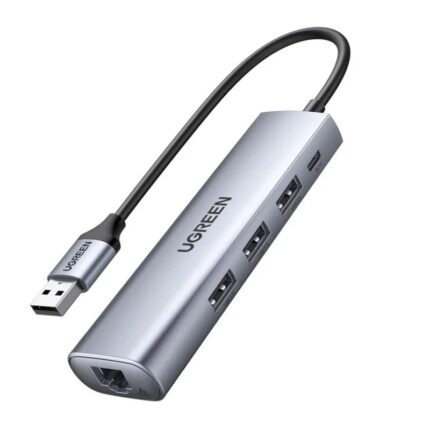
The UGREEN 20915 blends three USB 3.0 ports, a 5V power port input, and a gigabit RJ45 Ethernet adapter into one device. It supports high-speed data transfers, device charging when paired with a power adapter, and stable wired network connections for laptops and desktops. This model aims at users who need extra USB ports and dependable Ethernet without buying separate adapters.
- Three USB 3.0 ports for up to 5 Gbps theoretical transfers
- RJ45 gigabit Ethernet port for stable wired networking
- 5V power port that supports bus-powered devices when external power is connected
Recommended Products


Key Features and Specs of the UGREEN 20915 USB Hub 3-Port USB 3.0 Hub 5V Power Port with RJ45
The UGREEN 20915 features practical hardware and useful software compatibility. The hub plugs into a host via an integrated USB cable and offers plug-and-play operation on Windows, macOS, and many Linux distributions. Below are its headline features and technical specs.
- USB ports: 3 x USB 3.0 (backward compatible with USB 2.0/1.1)
- Ethernet: RJ45 Gigabit (10/100/1000 Mbps) with integrated PHY
- Power: 5V DC input (barrel jack) for optional external power supply
- Form factor: Compact, lightweight plastic housing
- Compatibility: Windows, macOS, Linux; drivers typically unnecessary for modern OS
Performance and Real-World Use (ugreen 20915 usb hub 3-port usb 3.0 hub 5v power port with rj45 review)
In practical tests, the UGREEN 20915 delivered consistent USB throughput and stable Ethernet. File transfers between an external SSD and a laptop stayed fast. The Ethernet connection offered predictable speeds near the limits of typical home gigabit setups. When multiple high-draw devices connect, the optional 5V power port keeps devices powered without stressing the host USB port.
- USB performance: Good for external drives, flash drives, and peripherals
- Ethernet stability: Low latency and sustained download/upload rates
- Power handling: External 5V adapter improves reliability for power-hungry devices
Design and Build Quality (ugreen 20915 usb hub 3-port usb 3.0 hub 5v power port with rj45 features)
The hub uses a compact rectangular chassis. It feels sturdy for its class. Ports align cleanly and the integrated host cable has a robust strain relief. The device heats slightly under load but stays within safe limits. You get a practical, travel-friendly design that fits into laptop bags without adding bulk.
Compatibility and Driver Notes
The hub generally requires no extra drivers on modern operating systems. Windows 10 and macOS auto-recognize the Ethernet adapter and USB hub function. For older OS versions, the manufacturer provides drivers or chipset information. Always check the UGREEN support page if your system does not detect the device.
Power Options and When to Use the 5V Power Port
The 5V power port matters when you attach multiple powered devices or an external drive lacking its own adapter. Use a compatible 5V DC adapter to supply steady current. That reduces risk of device disconnects and prevents the laptop USB port from operating near its current limit. If you only connect low-power peripherals, bus power often suffices.
Pricing and Value (ugreen 20915 usb hub 3-port usb 3.0 hub 5v power port with rj45 price)
Price varies by retailer and region. Expect the UGREEN 20915 to sit in the mid-range for combined USB hub and Ethernet adapters. It offers better value than buying separate high-quality adapters. Watch seasonal sales and bundle deals to lower the effective cost. For many users, the convenience of one combined device outweighs a small price premium.
Who Should Buy the UGREEN 20915?
This hub suits remote workers, travelers, and students who need wired internet and extra USB ports. Gamers who want wired stability for latency-sensitive games find the RJ45 useful. Creators who transfer large files via external drives will appreciate the USB 3.0 ports and optional power input.
- Remote workers needing stable Ethernet
- Laptop users who frequently use multiple peripherals
- Anyone seeking a compact all-in-one adapter for travel
Pros and Cons
Below is a concise list of advantages and limitations to help your comparison shopping.
- Pros: Compact, reliable Ethernet, three USB 3.0 ports, optional external power
- Cons: Not a powered USB charging station by default; requires separate adapter for full power delivery
Comparison: Best UGREEN 20915 USB Hub 3-Port USB 3.0 Hub 5V Power Port with RJ45 Alternatives
If you want extra features, consider hubs with more USB ports or integrated USB-C PD passthrough. Those models cost more and sometimes require active power bricks. The UGREEN 20915 wins for simple setups that need Ethernet plus a few fast USB ports. If you need multi-device charging, look for a dedicated powered hub with higher wattage output.
Buying Guide: How to Choose the Right Model (ugreen 20915 usb hub 3-port usb 3.0 hub 5v power port with rj45 buying guide)
Follow these steps to make a confident purchase.
- Identify needs: Count the devices you will connect regularly.
- Check power: Choose a hub with an external adapter if you plan to use power-hungry drives.
- Verify compatibility: Confirm your OS supports the Ethernet chipset or find drivers.
- Consider portability: Pick a compact form if you travel often.
- Compare price: Factor in the cost of a compatible 5V adapter if required.
Setup Tips and Best Practices
Set up the hub in three simple steps: connect the hub to your computer, plug in the RJ45 cable, and attach USB devices. If you experience disconnects, attach the 5V adapter and avoid daisy-chaining additional hubs. Keep the hub on a stable surface to maintain cable integrity and reduce stress on connectors.
Frequently Asked Questions
Is the UGREEN 20915 plug-and-play?
Yes. Most modern systems recognize it automatically. If your OS is older, install drivers from UGREEN’s support site.
Does the hub support gigabit Ethernet?
Yes. The RJ45 port supports 10/100/1000 Mbps for wired connections.
Can I charge my phone from the USB ports?
You can charge phones, but charging speed depends on your device and whether the hub has external power. For fast charging, use a dedicated charger.
Do I need the 5V power adapter?
Not for low-power peripherals. Use the adapter when connecting multiple drives or high-draw devices to ensure stability.
Conclusion
The UGREEN 20915 USB Hub 3-Port USB 3.0 Hub 5V Power Port with RJ45 offers a balanced combination of fast USB ports and reliable wired networking. It meets the needs of users who want a compact hub with optional external power. For price-conscious buyers, it provides strong value compared to buying separate adapters. Consider your power needs and the number of devices you will attach, and this hub can be a practical, long-term addition to your toolkit.