
TP-Link LS1005 5-Port 10/100Mbps Desktop Network Switch

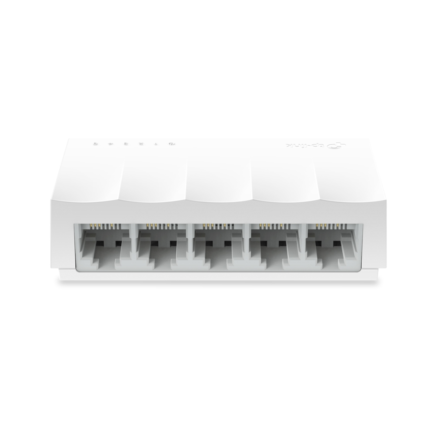
The TP-Link LS1005 5-Port 10/100Mbps Desktop Network Switch delivers simple, reliable Ethernet connectivity for small offices and home networks. This compact switch supports five 10/100 Mbps ports and runs fanless for silent operation. If you need straightforward plug-and-play networking, the TP-Link LS1005 5-Port 10/100Mbps Desktop Network Switch offers an affordable solution with solid basic features. This article gives a clear review, specs, price guidance, and a practical buying guide so you can decide with confidence.
TP-Link LS1005 5-Port 10/100Mbps Desktop Network Switch: Quick Overview
This tp-link ls1005 5-port 10/100mbps desktop network switch review focuses on core strengths and real-world use. The device targets users who need additional Ethernet ports without management complexity. Install the switch by plugging devices into any port. The switch auto-negotiates link speed and supports auto MDI/MDIX, so you do not need crossover cables. It draws low power and uses a compact plastic chassis that fits on a desk or shelf.
- Five 10/100 Mbps RJ45 ports
- Plug-and-play setup
- Auto-negotiation and Auto MDI/MDIX
- Fanless design for silent operation
- Energy-efficient Ethernet saves power
Recommended Products
tp-link ls1005 5-port 10/100mbps desktop network switch specs
Understanding specs helps match the device to your needs. The TP-Link LS1005 supports five 10/100 Mbps ports. It provides store-and-forward switching and a MAC address table sized for small networks. Typical switching capacity suits low to moderate traffic. The unit includes LED indicators for power and port activity. The power adapter supplies the required DC voltage. Because it lacks management features, administrators cannot configure VLANs or QoS on this model. That limitation fits buyers who want simplicity and low cost.
- Port count: 5 x 10/100 Mbps RJ45
- Switching architecture: Store-and-forward
- MAC table: Suitable for small office networks
- LEDs: Link/activity and power
- Power: External DC adapter, low consumption
- Dimensions: Compact, desktop form factor
tp-link ls1005 5-port 10/100mbps desktop network switch features
The TP-Link LS1005 focuses on essential features users actually need. It emphasizes ease of use and reliability over advanced controls. The switch supports auto MDI/MDIX on all ports. This feature prevents cable-type issues. Energy Efficient Ethernet reduces power draw when links are idle. The device uses store-and-forward switching to reduce packet errors. LEDs give instant status information. The absence of fans means no moving parts to fail, and it runs quietly in the background.
- Auto MDI/MDIX for cable flexibility
- Energy-efficient Ethernet for lower power use
- Silent operation with fanless design
- Durable, compact housing for desktop placement
- Plug-and-play operation for non-technical users
Performance and Real-World Use
Performance suits small offices, home labs, and media streaming setups. The 10/100 Mbps ports limit throughput compared with gigabit switches. For file transfers between multiple devices, expect slower speeds than with Gigabit Ethernet. For web browsing, VoIP, printers, and basic NAS access, the LS1005 performs well. It handles light to moderate concurrent traffic without configuration. Use it as an edge switch for cameras, printers, and legacy equipment that does not require gigabit speeds.
- Ideal for web, VoIP, printers, and light NAS use
- Not recommended for heavy file transfers across many devices
- Good for extending Ethernet to hard-to-reach corners
- Works well with routers that provide DHCP and routing
tp-link ls1005 5-port 10/100mbps desktop network switch price and value
Price often drives the decision for unmanaged switches. The TP-Link LS1005 usually appears at a budget-friendly price point. Search current listings to compare offers and shipping. For buyers on a tight budget, the LS1005 offers strong value for basic expansion. If you need gigabit speeds or managed features, budget more for an upgraded model. When assessing price, factor in durability, warranty, and energy savings. The low purchase cost and minimal power draw often justify the expense for low-demand environments.
- Budget-friendly for basic port expansion
- Compare prices across retailers to find the best deal
- Consider total cost of ownership: power use and reliability
Best TP-Link LS1005 5-Port 10/100Mbps Desktop Network Switch Use Cases
Choose this switch when simplicity and cost matter most. Use it in small offices that rely on a single router. Deploy it for home entertainment setups where gigabit is unnecessary. Connect printers, IP phones, and legacy devices that top out below 100 Mbps. Place it near a modem or router that already handles advanced network services. It also works well in classrooms and temporary setups where fast replacement is valuable.
- Small offices with basic networking needs
- Home networks for streaming and light NAS access
- Extension for IP phones and printers
- Temporary event networks or labs
tp-link ls1005 5-port 10/100mbps desktop network switch buying guide
Follow a clear checklist when you shop. First, confirm port speed needs. If devices use gigabit frequently, choose a Gigabit switch instead. Second, count your devices and allow headroom for growth. Third, check for management needs. If you require VLANs, QoS, or monitoring, select a managed model. Fourth, assess build quality and warranty. A reputable brand and a decent warranty reduce long-term risk. Fifth, compare prices and include power adapters and shipping in the final cost.
- Confirm 10/100 Mbps is sufficient for your devices
- Plan for at least one or two extra ports
- Decide if unmanaged simplicity meets your needs
- Check warranty and customer support options
- Compare retailer pricing and delivery terms
Setup Tips and Best Practices
Setup takes minutes. Place the switch on a stable surface near your router or patch panel. Connect the switch’s power adapter and plug in devices using standard Ethernet cables. Use cable labels if you manage multiple ports. Keep the switch in a well-ventilated area to avoid heat build-up. Although fanless, the unit still benefits from airflow. Test each connected device for link speed and stability. If a device cannot reach required throughput, check its NIC settings and cable quality.
- Label cables to identify connections quickly
- Use quality Cat5e or Cat6 cables for best results
- Keep the device away from direct heat sources
- Verify device NICs to rule out endpoint limitations
Alternatives and When to Upgrade
Consider alternatives when your needs change. Upgrade to a Gigabit switch when file transfers or local backups overwhelm 100 Mbps. Choose a managed switch if you need VLANs, QoS, or SNMP monitoring. For PoE devices, select a PoE-capable switch to avoid separate injectors. If silent operation matters but you need gigabit speeds, look for fanless gigabit models. Evaluate energy consumption and warranty when comparing models.
- Upgrade to gigabit for heavy file transfers
- Choose managed switches for advanced control
- Select PoE switches for cameras and access points
Frequently Asked Questions
Is the TP-Link LS1005 suitable for a small office?
The TP-Link LS1005 fits small offices with basic networking needs like printers, phones, and light NAS access. It does not support gigabit speeds or advanced management.
How does the TP-Link LS1005 compare in price and performance?
The unit offers strong value at a low price for 10/100 Mbps use. Performance meets expectations for light to moderate traffic but lags behind gigabit switches for heavy transfers.
Does this switch need configuration?
No. The LS1005 is plug-and-play. It has no management interface, so you simply connect devices and it begins forwarding traffic.
Can I use the LS1005 for IP cameras?
Yes, for cameras that stream at or below 100 Mbps. For multiple high-resolution streams, prefer a gigabit or PoE switch to ensure bandwidth and power needs.
Conclusion
The TP-Link LS1005 5-Port 10/100Mbps Desktop Network Switch provides a low-cost, reliable way to add Ethernet ports for basic networks. It works well for small offices, home setups, and devices that do not require gigabit speeds. This tp-link ls1005 5-port 10/100mbps desktop network switch review and buying guide highlighted features, specs, price considerations, and practical setup tips. If you need simple expansion without management, the TP-Link LS1005 5-Port 10/100Mbps Desktop Network Switch remains a sensible choice. Consider your throughput needs before you buy to ensure the switch matches your network demands.