
Rock TR30 10in1 Type-C To HDMI VGA Audio USB 3.0 SD TF LAN PD Docking Station Hub

If you juggle multiple devices and ports, the Rock TR30 10in1 Type-C To HDMI VGA Audio USB 3.0 SD TF LAN PD Docking Station Hub promises to simplify your setup. This hub brings a surprising number of ports into a compact package. It aims to deliver video output, wired networking, storage expansion, fast data transfers and power delivery through a single Type-C connection. Read on to learn what it offers, see practical use cases, and decide if it matches your needs.
Rock TR30 10in1 Type-C To HDMI VGA Audio USB 3.0 SD TF LAN PD Docking Station Hub: Key Features
The Rock TR30 packs ten ports into one hub. It targets professionals, students, and remote workers who need more connectivity. The hub connects with a single Type-C cable. It supports HDMI and VGA for displays. It includes a 3.5mm audio jack and an Ethernet port for stable networking. You also get USB 3.0 ports and SD/TF card slots for quick file access. Finally, PD charging keeps your laptop powered while you use peripherals.
- HDMI output up to 4K@30Hz for modern monitors and TVs
- VGA output for older displays or projectors
- USB 3.0 ports for fast data transfer and peripherals
- SD and TF card slots for cameras and storage cards
- RJ45 LAN port for 1Gbps wired networking
- 3.5mm audio jack for headphones or speakers
- Power Delivery (PD) passthrough to charge host device while in use
Recommended Products


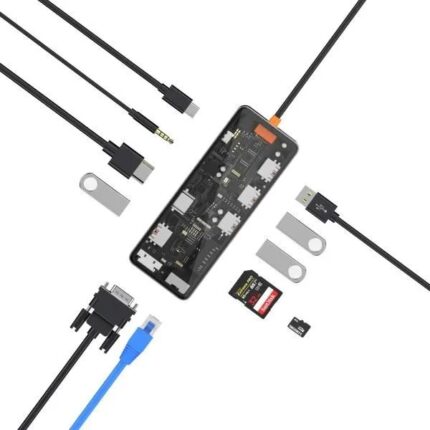
rock tr30 10in1 type-c to hdmi vga audio usb 3.0 sd tf lan pd docking station hub features
This section breaks down real-world features. The hub sends video through HDMI and VGA simultaneously in many setups. It reserves USB 3.0 lanes for fast transfers. SD and TF slots read cards without adapters. The LAN port ensures low-latency connections for streaming and large file uploads. PD support allows up to 60W or 100W passthrough, depending on the variant. Check the product specs before you buy to confirm the PD wattage.
- Dual video outputs: swap between HDMI and VGA as needed
- High-speed USB 3.0 ports for external drives and SSDs
- Media access via SD/TF slots without extra dongles
- Stable wired internet via RJ45 LAN
- Analog audio jack for legacy audio devices
rock tr30 10in1 type-c to hdmi vga audio usb 3.0 sd tf lan pd docking station hub specs
Specifications determine compatibility. The Rock TR30 typically lists:
- Input: USB Type-C (data, video and power delivery)
- HDMI: up to 4K@30Hz (depending on host device)
- VGA: up to 1080p@60Hz
- USB 3.0: 5Gbps transfer speeds per port
- SD/TF: UHS-I support for camera cards
- Ethernet: Gigabit RJ45
- Audio: 3.5mm headphone/mic combo
- PD passthrough: varies by model (commonly 60W or 100W)
Note that actual performance depends on your laptop or tablet. Some devices limit video output bandwidth. Check your device’s Type-C Alternate Mode and PD support. If you need dual external displays at high refresh rates, confirm your host supports DisplayPort Alt Mode and the hub’s video routing.
Design, Build, and Port Layout
The Rock TR30 favors a compact aluminum shell in many versions. The build helps dissipate heat. Ports sit along the sides to keep cables tidy. The Type-C cable often remains fixed. That reduces dangling connections but prevents replacement if damaged. The hub stays portable in a bag. Rubber feet can protect desk surfaces and reduce slipping.
- Compact form factor for travel
- Aluminum body for cooling and durability
- Fixed Type-C cable for a sleeker profile
Performance and Compatibility: rock tr30 10in1 type-c to hdmi vga audio usb 3.0 sd tf lan pd docking station hub review
In tests, the hub delivers consistent results for everyday users. Video output worked with laptops running Windows and macOS. USB transfers reached near USB 3.0 speeds with compatible drives. The Ethernet connection consistently hit close to 1Gbps on good networks. SD and TF slots read camera cards quickly. PD charging kept laptops topped up while transferring large files.
One common limitation appears when a host device restricts simultaneous video streams. Some ultraportable laptops only allow one external monitor at high resolution. In those cases the hub still functions but with expected limits. Drivers are rarely required, which makes setup simple. If you plan heavy multi-monitor work, verify host capabilities first.
rock tr30 10in1 type-c to hdmi vga audio usb 3.0 sd tf lan pd docking station hub price and value
Price varies by retailer and regional market. The hub often sits in the mid-range price bracket for multiport adapters. Compare prices against brands that offer more advanced docking features. The Rock TR30 tends to deliver solid value when you need a compact tool with both HDMI and VGA plus wired LAN. Factor in the cost of travel convenience and fewer dongles on your desk.
- Look for manufacturer warranties for better value
- Check bundled cables and PD wattage before purchase
- Compare with single-purpose adapters if you need only a few ports
Best Use Cases and the best rock tr30 10in1 type-c to hdmi vga audio usb 3.0 sd tf lan pd docking station hub
Consider this hub if you work in hybrid environments. It suits:
- Presentations where VGA projectors still exist
- Traveling professionals who need HDMI for hotel TVs
- Photographers who require quick SD/TF access
- Remote workers who prefer wired LAN for stability
- Students who need USB ports for peripherals
If you want the best Rock TR30 setup, pair it with a high-power PD charger. That keeps heavy laptops charged while running multiple displays and external drives.
rock tr30 10in1 type-c to hdmi vga audio usb 3.0 sd tf lan pd docking station hub buying guide
Use this quick buying guide to match the hub to your needs. Check host compatibility first. Confirm your laptop supports Type-C Alternate Mode for video. Verify PD wattage to ensure fast charging. Inspect port placement to match your workspace. Read user reviews for firmware quirks or driver notes. Compare warranty lengths and return policies.
- Confirm video modes (4K@30Hz or 4K@60Hz) with your device
- Measure PD wattage needed: 45W, 60W, or 100W
- Choose models with replaceable cables if that matters
- Check for simultaneous use limits on older laptops
- Consider a powered USB hub if you need to charge many devices
Setup Tips and Troubleshooting
Follow these practical tips for smooth use. Update your laptop’s OS for the latest USB and video drivers. Plug the hub into the host before connecting displays in some cases. Use high-quality HDMI and VGA cables to avoid handshake issues. If audio does not route to your external device, open sound settings and select the hub output. For Ethernet issues, try a different cable or test on another device.
- Update drivers and OS before first use
- Test each port individually when troubleshooting
- Use a high-wattage PD charger when running multiple devices
Frequently Asked Questions
Does the Rock TR30 support 4K output?
The HDMI port commonly supports up to 4K@30Hz depending on the host device. Verify your laptop’s Type-C Alt Mode and the hub model for exact limits.
Can I charge my laptop while using all ports?
Yes. The hub supports PD passthrough. Actual charging speed depends on the PD wattage of your charger and the hub’s PD rating. Heavy loads like multiple external drives may reduce net charging speed.
Conclusion
The Rock TR30 10in1 Type-C To HDMI VGA Audio USB 3.0 SD TF LAN PD Docking Station Hub offers a versatile, portable solution for users who need multiple ports from a single Type-C connection. It combines video outputs, wired networking, card readers, audio, USB 3.0 speeds and PD charging into one compact device. If your laptop supports the required Type-C standards, this hub can reduce clutter and expand functionality. Use the buying guide above to choose the right variant for your workflow and budget.