
ORICO CBS7 Desktop Cable Manager: Tame Your Tangled Wires

In today’s interconnected world, our desks often become battlegrounds of tangled wires and chaotic cords. From computer monitors and laptops to phone chargers and external hard drives, the sheer volume of cables can quickly overwhelm any workspace, leading to frustration, reduced productivity, and even potential hazards. Imagine a desk where every cable has its place, neatly organized and out of sight. This vision is precisely what the ORICO CBS7 Desktop Cable Manager aims to achieve. Designed to bring order to your digital life, this compact yet powerful tool offers a simple, effective solution to transform your cluttered desk into a streamlined, efficient, and aesthetically pleasing environment. It’s more than just a cable holder; it’s an investment in a calmer, more productive work or gaming setup.
Unveiling the ORICO CBS7 Desktop Cable Manager Features and Specs
The effectiveness of any desk accessory lies in its design and the quality of its components. The ORICO CBS7 Desktop Cable Manager stands out with a thoughtful approach to both. Understanding the core needs of users struggling with cable management, ORICO has engineered a product that is both functional and durable, boasting impressive ORICO CBS7 Desktop Cable Manager features and specifications that make it a compelling choice.
- Premium Silicone Construction: Crafted from high-grade, environmentally friendly silicone, the CBS7 is built to last. This material not only provides excellent flexibility, allowing cables to be inserted and removed easily without damage, but also ensures a soft touch that won’t scratch your desk surface or delicate cable insulation. The silicone’s natural grip helps secure cables firmly in place.
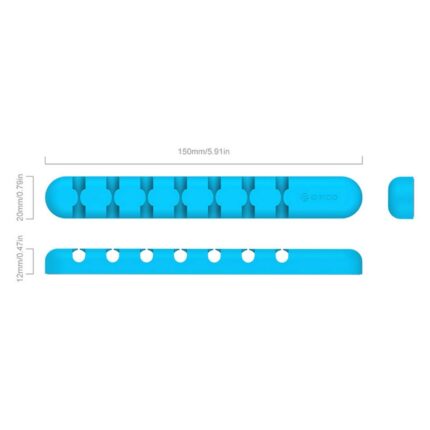
- Multi-Slot Design: The CBS7 is intelligently designed with multiple slots, typically accommodating three to five cables, depending on the model variation. These slots are sized to fit a wide range of cable diameters, from slim charging cords to thicker USB and HDMI cables. This versatility means you can manage various types of wires with a single device.
- Strong Adhesive Backing: A crucial feature for any desk accessory is its stability. The ORICO CBS7 comes equipped with a high-strength 3M adhesive pad. This industrial-grade adhesive ensures that once attached to a clean, flat surface, the cable manager stays firmly in position, preventing it from sliding or detaching even with frequent cable usage.
- Compact and Minimalist Footprint: Measuring just a few centimeters, the CBS7 maintains a remarkably low profile. Its sleek, unobtrusive design blends seamlessly into any desk aesthetic, from modern minimalist to traditional office setups. This compact size means it occupies minimal space, leaving your primary workspace clear and unobstructed.
- Color Options: While often available in classic black or white, ORICO sometimes offers various color options to match diverse personal preferences and office decor. This attention to detail allows users to choose a manager that complements their existing setup.
These specifications highlight ORICO’s commitment to delivering a robust and user-friendly solution for everyday cable clutter. The blend of durable materials, intelligent design, and reliable adhesion makes the ORICO CBS7 Desktop Cable Manager a practical addition to any desktop.
Recommended Products

Why the ORICO CBS7 Stands Out: An In-Depth Review
Beyond its technical specifications, the true measure of a product’s value lies in its real-world performance. Based on widespread user feedback and expert analysis, the ORICO CBS7 Desktop Cable Manager review consistently points to its exceptional effectiveness and user satisfaction. This isn’t just another generic cable clip; it’s a meticulously designed tool that addresses common pain points with remarkable efficiency, positioning it as one of the best ORICO CBS7 Desktop Cable Manager options on the market.
Enhanced Organization and Aesthetics
The most immediate and noticeable benefit is the transformation it brings to your workspace. Cables that once snaked across your desk or dangled precariously behind it are now neatly routed and held securely. This not only eliminates visual clutter but also prevents cables from falling off the desk, getting tangled with chair wheels, or being accidentally pulled. The minimalist design of the CBS7 enhances the overall aesthetic of your desk, contributing to a cleaner, more professional, and more inviting environment.
Durability and Longevity
Users consistently praise the durability of the silicone material. Unlike rigid plastic clips that can crack or lose their grip over time, the CBS7’s silicone construction withstands repeated use without degradation. The elasticity of the silicone ensures that cable slots maintain their shape and grip, providing consistent performance for years. The 3M adhesive is equally robust, offering long-term adhesion without leaving sticky residue if carefully removed.
Effortless Installation and Use
One of the most appealing aspects of the ORICO CBS7 is its simplicity. Installation is a matter of peeling off the adhesive backing and pressing the manager onto a clean surface. There are no screws, no complicated instructions, and no tools required. Inserting and removing cables is equally straightforward, allowing for quick adjustments when you add or remove devices from your setup. This ease of use makes it accessible to everyone, regardless of their technical proficiency.
Versatility Across Different Setups
Whether you have a dedicated gaming PC, a minimalist work-from-home setup, or a creative workstation, the CBS7 adapts beautifully. Its ability to hold various cable types means it can manage everything from charging cables and peripheral wires to audio cables and network cords. Users appreciate its adaptability for managing cables for monitors, keyboards, mice, speakers, and more, making it a universal solution for most desktop environments.
In essence, the ORICO CBS7 Desktop Cable Manager doesn’t just manage cables; it elevates the entire desk experience. Its combination of robust features, durable construction, and user-centric design makes it a highly recommended solution for anyone seeking to reclaim their workspace from the tyranny of tangled wires.
Understanding the ORICO CBS7 Desktop Cable Manager Price and Value Proposition
When considering any product, the cost is naturally a significant factor. The ORICO CBS7 Desktop Cable Manager price point is typically positioned in an accessible range, making it an affordable solution for most budgets. However, its true value extends far beyond the initial purchase cost, offering substantial long-term benefits that justify its investment.
Affordability Meets Quality
Compared to more elaborate or motorized cable management systems, the ORICO CBS7 offers an incredibly cost-effective solution without compromising on quality or effectiveness. Its simple yet ingenious design means that you are paying for durable materials and effective functionality rather than unnecessary complexities. This makes it an ideal entry-level product for individuals new to cable management or for those seeking an unpretentious yet powerful tool.
The Value of an Organized Workspace
The true value of the CBS7 lies in the benefits it brings to your daily life. A well-organized desk reduces stress and distractions, allowing you to focus better on tasks. By preventing cable snags and tangles, it also extends the lifespan of your cables and devices, saving you money on replacements. Furthermore, a tidy workspace enhances professionalism and creates a more positive environment, whether for personal use or for impressing clients during video calls.
Long-Term Savings
Consider the cumulative cost of replacing damaged cables or repairing ports on devices due to accidental pulls and strains. The ORICO CBS7 proactively prevents these incidents by holding cables securely, thereby offering long-term savings that far outweigh its modest purchase price. It’s an investment in preventative maintenance for your valuable electronics.
In summary, the ORICO CBS7 Desktop Cable Manager offers exceptional value. Its affordable price combined with its durable construction, ease of use, and significant impact on workspace organization and longevity of equipment makes it a smart choice for anyone looking to improve their desktop environment.
Your Comprehensive ORICO CBS7 Desktop Cable Manager Buying Guide
Choosing the right cable manager, even one as straightforward as the ORICO CBS7, benefits from a clear understanding of what to look for and how to ensure you’re getting the best product. This ORICO CBS7 Desktop Cable Manager buying guide will help you make an informed decision and optimize its use once it arrives.
Where to Purchase the ORICO CBS7
- Online Retailers: Major e-commerce platforms like Amazon, eBay, and regional electronics stores often carry ORICO products. These platforms offer convenience, competitive pricing, and user reviews which can be helpful.
- Official ORICO Store: Purchasing directly from ORICO’s official website or authorized distributors ensures authenticity and typically provides access to the latest models and warranty information.
- Local Electronics Stores: Some brick-and-mortar electronics retailers may stock ORICO products. This allows you to inspect the product physically before buying.
Always check seller reviews and product authenticity, especially on third-party marketplaces, to avoid counterfeits.
Key Considerations Before Buying
- Number of Cables: While the CBS7 is great for a few essential cables, assess the total number and thickness of cables you need to manage. If you have an exceptionally large number of thick cables, you might need multiple CBS7 units or a combination with other cable management solutions.
- Desk Material: The 3M adhesive works best on smooth, clean surfaces like wood, glass, metal, or smooth plastic. Ensure your desk surface is suitable for adhesive application. Rough or porous surfaces may reduce adhesion.
- Placement Strategy: Before applying, plan where you want to place the cable manager. Consider proximity to power outlets, device ports, and how cables will route to minimize strain and maximize tidiness.
- Color Preference: Choose a color (e.g., black, white, gray) that complements your desk and existing peripherals for a cohesive look.
Installation Tips for Optimal Performance
To get the most out of your ORICO CBS7 Desktop Cable Manager, follow these simple installation steps:
- Clean the Surface: Thoroughly clean the area where you intend to place the cable manager with an alcohol wipe or a damp cloth, then let it dry completely. Any dust, oil, or moisture will compromise the adhesive’s grip.
- Peel and Press: Carefully peel off the protective film from the 3M adhesive backing. Position the CBS7 precisely where you want it and press it firmly onto the surface for at least 30 seconds.
- Allow Adhesion Time: For maximum bonding strength, it’s recommended to let the adhesive cure for at least 24 hours before inserting cables. This allows the adhesive to fully bond with the surface, ensuring long-lasting stability.
- Insert Cables Gently: Once cured, gently slide your cables into the designated slots. Avoid forcing overly thick cables, as this can strain the silicone and potentially reduce its effectiveness.
Maximizing Your Cable Management Setup
The ORICO CBS7 is a fantastic starting point, but you can further enhance your cable management:
- Cable Ties or Sleeves: For longer runs of cables, consider bundling them together with reusable cable ties or cable sleeves before directing them into the CBS7. This creates a cleaner look and prevents tangles before they even reach the manager.
- Under-Desk Solutions: For power strips and bulky adapters, combine the CBS7 with an under-desk cable tray or basket. This keeps larger items completely out of sight while the CBS7 handles the desktop-level routing.
- Regular Maintenance: Periodically check your cable setup. Dust can accumulate, and cables might shift. A quick tidy-up every few weeks helps maintain the pristine look.
By following this guide, you can confidently purchase and effectively deploy the ORICO CBS7 Desktop Cable Manager, taking a significant step towards a more organized and enjoyable workspace.
Frequently Asked Questions
What types of cables can the ORICO CBS7 hold?
The ORICO CBS7 is designed to hold a variety of common desktop cables, including USB cables, charging cables (micro USB, USB-C, Lightning), HDMI cables, network cables, and audio cables. Its flexible silicone slots accommodate different diameters, making it versatile for most standard cords.
Is the 3M adhesive backing reusable or removable without damage?
The 3M adhesive is designed for strong, long-term adhesion and is generally not intended for repeated removal and reapplication. While it can often be removed from most smooth surfaces without significant damage if done carefully, it may leave some residue, and its adhesive strength will likely be compromised for reapplication. For best results, plan its placement carefully.
How many cables can one ORICO CBS7 unit manage?
Most ORICO CBS7 models feature three, four, or five individual slots. This allows it to manage an equivalent number of cables simultaneously. For setups with more cables, users often purchase multiple CBS7 units or combine it with other cable management solutions.
Will the ORICO CBS7 damage my desk surface?
When applied to clean, sealed, smooth surfaces like finished wood, glass, metal, or smooth plastic, the 3M adhesive is generally safe and unlikely to cause damage. However, caution should be exercised on painted, unsealed, or delicate surfaces, as strong adhesives can potentially peel paint or damage finishes upon removal. Always test in an inconspicuous area if you are concerned.
Conclusion
In the relentless pursuit of productivity and a clutter-free environment, the ORICO CBS7 Desktop Cable Manager emerges as an indispensable tool. It provides a simple yet profoundly effective solution to one of the most common frustrations in modern workspaces: tangled cables. Through its thoughtful design, durable silicone construction, and reliable adhesive, the CBS7 transforms chaotic cord situations into organized tranquility. From understanding its impressive features and specifications to appreciating its accessible price point and long-term value, it’s clear why this cable manager receives such positive reviews. By integrating the ORICO CBS7 into your desk setup, you’re not just buying a piece of plastic; you’re investing in a more streamlined, efficient, and visually appealing workspace that fosters focus and reduces stress. Embrace the simplicity and order it brings, and experience the difference a well-managed desk can make in your daily routine.