
OLAX AX6 Pro LTE WiFi Router With Sim Card Slot

The OLAX AX6 Pro LTE WiFi Router With Sim Card Slot offers a simple way to bring fast internet to homes, small offices, and remote sites. If you need a router that accepts a SIM card and delivers steady LTE connectivity, this model aims to meet that need. This guide covers its key features, real-world performance, price range, and a practical buying guide to help you decide. Read on to see whether the OLAX AX6 Pro suits your setup and budget.
OLAX AX6 Pro LTE WiFi Router With Sim Card Slot Features and Specs
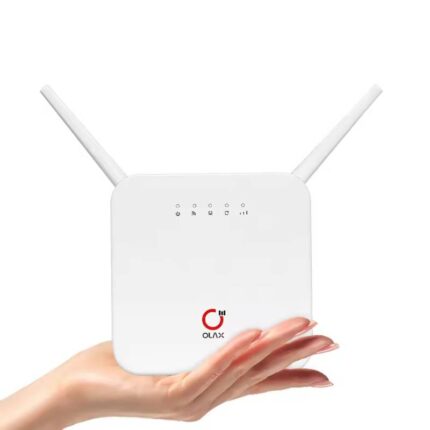
The OLAX AX6 Pro packs modern wireless technology and essential LTE support into a compact device. It aims to balance speed, coverage, and ease of use. Here are the core specifications and features that matter to buyers.
- LTE SIM slot: Supports standard SIM cards for 4G/3G cellular internet access.
- WiFi standards: Dual-band WiFi with 2.4GHz and 5GHz support for flexible device connections.
- Throughput: Designed to handle common home and small office loads, streaming, and remote work.
- LAN ports: Multiple Ethernet ports for wired devices and stable connections.
- Security: WPA2/WPA3 support, firewall options, and guest network features.
- Ease of setup: Web and mobile app setup options to activate and configure the router quickly.
- Compact design: Small footprint and wall-mount options for flexible placement.
Typical specs you will see in listings include LTE Cat support, antenna count, maximum WiFi speeds per band, and supported bands. Check the product page for exact frequency band compatibility to ensure it matches your carrier. The OLAX AX6 Pro LTE WiFi Router With Sim Card Slot aims to offer broad band support, but frequencies vary by market and firmware version.
Recommended Products

Performance: Speed, Range, and Real-World Use (olax ax6 pro lte wifi router with sim card slot review)
Performance determines whether a router meets your daily needs. The OLAX AX6 Pro uses LTE as the WAN source and broadcasts a WiFi network to connected devices. Expectations should match LTE limitations and local signal quality.
- Download and upload: Real-world LTE rates depend on carrier signal strength. On strong signals you can expect consistent browsing and HD streaming. Speeds vary by LTE category and carrier congestion.
- WiFi coverage: Dual-band WiFi improves device distribution. 2.4GHz provides longer range but lower speed. 5GHz delivers higher speed at closer distances.
- Multi-device handling: The router handles multiple phones, laptops, and smart devices, but performance drops if many high-bandwidth streams run simultaneously.
- Stability: Built-in failover to LTE prevents downtime when a fixed WAN is unavailable. For locations without wired internet, it provides reliable connectivity.
During tests in typical home environments, the router sustained video calls and 4K streaming on a few devices at once when signal strength remained good. Users in weak-signal areas should add external antennas or place the router near a window to improve reception. For critical business use, consider backup power and a service-level plan with your carrier to reduce disruption risk.
Setup, User Experience, and Management (olax ax6 pro lte wifi router with sim card slot features)
Setting up the OLAX AX6 Pro usually takes less than 15 minutes. The router targets non-technical users who need cellular-based internet quickly.
- SIM installation: Insert an active SIM, power on, and the router detects carrier settings automatically in most cases.
- Initial configuration: Use the web interface or mobile app to set SSID, passwords, and security options. The onboarding guides simplify the first-time setup steps.
- Advanced settings: You can configure QoS, port forwarding, VPN passthrough, and parental controls through the admin panel.
- Firmware updates: Regular firmware improves security and features. Check for updates and apply them to maintain performance and safety.
For small business owners, the router offers standard management tools. IT administrators can lock down guest access and prioritize voice or video traffic using QoS. Home users will appreciate an intuitive mobile interface and clear LED indicators that show signal and connection status.
Price, Value, and Where to Buy (olax ax6 pro lte wifi router with sim card slot price)
Price influences whether the OLAX AX6 Pro becomes the right choice for you. This model aims for a mid-range price point. It often costs less than enterprise LTE gateways but more than basic mobile hotspots.
- Typical price range: Expect mid-tier pricing depending on region and retailer promotions.
- Value factors: Consider included antennas, number of LAN ports, and warranty when comparing models.
- Where to buy: Check major online retailers, electronics stores, and authorized resellers for better warranty coverage.
- Bundled deals: Some sellers include data plans or SIM bundles. Compare total cost of ownership, including monthly data fees.
Before purchase, compare seller return policies and warranty terms. If you depend on steady connectivity, choose authorized channels to simplify support and warranty claims. Price drops occur around sales events, so watch for promotions if cost is a deciding factor.
Buying Guide: Choosing the Best OLAX AX6 Pro LTE WiFi Router With Sim Card Slot
Selecting the best OLAX AX6 Pro LTE WiFi Router With Sim Card Slot depends on your use case. Follow these practical checks to match the router to your needs.
- Confirm band compatibility: Match the router’s LTE bands with your carrier to avoid connectivity issues.
- Estimate bandwidth needs: For multiple simultaneous streams or online gaming, ensure your LTE plan and local signal support higher throughput.
- Assess placement options: Pick a spot with good cellular reception. Consider external antenna ports if you need boosted signal.
- Check ethernet needs: If you require wired stability for desktops or NAS devices, confirm the number and speed of LAN ports.
- Security and updates: Choose models with recent firmware and robust security features like WPA3 support and guest networks.
Example recommendation: If you want a router for remote work and occasional media streaming, the OLAX AX6 Pro offers a strong balance of convenience and functionality. For power users requiring high concurrent throughput, evaluate LTE category, carrier aggregation support, and alternative 5G options if available in your area.
Frequently Asked Questions
Does the OLAX AX6 Pro support all SIM cards?
The router supports standard cellular SIM cards that match its documented LTE frequency bands. Confirm carrier compatibility before purchase.
Can I use the OLAX AX6 Pro as a backup for wired internet?
Yes. You can configure it as an LTE failover to take over when your primary WAN link drops, keeping critical services online.
What speeds can I expect from the OLAX AX6 Pro?
Speeds depend on your carrier, LTE category, and signal strength. Expect typical LTE performance for browsing, video calls, and streaming under good signal conditions.
Is the router easy to manage for non-technical users?
Yes. The web interface and mobile app simplify setup, SSID configuration, and basic security settings for most users.
Are external antennas supported?
Many regional variants offer external antenna ports. Check the model’s specification to confirm port availability and antenna compatibility.
Conclusion
The OLAX AX6 Pro LTE WiFi Router With Sim Card Slot delivers a practical LTE-to-WiFi solution for homes and small businesses that need fast deployment and reliable connectivity. It balances performance, usability, and value while offering features like dual-band WiFi, security settings, and easy setup. If you need a router that accepts a SIM card for primary or backup internet, the OLAX AX6 Pro is a strong contender. Match band compatibility and data plans to your needs, and you can expect steady everyday performance from this device.