
Logitech M170 Wireless Mouse: Reliable Budget Clicker

The Logitech M170 Wireless Mouse offers simple, reliable wireless control for home and office users. This compact mouse pairs via a tiny USB receiver. It delivers steady tracking and long battery life for casual workflows. If you need a fuss-free, affordable option, the Logitech M170 Wireless Mouse appears as a strong contender. This review covers features, specs, price, and a practical buying guide to help you decide.
Logitech M170 Wireless Mouse: Key Features
The M170 emphasizes reliability and ease of use. It uses a 2.4 GHz connection that keeps your cursor steady up to 10 meters. Setup is plug-and-play; no software is required. Logitech promises up to 12 months of battery life on one AA battery. The mouse works on most desk surfaces except clear glass without a mouse pad. If you value simplicity, these features matter most.
- Plug-and-play 2.4 GHz wireless connectivity
- Up to 12 months of battery life on one AA battery
- Compact, ambidextrous design for right and left users
- Optical tracking for everyday tasks
- Durable primary buttons rated for millions of clicks
Recommended Products


Design, Comfort, and Build
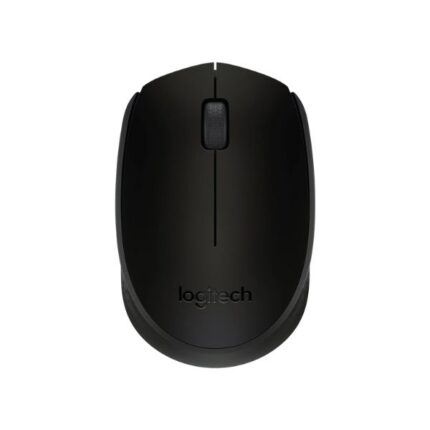
The M170 uses a compact shape that fits most hands. The curved shell supports a fingertip or claw grip. Plastic feels sturdy without being heavy. Buttons click with a crisp, predictable action. The scroll wheel rolls smoothly for web browsing and document navigation. Because it lacks extra thumb buttons, the design stays clean.
- Dimensions: compact and travel-friendly
- Weight: light enough for easy transport
- Finish: matte plastic that resists fingerprints
- Ambidextrous shape suitable for left- or right-handed users
Logitech M170 Wireless Mouse Review: Performance
In daily use, the M170 performs reliably. Cursor movement feels accurate for office tasks. Tracking works well on wood, fabric, and standard mouse pads. The sensor handles typical pointer speeds cleanly. You should not expect gaming-level precision. For document editing, browsing, and light photo work, it delivers consistent results.
Latency remains low for non-competitive gaming. The 2.4 GHz link minimizes dropout in crowded Wi-Fi environments. Wireless interference can still occur near heavy radio sources. If you travel with a laptop, the tiny USB receiver stores easily in a bag. Battery replacement is quick and tool-free.
Logitech M170 Wireless Mouse Specs
Knowing the specs helps match the mouse to your needs. Here are the essential Logitech M170 wireless mouse specs. These numbers explain why the model suits casual and productivity users more than gamers or designers who need high DPI settings.
- Connectivity: 2.4 GHz USB receiver
- Sensors: Optical tracking (standard DPI for office use)
- Battery: 1x AA (up to 12 months)
- Compatibility: Windows, macOS, Chrome OS, Linux
- Buttons: Left, right, scroll wheel (middle click)
- Range: Up to 10 meters (typical)
Logitech M170 Wireless Mouse Price and Value
Price drives many purchasing decisions. The Logitech M170 Wireless Mouse price generally falls in the budget category. Retailers often list it among the most affordable models from Logitech. You get a durable, no-frills mouse for a low cost. That makes it a great choice for classrooms, offices, and as a spare for travel.
Compared to higher-priced alternatives, the M170 skips advanced features. It lacks adjustable DPI, RGB lighting, and extra programmable buttons. Those omissions reduce cost without impacting basic productivity. If you need a reliable daily driver at a low price, this model offers solid value.
Who Should Buy the Logitech M170 Wireless Mouse?
This mouse suits specific users. Consider the M170 if you want a dependable, low-cost device for routine tasks. It works well for students, remote workers, and small-business setups. Buy it as a secondary mouse for travel or as a replacement for a worn-out wired mouse.
- Students needing an affordable, portable mouse
- Office workers focused on typing and browsing
- Home users who want simple wireless convenience
- Anyone who needs a dependable backup mouse
Logitech M170 Wireless Mouse Buying Guide
Use this short buying guide to pick the best option for your needs. The phrase “best Logitech M170 wireless mouse” usually refers to choosing where to buy, color options, and warranty. Follow these steps to choose wisely.
- Check compatibility with your operating system before purchase.
- Buy from reputable retailers to ensure warranty coverage.
- Consider color and finish for personal preference and visibility.
- Compare prices across stores and official Logitech listings.
- Look for bundled deals that include extra batteries or accessories.
If you need more advanced features, such as higher DPI or extra buttons, look at other Logitech lines like the Mx series. For everyday users, however, the M170 covers the essentials at a low cost.
Setup and Maintenance Tips
Set up the M170 quickly. Plug the USB receiver into a free port. Power on the mouse and wait a few seconds for the system to detect it. You can start using it immediately.
- Store the receiver in your laptop bag to prevent loss.
- Remove the battery during long storage periods to prevent corrosion.
- Clean the optical sensor and feet occasionally with a soft cloth.
- Replace the AA battery when pointer response slows or lags appear.
Frequently Asked Questions
Is the Logitech M170 Wireless Mouse good for gaming?
The M170 works for casual gaming but lacks high DPI and programable buttons. Competitive gamers should choose a gaming-oriented mouse.
What is the battery life of the Logitech M170 Wireless Mouse?
Logitech rates the battery life at up to 12 months with normal use on a single AA battery. Actual life depends on usage patterns and battery quality.
Can I use the Logitech M170 on different operating systems?
Yes. The M170 supports Windows, macOS, Chrome OS, and many Linux distributions. No drivers are required for basic functionality.
Conclusion
The Logitech M170 Wireless Mouse gives reliable wireless control at a low price. It delivers solid tracking, long battery life, and easy setup for everyday tasks. If you want a simple, durable mouse without extra features, the Logitech M170 Wireless Mouse makes a practical choice. Use this review, specs, price notes, and buying guide to decide if it fits your needs.