
Hoco UD15 Smart USB And Type C Flash Drive: The Ultimate Review

In today’s fast-paced digital world, efficient data storage and transfer are paramount. We constantly move files between smartphones, tablets, laptops, and desktops, demanding versatile and reliable solutions. Enter the Hoco UD15 Smart USB And Type C Flash Drive, a revolutionary device designed to bridge the gap between traditional USB-A and modern USB-C ports. This innovative flash drive promises not just storage, but a seamless experience, making it an indispensable tool for students, professionals, and tech enthusiasts alike. Forget juggling multiple adapters or struggling with incompatible ports; the Hoco UD15 offers a single, elegant solution for all your data transfer needs.
Unpacking the Hoco UD15 Smart USB And Type C Flash Drive Features
The true power of any gadget lies in its capabilities, and the Hoco UD15 excels with a suite of features crafted for convenience and performance. Understanding these attributes helps users maximize its potential and justify why it stands out in a crowded market.
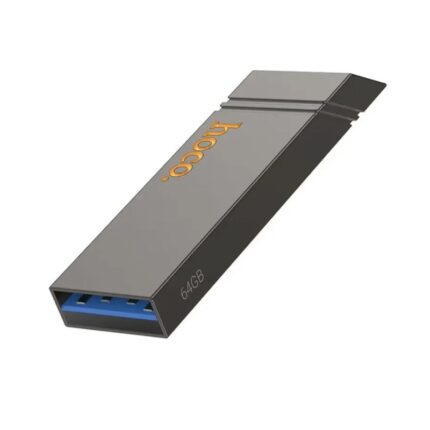
- Dual Interface Design: The most prominent feature is its dual connectivity. Boasting both a standard USB-A 3.0 connector and a reversible USB-C connector, the Hoco UD15 ensures universal compatibility across a vast range of devices, from older laptops to the latest smartphones and MacBooks. This design eliminates the need for separate drives or bulky adapters, streamlining your workflow significantly.
- High-Speed Data Transfer: Equipped with USB 3.0 technology, this flash drive delivers impressive read and write speeds. Users can transfer large files—think high-resolution photos, 4K videos, or extensive document archives—in a fraction of the time compared to slower USB 2.0 drives. This speed is crucial for professionals handling time-sensitive projects or anyone looking to minimize waiting times.
- Robust and Durable Build: Hoco constructs the UD15 with quality materials, ensuring durability. Its sturdy casing protects against everyday bumps and drops, safeguarding your valuable data. The compact, capless design for the Type-C port and a secure cap for the USB-A port enhance its portability and longevity.
- Plug-and-Play Simplicity: No drivers, no software installations. The Hoco UD15 offers true plug-and-play functionality. Simply insert it into your device, and it’s ready to use, appearing as a standard external drive. This ease of use makes it accessible to everyone, regardless of technical proficiency.
- Generous Storage Capacities: Available in various capacities, the Hoco UD15 caters to diverse storage needs. Whether you need a few gigabytes for documents or several hundred for multimedia collections, you will find a suitable option. This flexibility makes it a versatile storage solution for personal and professional use.
Recommended Products

Hoco UD15 Smart USB And Type C Flash Drive Review: Performance and Usability
Beyond the specifications, a real-world assessment reveals the true value of the Hoco UD15. Our comprehensive review highlights its practical advantages and user experience.
Speed and Efficiency
When testing the Hoco UD15, its USB 3.0 interface truly shines. Large video files, typically sluggish on older drives, transfer remarkably quickly. For instance, moving a 10GB folder of mixed files from a laptop to the UD15 completes in minutes, not tens of minutes. This efficiency directly translates to saved time and reduced frustration, particularly for those frequently working with large datasets or media files.
Cross-Device Compatibility
The dual connector design proves invaluable. Users seamlessly connect the drive to a USB-C smartphone to back up photos, then plug it directly into a USB-A desktop to edit those images, all without an internet connection or cloud service. This level of versatility ensures you always have access to your data, regardless of the device you are using. It is an ideal solution for professionals who switch between different operating systems and hardware configurations.
Design and Portability
The Hoco UD15 boasts a sleek, minimalist design that emphasizes portability. Its compact form factor easily slips into a pocket or attaches to a keychain, making it an unobtrusive addition to your everyday carry. The protective caps for both connectors ensure durability, preventing damage to the delicate interfaces when not in use. This thoughtful design contributes significantly to its status as a reliable daily driver.
Understanding the Hoco UD15 Smart USB And Type C Flash Drive Price and Value
Investing in a flash drive means considering both its upfront cost and its long-term value. The Hoco UD15 positions itself as a competitive option by balancing advanced features with an accessible price point.
The pricing for the Hoco UD15 varies primarily by storage capacity and retailer. Generally, you find it priced very competitively when compared to other dual-interface drives offering similar speed and build quality. Shoppers often discover it offers superior value, providing high-speed USB 3.0 performance and universal compatibility without a premium price tag. Keep an eye out for promotions and bundle deals from various online and physical electronics stores.
Consider the cost savings from not needing multiple drives or adapters. The single Hoco UD15 effectively replaces several devices, consolidating your tech accessories and simplifying your digital life. This efficiency, combined with its robust performance, makes its price highly justifiable for anyone seeking a reliable and versatile storage solution.
Hoco UD15 Smart USB And Type C Flash Drive Specs: A Closer Look
For those who delve into the technical details, the specifications of the Hoco UD15 underscore its advanced engineering and performance capabilities.
- Interface: USB 3.0 (Type-A) and USB 3.0 (Type-C)
- Material: High-grade metallic or durable plastic casing (model dependent)
- Capacities: Available in common sizes such as 32GB, 64GB, 128GB, and 256GB.
- Read Speed: Typically up to 80-100 MB/s (varies by capacity and host device)
- Write Speed: Typically up to 15-30 MB/s (varies by capacity and host device)
- Compatibility: Windows XP/7/8/10/11, macOS X and above, Linux, Android (with OTG support), Chrome OS.
- Dimensions: Compact and portable design, usually under 7cm in length.
These specifications confirm the Hoco UD15 as a high-performance device capable of handling demanding data tasks. The USB 3.0 standard ensures backward compatibility with USB 2.0 ports, albeit at reduced speeds, providing flexibility across older hardware as well.
Best Hoco UD15 Smart USB And Type C Flash Drive: Why It’s a Top Choice
Defining the “best” often comes down to a blend of features, performance, reliability, and value. The Hoco UD15 consistently emerges as a top contender for several compelling reasons:
- Unmatched Versatility: Its dual USB-A and USB-C interface is its strongest asset, offering a level of compatibility few other drives can match. This makes it a universal tool in an increasingly diverse tech ecosystem.
- Reliable Performance: The consistent high-speed data transfer capabilities ensure that you spend less time waiting and more time working or enjoying your content. It performs reliably under various conditions, making it a trustworthy storage option.
- Durability and Design: The robust construction protects your data, while the compact design makes it exceptionally portable. It is built to withstand the rigors of daily use.
- Excellent Value: Considering its feature set, speed, and build quality, the Hoco UD15 offers an outstanding return on investment. It provides premium functionality without the premium price tag.
For users who frequently switch between devices with different port types, need quick and secure offline data transfer, and demand reliability, the Hoco UD15 stands out as the best choice, simplifying their digital interactions significantly.
Hoco UD15 Smart USB And Type C Flash Drive Buying Guide
Making an informed purchase ensures you select the right Hoco UD15 for your specific needs. Follow this guide to secure the best value and performance.
Determine Your Capacity Needs
Assess how much storage you truly require. For documents and a few photos, 32GB or 64GB may suffice. If you work with large media files, such as 4K videos or extensive software installations, opt for 128GB or 256GB. Overestimating can lead to unnecessary expense, while underestimating results in insufficient space.
Check for USB 3.0 Compatibility
To fully leverage the Hoco UD15’s speed, ensure your primary devices (laptops, desktops, compatible smartphones) feature USB 3.0 or USB 3.1 Type-A or Type-C ports. While backward compatible with USB 2.0, you will experience significantly slower transfer rates.
Compare Retailers and Prices
Shop around. Different online marketplaces and local electronics stores offer varying prices and promotions. Look for reputable sellers to ensure you receive an authentic Hoco product and benefit from customer service and warranty policies.
Read User Reviews
While this article provides an in-depth review, checking recent user feedback on retailer sites can offer additional perspectives on long-term reliability and specific use cases. Pay attention to comments regarding actual transfer speeds and device compatibility.
Consider Your Usage Scenarios
Will you primarily use it for quick backups, transferring large project files, or as an expansion for your smartphone storage? Your intended use helps validate the investment and ensures the Hoco UD15 meets your expectations.
Frequently Asked Questions
What devices are compatible with the Hoco UD15 Smart USB And Type C Flash Drive?
The Hoco UD15 is compatible with virtually any device featuring a standard USB-A 2.0/3.0 port or a USB-C 2.0/3.0 port. This includes Windows PCs, MacBooks, Linux systems, Android smartphones and tablets with OTG support, and Chromebooks.
Do I need to install any software to use the Hoco UD15?
No, the Hoco UD15 is a plug-and-play device. Your operating system automatically recognizes it as an external storage device, requiring no additional drivers or software installations.
What is the difference between USB 2.0 and USB 3.0 on this drive?
USB 3.0 offers significantly faster data transfer speeds compared to USB 2.0. When connected to a USB 3.0 port, the Hoco UD15 achieves its maximum advertised speeds, drastically reducing transfer times for large files. It operates at USB 2.0 speeds when connected to a USB 2.0 port.
Is the Hoco UD15 suitable for booting an operating system?
Yes, like most flash drives, you can use the Hoco UD15 to create a bootable USB drive for installing operating systems or running live environments, provided the system BIOS/UEFI supports booting from USB.
How do I properly care for my Hoco UD15 Smart USB And Type C Flash Drive?
To ensure longevity, always eject the drive safely from your computer before removing it. Protect it from extreme temperatures, moisture, and strong magnetic fields. Store it in a clean, dry place, and use the included caps to protect the connectors.
Conclusion
The Hoco UD15 Smart USB And Type C Flash Drive stands as a testament to thoughtful design and practical innovation in portable storage. Its dual USB-A and USB-C connectivity solves a common modern tech dilemma, offering unparalleled versatility and convenience. With robust USB 3.0 speeds, durable construction, and a user-friendly plug-and-play experience, it serves as an excellent investment for anyone needing reliable and efficient data management across diverse devices. Whether for professional backup, quick file sharing, or expanding device storage, the Hoco UD15 delivers consistent performance and exceptional value. This makes the Hoco UD15 Smart USB And Type C Flash Drive not just a tool, but an essential companion for your digital life, simplifying how you connect, transfer, and store your valuable data.