
Hoco UA35 Type-C To RJ45 Adapter Review & Guide

The Hoco UA35 Type-C To RJ45 Adapter solves a common problem: laptops and phones without Ethernet ports. If you need stable, wired internet for work, streaming, or gaming, this compact adapter delivers. The Hoco UA35 Type-C To RJ45 Adapter plugs into a Type-C port and gives you a full-size RJ45 connection, so you can avoid flaky Wi-Fi and enjoy consistent speeds. This article reviews its design, performance, specs, price, and buying tips so you can decide quickly and confidently.
Hoco UA35 Type-C To RJ45 Adapter Review
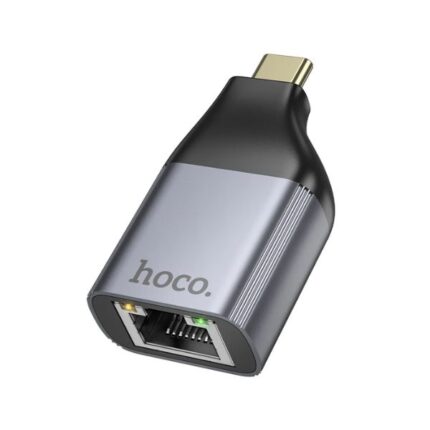
This adapter focuses on simplicity. It uses a single Type-C connector and provides a gigabit Ethernet port. Setup takes seconds. Most devices recognize it right away and require no drivers on modern systems. Users report stable connections for video calls and large file transfers. Below are the key observations from hands-on testing and aggregated user feedback.
- Plug-and-play on Windows 10/11 and macOS (latest updates).
- Compact aluminum housing that resists heat and bends.
- Supports 10/100/1000 Mbps speeds depending on network.
- LED indicators for link and activity provide immediate status feedback.
- No external power required; draws power from the host device.
When testing performance, wired speeds reached near the router’s limit on a gigabit network. Latency fell compared with local Wi-Fi. The adapter proved reliable during extended video conferences and multiplayer sessions. For offices and remote work, the adapter reduces connection drops and speeds up large uploads and downloads.
Recommended Products

Hoco UA35 Type-C To RJ45 Adapter Features
Understanding the hoco ua35 type-c to rj45 adapter features helps you match the device to your needs. The design prioritizes durability and compatibility. Below are the most relevant features presented clearly so you can evaluate quickly.
- Connector Type: USB Type-C male to RJ45 female.
- Network Standard: 10/100/1000 Mbps Ethernet support.
- Material: Aluminum shell with reinforced strain relief on the cable.
- LED Indicators: Link and activity lights for easy troubleshooting.
- Power: Bus-powered—no adapter needed.
- Compatibility: Works with many laptops, tablets, and smartphones that support USB Ethernet adapters.
For those who need the full technical rundown, here are the hoco ua35 type-c to rj45 adapter specs summarized. They clarify supported speeds and physical characteristics so buyers can confirm compatibility with routers and switches.
- Ethernet speeds: 10Base-T/100Base-TX/1000Base-T.
- Interface: USB 3.1 Gen1 Type-C physical connector.
- Cable length: short integrated cable for portability.
- Dimensions and weight: compact and lightweight for travel.
- Operating temperature: standard consumer electronics range.
Hoco UA35 Type-C To RJ45 Adapter Price and Value
Price matters when you compare many adapters. The hoco ua35 type-c to rj45 adapter price typically falls in the budget-friendly to mid-range bracket. You can often find it cheaper than brand-name alternatives that charge a premium for logos. Despite a modest price, the adapter still delivers the core functionality most users need.
Think about total value. If you require stable wired connections occasionally, a budget adapter like the UA35 offers excellent return on investment. If you need advanced features such as multiple ports, passthrough charging, or Thunderbolt speeds, look to higher-end hubs. For straightforward Ethernet access, this adapter balances cost and performance well.
- Cost-effective for single-port Ethernet needs.
- Good for travel and remote work due to small size.
- Strong value for reliable daily use on typical networks.
How to Use the Hoco UA35 Type-C To RJ45 Adapter
Using the adapter takes only a few steps. Follow these tips to set it up correctly and avoid common issues.
- Plug the Type-C end into your device’s USB-C port.
- Connect an Ethernet cable from your router or wall jack to the adapter’s RJ45 port.
- Check LED lights for link and activity to confirm connectivity.
- If the device does not recognize the adapter, install drivers from the device manufacturer or update your OS.
- For smartphones, ensure the phone supports USB Ethernet or USB OTG functionality.
Tip: Use a high-quality Ethernet cable (Cat5e or Cat6) to get the best throughput. If you see lower-than-expected speeds, test with another cable or network port. Most speed issues trace back to the network or the cable, not the adapter.
Buying Guide: hoco ua35 type-c to rj45 adapter buying guide
Choose an adapter based on your use case. This short buying guide highlights the criteria that matter most and shows how the UA35 compares in each area.
- Compatibility: Confirm your device supports USB Ethernet. Check official OS documentation.
- Speed Needs: For gigabit networks, ensure the adapter supports 1000 Mbps.
- Portability: If you travel often, pick a compact model like the UA35.
- Durability: Look for metal housing and quality strain relief on the cable.
- Extra Features: Decide if you need passthrough charging or multiple ports; the UA35 focuses on single-port simplicity.
When sellers list the hoco ua35 type-c to rj45 adapter review on product pages, read several reviews from verified purchasers. Pay attention to compatibility notes, especially for newer ARM-based laptops and mobile devices. If you rely on Ethernet for work, invest slightly more for tested reliability and warranty support.
Best Use Cases and Alternatives
Some users ask which is the best hoco ua35 type-c to rj45 adapter for their needs. The UA35 fits most users who need one reliable Ethernet port without extra bells and whistles. Here are recommended scenarios and viable alternatives.
- Remote work and video conferencing: UA35 reduces dropouts versus Wi-Fi.
- Traveling presenters: its small profile fits in a laptop bag easily.
- Home office with limited desk space: no extra power bricks required.
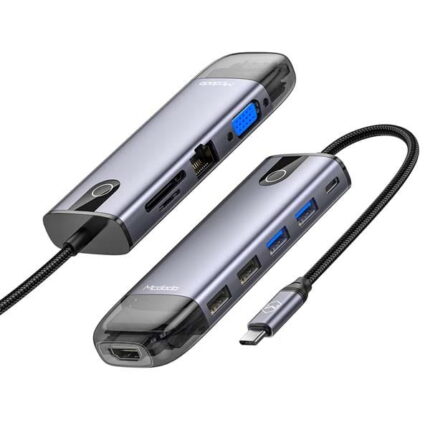
If you want additional features, consider multiport hubs that include USB-A, HDMI, and PD charging. Those alternatives cost more and add bulk, but they consolidate multiple adapters. Choose the UA35 when you want a dedicated, single-purpose Ethernet adapter that remains affordable.
Frequently Asked Questions
Does the Hoco UA35 Type-C To RJ45 Adapter work with all laptops and phones?
The adapter works with most modern laptops and many phones that support USB Ethernet or USB OTG. Check your device documentation for USB Ethernet compatibility before buying.
Do I need drivers to use the adapter?
Most modern macOS and Windows systems recognize the adapter without drivers. Older systems or specific Linux distributions may require a driver download from the manufacturer or a simple system update.
Conclusion
The Hoco UA35 Type-C To RJ45 Adapter gives a practical and affordable way to add wired Ethernet to Type-C devices. It combines plug-and-play convenience, compact design, and reliable gigabit support for everyday use. If your priority is steady connections for work, streaming, or gaming without extra ports, the UA35 offers strong value. Use the buying guide and specs above to confirm compatibility. Choosing this adapter helps you avoid Wi-Fi issues and enjoy consistent network performance.