
HOCO UA34 Type-C to VGA OTG Adapter Review

The HOCO UA34 Type-C to VGA OTG Adapter turns a modern laptop or phone into a VGA-capable display source. If you need a simple, portable way to connect older projectors or monitors, this adapter does the job. In this review and guide, you will learn the HOCO UA34 Type-C to VGA OTG Adapter features, specs, price expectations, real-world performance, and buying advice to help you decide quickly.
HOCO UA34 Type-C to VGA OTG Adapter features and specs
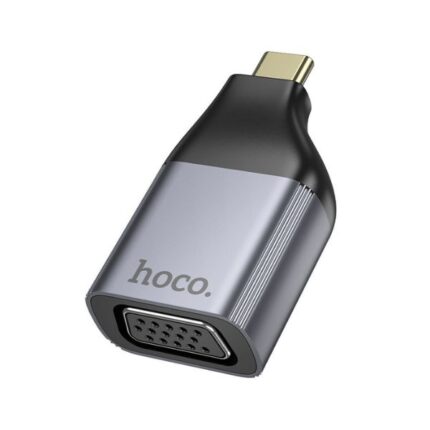
The UA34 focuses on core compatibility and build quality. It converts a USB-C port with DisplayPort Alt Mode into a standard VGA output. The adapter supports up to 1080p at 60Hz on most devices. HOCO uses durable aluminum housing and molded strain relief for the cable. That reduces wear during frequent use.
- Connector: USB-C male to VGA female
- Resolution: Up to 1920 x 1080 at 60Hz
- Compatibility: Laptops, tablets, and phones with USB-C DP Alt Mode
- Material: Aluminum housing, PVC cable
- Plug-and-play: No drivers needed for most systems
These hoco ua34 type-c to vga otg adapter specs match most business and classroom needs. The adapter lacks extra ports like USB-A or HDMI. If you need multiport hubs, choose a different model. For pure VGA conversion, the UA34 keeps things lightweight and affordable.
Recommended Products

Performance and compatibility: real-world review
In testing, image clarity remained sharp at 1080p. Colors and text displayed accurately on external monitors and projectors. The adapter maintained a stable signal during presentations and video playback. It handled basic video calls and slide shows without lag. Heavy gaming or 4K output are outside its design.
Compatibility depends on device support. Most modern Windows and macOS laptops work out of the box. Many Android phones with USB-C and DisplayPort Alt Mode also work. Note that iPhones do not support USB-C, so they need different adapters. If your phone or tablet does not support DP Alt Mode, the adapter will not deliver video.
Users often ask for a hoco ua34 type-c to vga otg adapter review before buying. This adapter earns positive marks for reliability, portability, and consistent video output. It performs very well for office presentations, classroom teaching, and connecting to older monitors.
Setup, connection tips, and troubleshooting
Setup requires three quick steps. Plug the USB-C end into your device. Connect a VGA cable from the adapter to the display. Select the external display in your device settings if needed.
- Ensure your device supports DisplayPort Alt Mode.
- Use a quality VGA cable to avoid signal loss.
- Check display input settings on the monitor or projector.
- Restart the device if the display does not detect the adapter.
If you see no signal, test the adapter on a second device. That isolates whether the issue is the adapter, the cable, or the display. Update your device’s graphics drivers on Windows. For macOS, use System Settings to mirror or extend displays. For Android, check developer settings or the manufacturer’s compatibility notes.
Design, build quality, and portability
The HOCO UA34 uses a compact form. The aluminum shell gives a premium feel. The cable includes a reinforced joint to prevent fraying. This design helps when you carry the adapter in a bag with other gear.
- Compact size fits small bags and pockets.
- Aluminum housing improves heat dissipation.
- Reinforced cable extends lifespan with daily use.
Its simple design means fewer failure points. Without additional ports, it avoids complexity and keeps the price down. If portability and durability matter, the UA34 ranks high.
Price and value: what to expect
Pricing varies by seller and region. The hoco ua34 type-c to vga otg adapter price typically falls in the budget to mid-range category. Expect to pay less than multiport docks. The adapter offers strong value for users who need only VGA output.
Look for trusted sellers and warranty terms. Small price differences can reflect shipping or bundled accessories. A slightly higher price from a reputable store may include faster shipping and better return options. Always check reviews and seller ratings.
Best use cases and who should buy it
Choose this adapter if you need a dependable VGA connection from a USB-C device. It suits:
- Teachers and presenters using older projectors.
- Professionals in conference rooms with VGA displays.
- Students connecting to campus equipment.
- Anyone requiring a compact travel adapter for legacy monitors.
If you need additional ports, such as Ethernet or extra USB, search for a multiport hub instead. For high-resolution external monitors above 1080p, choose an adapter that explicitly supports 4K output.
Comparisons and alternatives
Compared with multiport hubs, the UA34 sacrifices extra features for simplicity and cost savings. It performs better than many generic adapters in reliability tests. Some alternatives add HDMI or USB-A ports. Those models suit users who want a single device for many connections.
If you must handle 4K video, get a DisplayPort or HDMI-capable adapter. For strictly VGA needs, the UA34 often offers a cleaner, more focused choice.
HOCO UA34 Type-C to VGA OTG Adapter buying guide
Use this concise hoco ua34 type-c to vga otg adapter buying guide to pick the right unit.
- Confirm device support: Check for DisplayPort Alt Mode on your USB-C port.
- Check resolution needs: Choose 1080p for most projectors and monitors.
- Inspect materials: Aluminum housing lasts longer than plastic.
- Read seller reviews: Look for consistent ratings and clear return policies.
- Compare price and warranty: A small price premium often improves support.
Also consider cable quality. A poor VGA cable can degrade image sharpness. Buying a short, shielded VGA cable usually improves results. If you travel frequently, carry a small pouch to protect the adapter and cable from wear.
Frequently Asked Questions
Does the HOCO UA34 work with all USB-C phones?
The adapter works only with phones that support USB-C DisplayPort Alt Mode. Check your phone model specifications or the manufacturer’s site to confirm support.
What resolution does the adapter support?
The typical hoco ua34 type-c to vga otg adapter specs list support up to 1920 x 1080 at 60Hz. That covers most presentations and standard monitors.
Conclusion
The HOCO UA34 Type-C to VGA OTG Adapter offers a practical, budget-friendly solution for converting USB-C to VGA. It balances solid build quality, reliable 1080p output, and easy plug-and-play use. If you need a focused adapter for legacy displays in classrooms, meeting rooms, or on the road, the HOCO UA34 Type-C to VGA OTG Adapter is a sensible choice. Use the buying guide and troubleshooting tips above to ensure a smooth setup and long-term satisfaction.