
Hoco UA28 USB Bluetooth Adapter Review & Guide

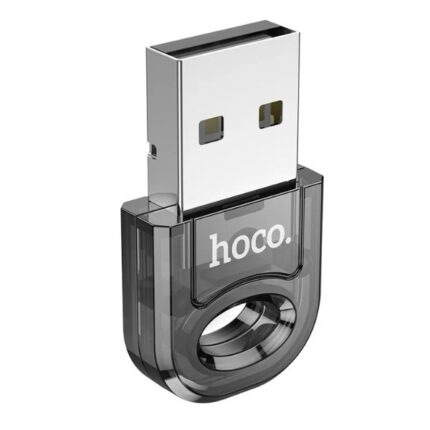
The Hoco UA28 USB Bluetooth Adapter offers a simple way to add Bluetooth to a desktop or older laptop. If your PC lacks modern wireless options, this tiny dongle can restore audio, peripherals, and file transfer features. This Hoco UA28 USB Bluetooth Adapter review explains real-world performance, key specs, and buying advice so you can decide quickly and confidently.
Hoco UA28 USB Bluetooth Adapter Features and Specs
The UA28 focuses on plug-and-play convenience. It supports common Bluetooth profiles for audio and input devices. You will get stable pairing with headsets, keyboards, mice, and speakers. Below are the main hoco ua28 usb bluetooth adapter features and hoco ua28 usb bluetooth adapter specs.
- Bluetooth version: Typically Bluetooth 5.0 for improved range and power efficiency
- Form factor: Compact USB-A dongle that stays low-profile
Key specs include low power consumption and backwards compatibility with Bluetooth 4.2 and 4.0 devices. The adapter usually works on Windows 7, 8, 10, and 11. Some macOS and Linux setups also accept it with minimal driver work. Drivers may be needed for older systems; most modern Windows installs detect the device automatically.
Recommended Products

Performance: Range, Latency, and Audio Quality
Expect about 10 meters of effective range indoors. Walls and interference reduce that range. Outdoors, line-of-sight range can reach 20 meters in ideal conditions. The Hoco UA28 manages typical Bluetooth audio well. It handles voice calls and music streaming for everyday use.
Latency matters if you play fast-paced games or watch videos without A/V sync features. The adapter uses standard audio codecs and may not support advanced low-latency codecs like aptX on all host systems. If low latency matters, test the adapter before relying on it for competitive gaming.
Compatibility and Setup
Most users connect the Hoco UA28 in under five minutes. Insert the dongle into a free USB-A port. Windows often installs drivers automatically. If Windows does not, download drivers from the seller or use the included CD, if present. Pairing follows standard Bluetooth procedures from your operating system.
- Windows: Open Bluetooth settings, click Add device, select the UA28 device.
- macOS/Linux: Use the system Bluetooth menu. Some Linux distributions need a manual package install.
If you see dropouts, move the adapter to a different USB port. A USB extension cable can improve range and reduce interference from metal chassis or crowded ports. Place audio sources and controllers within 10 meters for best results.
Hoco UA28 USB Bluetooth Adapter Price and Value
Price matters for small accessories. The hoco ua28 usb bluetooth adapter price usually sits in the budget segment. Expect to pay less than branded alternatives from major networking companies. That low price gives good value for basic needs. However, higher-priced adapters may offer advanced codecs, stronger chips, or multiple simultaneous connections.
When comparing cost, factor in warranty length and seller reputation. A slightly higher cost from a trusted retailer can save time on returns and support. For occasional audio calls, remote control, or pairing a keyboard and mouse, the Hoco UA28 offers strong value at its typical price point.
Best Hoco UA28 USB Bluetooth Adapter Use Cases
Not every adapter suits every user. This section helps you match the Hoco UA28 to the right needs. Use these examples to judge whether it is right for you.
- Home office: Pair a wireless headset for calls. The adapter keeps setup simple and stable.
- Media PC: Stream music or podcasts to Bluetooth speakers. Expect clear audio for most content.
- Legacy laptop upgrade: Add Bluetooth to an older laptop that lacks wireless features.
If you need multi-device low-latency streaming, consider higher-end dongles that advertise aptX Low Latency or proprietary low-lag modes. For most everyday tasks, the UA28 performs well and saves money.
Practical Tips: Installation, Troubleshooting, and Optimization
Follow these steps for a smooth experience. They act as a concise hoco ua28 usb bluetooth adapter buying guide and setup checklist.
- Install drivers if Windows does not auto-detect the dongle.
- Keep the adapter clear of metal obstructions. Use a USB extension cable when needed.
- Disable conflicting wireless devices if pairing fails. Some 2.4 GHz devices create noise.
- Update your PC’s Bluetooth stack and audio drivers for best compatibility.
Troubleshooting notes: If audio stutters, try changing the audio format in your sound settings. Restart the Bluetooth service on Windows if pairing problems occur. For connection drops, test other Bluetooth devices to isolate the issue to the adapter or the paired device.
Comparing the Hoco UA28 to Alternatives
When shopping, compare the UA28 against common alternatives on four factors: Bluetooth version, codec support, physical size, and driver support. Many cheap adapters only list basic specs. The UA28 often balances size and performance better than generic no-name sticks.
If you prioritize advanced audio quality, look for adapters that explicitly support aptX, aptX HD, or LDAC. For gaming, search for adapters with low-latency features. If you need multi-host connectivity, check whether the dongle supports pairing multiple devices simultaneously.
Frequently Asked Questions
Is the Hoco UA28 USB Bluetooth Adapter compatible with Windows 11?
Yes. Many users report seamless compatibility with Windows 11. Windows usually installs the required drivers automatically. If not, download drivers from the vendor or seller page.
Can I use the Hoco UA28 for Bluetooth audio and a keyboard at the same time?
Yes. The adapter supports multiple profiles and can handle audio and HID devices simultaneously. Performance depends on device load and signal interference.
Buying Advice: How to Choose the Right Hoco UA28 USB Bluetooth Adapter
Follow this hoco ua28 usb bluetooth adapter buying guide to pick the right unit for your needs. Consider three main factors: intended use, operating system compatibility, and required audio features.
- Intended use: Choose UA28 for general audio and peripherals. Pick a higher-end dongle for specialized audio needs.
- Operating system: Confirm driver availability for your OS before purchase.
- Audio features: If you need low latency or high-resolution audio, verify codec support and advertised latency numbers.
Also read user reviews. Look for recent feedback about driver updates and real-world range. Sellers with clear return policies reduce risk. If the price looks too low compared to competitors, check for counterfeit or subpar revisions.
Final Verdict: Is the Hoco UA28 Right for You?
The Hoco UA28 USB Bluetooth Adapter offers a straightforward upgrade path to add Bluetooth to a non-Bluetooth PC. It handles audio, keyboards, mice, and basic peripherals well. It performs best for casual and productivity users. It provides strong value at an affordable price.
If you need advanced audio codecs or gaming-grade low latency, compare detailed specs before buying. For most home and office users, the adapter delivers reliable connectivity and easy setup.
Conclusion
This Hoco UA28 USB Bluetooth Adapter review shows the adapter delivers solid, budget-friendly Bluetooth for PCs. It balances compact design, broad compatibility, and easy installation. Use the practical tips here to install and optimize the device. Check price and seller reputation before buying the best Hoco UA28 USB Bluetooth Adapter for your setup.