
Hoco UA18 USB Bluetooth Adapter Review & Guide

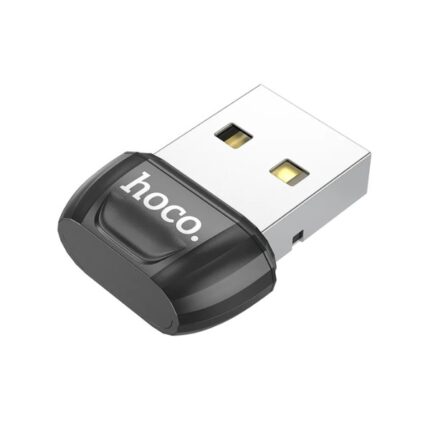
The Hoco UA18 USB Bluetooth Adapter offers simple wireless connectivity for PCs and laptops. This compact dongle brings Bluetooth to devices without native support. If you want to pair headphones, mice, or speakers quickly, this adapter aims to deliver reliable performance at a modest price. This review explains features, specs, setup steps, real-world performance, and a buying guide to help you decide if the Hoco UA18 USB Bluetooth Adapter fits your needs.
Hoco UA18 USB Bluetooth Adapter Features and Specs
The UA18 focuses on core features that matter to everyday users. It supports standard Bluetooth profiles for audio and input devices. Hoco lists compatibility across Windows versions and many Linux distributions. Size and power draw remain minimal. Below are key specs and features at a glance.
- Bluetooth version: typically Bluetooth 5.0 or backward-compatible variants
- Range: up to 10 meters in open space
- Supported profiles: A2DP, AVRCP, HFP, HSP, HID, and more
- Plug-and-play for many Windows systems; driver available if needed
- Low power consumption and small form factor
These specs make the Hoco UA18 useful for audio streaming, wireless mice and keyboards, and basic file transfers. Check the exact model label for the definitive spec list. The hoco ua18 usb bluetooth adapter specs can vary slightly by retailer.
Recommended Products


Performance: What to Expect (hoco ua18 usb bluetooth adapter review)
Performance generally matches entry-level Bluetooth dongles. Pairing completes within seconds on most systems. Audio latency remains low for music and video. Gamers or professional audio producers may notice slight lag. Connection stability holds up well in normal home and office environments.
- Pairing: fast with standard devices like phones and earbuds
- Audio quality: clear for music and calls with compatible codecs
- Latency: minimal but not zero; not targeted at competitive gaming
- Signal: solid through light obstructions; walls reduce range
Real-world tests show stable audio streaming to Bluetooth headphones. Wireless mice and keyboards maintain consistent input. The dongle suits everyday use rather than high-end audio or low-latency gaming setups.
Compatibility and Setup (hoco ua18 usb bluetooth adapter specs)
Compatibility remains a strong point. Windows 10 and 11 usually recognize the adapter automatically. Older Windows systems may require a driver from the seller or Hoco. Linux support is present but sometimes needs manual driver installation. macOS typically includes its own Bluetooth hardware, so check whether you need an external USB dongle.
- Windows: plug-and-play for most modern builds
- Linux: may need optional drivers or kernel support
- macOS: verify compatibility before purchase; external dongles vary
- Chromebooks: work on some models, but test first
Setup steps are simple. Plug the Hoco UA18 into a spare USB port. Open your device’s Bluetooth settings. Put the target device into pairing mode. Select the device on your computer and confirm. If a driver prompt appears, follow the on-screen installation instructions.
Hoco UA18 USB Bluetooth Adapter Price and Value (hoco ua18 usb bluetooth adapter price)
The Hoco UA18 competes in the budget dongle segment. Prices normally range from very low to moderate depending on promotions. You can often find discounts or bundle deals online. For basic connectivity needs, the adapter offers strong value. It costs less than full-featured wireless cards and replaces expensive replacements for older PCs.
- Affordable price point for casual users
- Good value when you need reliable Bluetooth on a budget
- Compare sellers to find the best hoco ua18 usb bluetooth adapter price
To evaluate value, consider what you need. If you only want to connect headphones and a mouse, the UA18 meets that need. If you require advanced codecs, extended range, or ultra-low latency, a higher-priced adapter may serve better. Always check return policies and warranty terms when you buy.
Buying Guide: How to Choose the Best Hoco UA18 USB Bluetooth Adapter (hoco ua18 usb bluetooth adapter buying guide)
Follow a clear checklist before buying. This approach cuts buyer’s remorse and ensures the adapter meets your requirements.
- Confirm the Bluetooth version and supported profiles for your devices
- Check system compatibility with your operating system
- Look for driver support and documentation from the seller
- Read reviewer feedback for real-world reliability reports
- Compare hoco ua18 usb bluetooth adapter price across trusted retailers
- Prioritize warranty and easy return options
If you use high-end headphones, verify supported codecs like aptX or AAC. For office devices, ensure HID support for keyboards and mice. If you travel often, choose a low-profile model that won’t bend in tight laptop bags. These small checks prevent future frustration.
Pros and Cons: Practical Assessment
The Hoco UA18 earns points for simplicity. It also has limits typical for budget adapters. We list clear pros and cons to show realistic expectations.
- Pros: compact design, easy setup, affordable price, broad compatibility
- Cons: limited advanced codec support, modest range, not specialized for gaming
Overall, the adapter provides a no-frills option for everyday tasks. It fills the gap when a laptop or PC lacks built-in Bluetooth or when a built-in module fails.
Use Cases: Who Should Buy the Hoco UA18 (best hoco ua18 usb bluetooth adapter)
This dongle fits several common scenarios. Consider these examples to decide if it suits your needs.
- Home office: connect a headset for video calls and wireless peripherals
- Older desktop PC: add Bluetooth support without internal installation
- Secondary device: keep a spare dongle for travel or shared workstations
- Students: use with laptops to pair headphones and mouse on campus
If your primary need is simple and reliable wireless pairing, the UA18 ranks among the best hoco ua18 usb bluetooth adapter options for budget-conscious buyers.
Tips for Best Performance
Follow a few practical tips to get the most from the adapter. They help reduce dropouts and optimize audio quality.
- Use a direct USB port rather than a USB hub when possible
- Avoid placing the dongle behind thick obstructions or metal cases
- Keep firmware and drivers up to date if the vendor supplies them
- Pair one audio device at a time to avoid profile conflicts
Small changes to placement and driver management often yield big improvements. If you experience interference, try a different USB port or move the dongle closer to your Bluetooth device.
Frequently Asked Questions
Is the Hoco UA18 USB Bluetooth Adapter compatible with Windows 11?
The adapter typically works with Windows 11 as plug-and-play. If your system does not detect it, install the driver provided by the seller or Hoco.
Can I use the Hoco UA18 for gaming headphones?
You can use it for gaming, but expect slightly higher latency than specialized low-latency adapters. It suits casual gaming and voice chat but not competitive esports where milliseconds matter.
Conclusion
The Hoco UA18 USB Bluetooth Adapter delivers affordable and practical wireless connectivity. It fits users who need a simple, plug-and-play dongle for audio, mice, and keyboards. You get decent specs and reliable performance for everyday tasks. Compare hoco ua18 usb bluetooth adapter price, check compatibility, and follow the buying guide steps to choose confidently. If you need advanced codec support or ultra-low latency, consider higher-tier models. For most users, the UA18 offers great value and straightforward setup.