
Hoco HI32 USB 150Mbps 3dBi Wi-Fi Adapter: Ultimate Guide

In today’s interconnected world, a stable and fast internet connection is not just a convenience; it’s a necessity. Whether you stream high-definition content, engage in online gaming, or work remotely, reliable Wi-Fi is paramount. However, many older laptops or desktop PCs struggle with outdated wireless capabilities, often leading to frustrating lags and dropped connections. This is where the Hoco HI32 USB 150Mbps 3dBi Wi-Fi adapter steps in, offering a simple yet powerful upgrade. This compact device transforms your connectivity experience, providing an immediate boost to your wireless performance. It’s a game-changer for anyone seeking to revitalize their internet speed and signal strength without investing in entirely new hardware.
Unpacking the Hoco HI32 USB 150Mbps 3dBi Wi-Fi Adapter Features
The Hoco HI32 adapter packs a surprising amount of technology into its small form factor. Understanding its core features reveals why this device stands out as an excellent choice for improving your wireless experience.
High-Speed Wireless Performance
- 150Mbps Speed: This adapter offers a maximum wireless speed of 150 megabits per second (Mbps). While not the absolute fastest on the market, 150Mbps is more than sufficient for everyday tasks such as web browsing, email, social media, and even standard-definition video streaming. It provides a significant upgrade over much older Wi-Fi standards.
- 802.11n Standard: The Hoco HI32 adheres to the IEEE 802.11n standard, commonly known as Wireless-N. This standard delivers improved range and speed compared to older 802.11g devices, ensuring a more robust and reliable connection, especially in environments with multiple wireless signals.
Enhanced Signal Reception with 3dBi Antenna
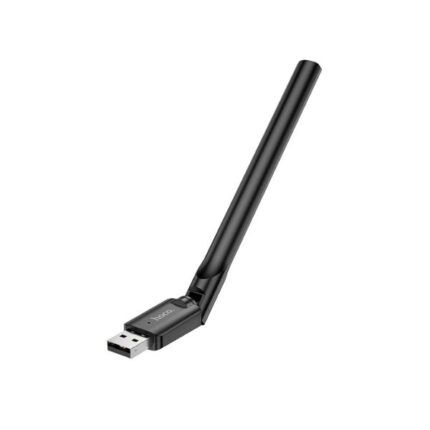
- 3dBi External Antenna: A key differentiator for the Hoco HI32 is its 3dBi external antenna. Unlike internal antennas found in many miniature adapters, an external antenna significantly improves signal reception and transmission. This translates directly into a stronger, more stable connection, reducing dead zones and buffering. The ability to adjust the antenna’s orientation also allows for fine-tuning the signal for optimal performance.
- Improved Coverage: Users often find that the 3dBi antenna helps extend the Wi-Fi signal range within their homes or offices. This is particularly beneficial in larger spaces or areas where the primary router signal struggles to reach.
Plug-and-Play Convenience
- USB 2.0 Interface: The adapter connects via a standard USB 2.0 port, making it compatible with virtually any desktop computer or laptop. Installation is often straightforward, with many operating systems automatically recognizing the device and installing the necessary drivers.
- Broad Compatibility: The Hoco HI32 supports a wide range of operating systems, including various versions of Windows (XP, Vista, 7, 8, 10, 11) and often Linux, ensuring broad usability across different platforms.
Compact and Portable Design
- Miniature Size: Despite its external antenna, the main body of the adapter remains compact. This makes it easy to transport and ideal for users who need a reliable Wi-Fi solution on the go.
- Discreet Profile: Its small footprint means it doesn’t obstruct adjacent USB ports, maintaining a clean setup for your device.
Recommended Products
Hoco HI32 USB 150Mbps 3dBi Wi-Fi Adapter Review: Real-World Performance
When evaluating a new piece of hardware, real-world performance is critical. A comprehensive hoco hi32 usb 150mbps 3dbi wi-fi adapter review reveals that this device consistently delivers on its promises for its intended use case. Users frequently praise its ease of installation and noticeable improvement in signal strength.
Installation and Setup
Most users report a “plug-and-play” experience. Upon inserting the adapter into a USB port, Windows operating systems often detect and install the drivers automatically within moments. For older systems or specific Linux distributions, a quick driver installation from a provided mini-CD or manufacturer website ensures full functionality. This simplicity greatly reduces setup time and frustration, making it accessible even for those with limited technical expertise.
Signal Strength and Stability
The 3dBi external antenna truly shines in improving signal stability. Many reviews highlight a significant reduction in dropped connections and an increase in reported Wi-Fi signal bars, especially in areas previously prone to weak signals. This makes it an ideal upgrade for older devices struggling to maintain a consistent connection.
Speed Performance for Everyday Use
While 150Mbps is not suitable for extreme multi-gigabit file transfers, it comfortably handles typical internet activities. Streaming 1080p videos on platforms like YouTube or Netflix runs smoothly, and general web browsing feels snappy. For casual online gaming, the adapter maintains a stable connection, reducing latency issues often associated with poor Wi-Fi. It reliably serves as an excellent solution for enhancing the online experience on a budget.
Hoco HI32 USB 150Mbps 3dBi Wi-Fi Adapter Price: Value Proposition
The hoco hi32 usb 150mbps 3dbi wi-fi adapter price point is one of its most attractive aspects. Positioned as an entry-level to mid-range Wi-Fi adapter, it offers exceptional value for its performance capabilities.
Affordable Upgrade
Compared to the cost of a new laptop or a high-end router, the Hoco HI32 represents a minimal investment that yields significant improvements in wireless connectivity. This makes it an accessible option for students, home users, or anyone looking for a cost-effective solution to Wi-Fi woes.
Where to Buy
You find the Hoco HI32 adapter available through various online retailers and electronics stores. Its widespread availability ensures competitive pricing and easy access. Always compare prices from different vendors to secure the best deal, but expect it to remain an incredibly budget-friendly option.
Hoco HI32 USB 150Mbps 3dBi Wi-Fi Adapter Specs at a Glance
For those who delve into the technical specifics, the hoco hi32 usb 150mbps 3dbi wi-fi adapter specs confirm its solid foundation as a reliable wireless device.
- Model: Hoco HI32
- Interface: USB 2.0
- Wireless Standards: IEEE 802.11n, IEEE 802.11g, IEEE 802.11b
- Wireless Speed: Up to 150Mbps
- Antenna Type: External, 3dBi Omni-directional
- Frequency Range: 2.4-2.4835GHz
- Security Features: Supports 64/128-bit WEP, WPA-PSK/WPA2-PSK, WPA/WPA2 encryption
- Operating Systems: Windows XP/Vista/7/8/10/11, Linux (specific kernel versions may vary)
- Dimensions: Compact design, typically with a small main body and adjustable antenna.
These specifications highlight its adherence to established wireless standards and its capability to provide secure and stable connections across common operating systems.
Best Hoco HI32 USB 150Mbps 3dBi Wi-Fi Adapter: Is It for You?
Determining the best hoco hi32 usb 150mbps 3dbi wi-fi adapter depends on your specific needs. It excels in certain scenarios, making it an ideal choice for many users.
Ideal Use Cases
- Older Laptops/Desktops: If your computer has outdated internal Wi-Fi (e.g., 802.11b/g only) or a malfunctioning internal card, the Hoco HI32 offers a cheap and effective upgrade.
- Improved Signal Strength: For systems located far from the router or in areas with weak signals, the 3dBi antenna significantly boosts reception.
- Budget-Conscious Users: When cost is a primary concern but performance cannot be completely sacrificed, this adapter provides excellent value.
- Secondary/Guest Computers: It serves as a perfect solution for providing reliable internet to a secondary PC, guest computer, or a device that only requires moderate internet speeds.
When You Might Consider Alternatives
- Gigabit Internet Users: If you have a fiber optic internet connection with speeds exceeding 300Mbps, this adapter will bottleneck your connection. You would need an 802.11ac or 802.11ax adapter.
- Intensive Online Gaming/Large File Transfers: While stable, the 150Mbps speed might not satisfy the most demanding online gamers or those who frequently transfer very large files over the network.
- Dual-Band Needs: The Hoco HI32 operates only on the 2.4GHz band. If your router supports 5GHz and you need to utilize that less congested band, you would require a dual-band adapter.
Hoco HI32 USB 150Mbps 3dBi Wi-Fi Adapter Buying Guide
Making an informed decision when purchasing a wireless adapter ensures you get the most out of your investment. This hoco hi32 usb 150mbps 3dbi wi-fi adapter buying guide helps you navigate the considerations.
1. Assess Your Current Needs
First, identify why you need a new adapter. Is it for speed, range, or replacing a faulty component? The Hoco HI32 is best for those seeking improved range and reliability on a budget, especially for devices with older Wi-Fi standards or weak signal reception.
2. Check Compatibility
Ensure your computer has an available USB 2.0 (or 3.0, as they are backward compatible) port. Verify your operating system is supported. While most modern Windows versions work seamlessly, confirm driver availability for older or less common OS versions.
3. Consider Your Router’s Capabilities
The Hoco HI32 works with all 2.4GHz routers (802.11b/g/n). If your router is newer and offers 5GHz Wi-Fi (802.11ac/ax), remember that the HI32 will only connect to the 2.4GHz band. This is not necessarily a drawback, as 2.4GHz offers better range and penetration through walls.
4. Read User Reviews
Always check recent user reviews for feedback on driver stability, actual speed performance, and antenna effectiveness. Pay attention to comments from users with similar setups or usage patterns.
5. Compare Prices and Warranty
Look for competitive pricing across different retailers. Also, check the seller’s return policy and any manufacturer warranty offered. A good warranty provides peace of mind against potential defects.
6. Ease of Installation
The Hoco HI32 is renowned for its straightforward installation. If you prefer a hassle-free setup without extensive driver hunting, this adapter is an excellent choice.
7. Physical Size and Port Impact
While compact, the external antenna means the adapter is slightly larger than a “nano” dongle. Ensure it doesn’t obstruct other ports you need to use frequently, though its adjustable antenna often allows for flexible positioning.
8. Future-Proofing (Limited)
Understand that 150Mbps is an 802.11n standard speed. It offers a solid performance for its class, but it is not the latest Wi-Fi technology. If you anticipate upgrading to multi-gigabit internet or need bleeding-edge speeds for highly demanding tasks, consider an 802.11ac or 802.11ax adapter.
Frequently Asked Questions
What is the maximum speed of the Hoco HI32 USB Wi-Fi adapter?
The Hoco HI32 USB Wi-Fi adapter offers a maximum theoretical speed of 150Mbps (megabits per second).
Does the Hoco HI32 support 5GHz Wi-Fi?
No, the Hoco HI32 operates only on the 2.4GHz frequency band. It does not support 5GHz Wi-Fi connections.
Is the Hoco HI32 compatible with Windows 11?
Yes, the Hoco HI32 is generally compatible with Windows 11, along with other Windows versions like XP, Vista, 7, 8, and 10. Drivers typically install automatically.
What does the 3dBi antenna do for the Wi-Fi adapter?
The 3dBi external antenna significantly improves signal reception and transmission strength compared to internal antennas. This results in a more stable connection, better range, and reduced dead zones.
Can I use the Hoco HI32 for online gaming?
For casual online gaming, the Hoco HI32 provides a stable connection. However, for highly competitive gaming that demands ultra-low latency and maximum bandwidth, an Ethernet connection or a higher-speed dual-band adapter might be preferable.
Is the Hoco HI32 difficult to install?
No, installation is usually very straightforward. Most operating systems recognize the Hoco HI32 as a plug-and-play device, automatically installing the necessary drivers upon insertion into a USB port.
Conclusion
The Hoco HI32 USB 150Mbps 3dBi Wi-Fi adapter stands as an outstanding solution for users seeking to enhance their wireless connectivity without breaking the bank. Its combination of 150Mbps speed, an effective 3dBi external antenna, and simple plug-and-play functionality makes it an invaluable upgrade for older devices or systems struggling with poor Wi-Fi signals. By offering improved range, stability, and reliable performance for everyday internet tasks, the Hoco HI32 effectively revitalizes your digital experience. It represents a smart, cost-effective investment for anyone needing a dependable boost to their wireless network capabilities, proving that substantial improvements don’t always require a hefty price tag.