
Hoco D1 Indoor PTZ HD Camera: Review & Buying Guide

The Hoco D1 Indoor PTZ HD Camera delivers modern security features at an affordable price. If you seek clear video, flexible pan-tilt control, and simple setup, this camera deserves a close look. The Hoco D1 Indoor PTZ HD Camera combines 1080p imaging, two-way audio, and smart motion alerts into a compact design. This review covers specs, real-world performance, price expectations, and a practical buying guide to help you decide.
Hoco D1 Indoor PTZ HD Camera features
Hoco lists several notable features for the D1. The camera offers 1080p HD video, 355° pan and 90° tilt, and night vision. It supports two-way audio, motion detection, and cloud or local storage. The camera works with both Wi-Fi and wired networks depending on the model. Many users like the compact body and the adjustable field of view. For households and small offices, these features balance value and utility.
- 1080p HD resolution for clear daytime footage
- Wide PTZ range for full-room coverage
- Infrared night vision to 10-15 meters
- Two-way audio to communicate remotely
- Motion alerts with configurable sensitivity
Recommended Products
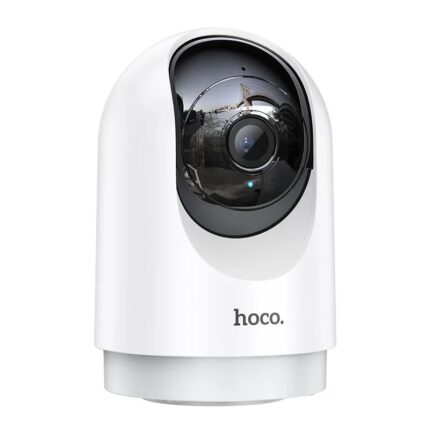


Hoco D1 Indoor PTZ HD Camera review: Real-world performance
In everyday use, the camera records sharp daytime video. Colors appear natural. The auto-exposure adapts quickly to changing lights. The PTZ controls respond smoothly when you pan or tilt from the app. Motion alerts trigger reliably for human movement while reducing false alarms from pets. Night vision shows clear silhouettes and readable faces within its documented range. Audio quality matches expectations for an indoor security camera. The microphone picks up speech clearly at short range. The speaker reproduces voice well enough for basic communication.
Setup usually takes under ten minutes with the included app. The app guides you through Wi-Fi credentials and camera naming. Firmware updates happen over the network and improve stability. Some users prefer a wired Ethernet connection for the most consistent streaming. Overall, the Hoco D1 performs well for routine monitoring and general security tasks.
Hoco D1 Indoor PTZ HD Camera specs
Understanding the technical specs helps match the camera to your needs. The key specs below reflect common Hoco D1 configurations. Check the specific model listing before you buy since vendors sometimes change details.
- Resolution: 1920 x 1080 (Full HD)
- Lens: Wide-angle with digital zoom
- Pan: 355 degrees; Tilt: 90 degrees
- Night Vision: IR LEDs up to 10–15 meters
- Connectivity: 2.4 GHz Wi-Fi; some models include Ethernet
- Storage: MicroSD card slot (up to 128 GB) and cloud option
- Audio: Two-way talk with built-in mic and speaker
- Power: DC adapter (spec varies by region)
Hoco D1 Indoor PTZ HD Camera price and value
Price depends on retailer, region, and whether the package includes extra features like cloud subscriptions. The Hoco D1 Indoor PTZ HD Camera typically sits in the budget to mid-range bracket. Expect a lower upfront cost than premium brands. Cloud storage may add monthly fees. Local microSD storage keeps ongoing expenses low.
When you compare price to offered features, the camera delivers strong value. You receive PTZ control and 1080p video without a high price tag. If you need extended cloud history, include subscription costs in your budget. For many buyers, the one-time purchase plus local storage meets their needs and keeps lifetime costs minimal.
Best Hoco D1 Indoor PTZ HD Camera use cases
This camera serves several common scenarios well. It acts as a baby monitor, pet camera, and general room surveillance unit. Small retail spaces can use it to monitor aisles or checkout counters. The PTZ range helps cover wide rooms without multiple cameras. Install the camera in a central position to maximize coverage and reduce blind spots.
- Home monitoring: Check entrances, living rooms, and nurseries.
- Pet watching: Monitor activity and speak to pets remotely.
- Small office security: Track movement and deter theft.
- Remote care: Keep an eye on elderly family members.
Hoco D1 Indoor PTZ HD Camera buying guide
Follow these steps to choose the right model and accessories. First, confirm whether you need wired Ethernet for the strongest connection. Next, decide on storage preferences. MicroSD cards keep costs down. Cloud plans offer convenience and off-site backup. Then, evaluate mounting needs. Wall or ceiling mounts change the field of view and may require extra hardware. Finally, inspect warranty and return policies before purchase.
- Check compatibility with your home network (2.4 GHz Wi-Fi).
- Choose between local microSD and cloud storage plans.
- Pick mounts that match your installation location.
- Review privacy features and app permissions.
- Confirm the seller’s warranty and support options.
Installation tips and best practices
Install the camera where it has a clear line of sight to the main area. Avoid pointing it directly at windows to reduce glare. Place it 2.5–3 meters high for optimal coverage. Use a strong Wi-Fi signal or an Ethernet cable for steady streaming. Configure motion zones to focus alerts on important areas. Test two-way audio before relying on it for urgent communication.
Secure the device by updating firmware immediately after setup. Use a strong, unique password for the camera and your cloud account. Disable unused services and check app permissions regularly. These steps reduce vulnerability and protect your recorded footage.
Comparison: Hoco D1 versus similar indoor PTZ cameras
The Hoco D1 competes with cameras from other budget brands. It matches peers on core features like 1080p video and PTZ range. Some alternatives offer higher resolution, e.g., 2K or 4K, at a higher cost. Others provide more advanced AI detection for people, pets, and vehicles. If you prioritize image clarity over cost, choose a higher-resolution model. If price and reliable day/night performance matter most, the Hoco D1 represents a smart compromise.
- Choose Hoco D1 for balanced price and essential features.
- Pick premium models for advanced AI and higher resolutions.
- Consider brand support and app reviews when comparing options.
Pros and cons
We weigh strengths and limitations so you decide with clarity.
- Pros: Affordable, easy setup, full PTZ, two-way audio, solid app support.
- Cons: Limited advanced AI features, 1080p is not the highest resolution, some features need a subscription.
Frequently Asked Questions
Is the Hoco D1 Indoor PTZ HD Camera easy to install?
The camera installs quickly using the mobile app. Most users finish setup in under 10 minutes with a stable Wi-Fi network.
Does the Hoco D1 support cloud storage?
Yes. The camera supports cloud storage with optional subscription plans and also accepts local microSD cards for onboard recording.
Conclusion
The Hoco D1 Indoor PTZ HD Camera provides strong value for home and small business users. It combines reliable 1080p video, wide pan-tilt coverage, night vision, and two-way audio at an affordable price. Use local storage to avoid monthly fees or select cloud plans when you need off-site backup. Check specs, confirm mounting needs, and secure the device after setup. For most buyers who seek dependable indoor monitoring without premium cost, the Hoco D1 Indoor PTZ HD Camera represents a practical and effective choice.