
WiWU Picasso Active Stylus Pen IOS & Android

The WiWU Picasso Active Stylus Pen IOS & Android aims to deliver precise control for drawing, note-taking, and navigation. Whether you use an iPad, an Android tablet, or a large phone, this stylus promises cross-platform compatibility and a natural pen-like feel. This review covers core features, real-world performance, pros and cons, and a buying guide to help you decide if the WiWU Picasso Active Stylus Pen IOS & Android fits your needs.
WiWU Picasso Active Stylus Pen IOS & Android: Key Features
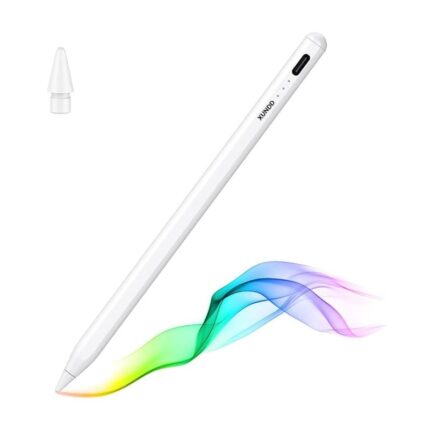
The WiWU Picasso Active Stylus Pen IOS & Android focuses on comfort, responsiveness, and universal compatibility. It targets artists, students, and professionals who want a reliable tool at a reasonable cost. The pen combines pressure-sensitive input with a fine tip for detailed work. It often pairs via Bluetooth for advanced shortcuts and palm rejection. The build feels solid and the weight balances well for long sessions.
- Cross-platform compatibility with iOS and Android devices
- Fine-tip design for precision drawing and handwriting
- Pressure sensitivity and palm rejection for natural strokes
- Rechargeable battery with quick recharging
- Shortcut buttons for eraser, undo, or mode switching
Recommended Products



Performance and Real-World Use: wiwu picasso active stylus pen ios & android review
In everyday use the stylus responds quickly. Lines track hand movement with minimal lag. Artists will notice smoother curves and finer details than with a capacitive finger. For note-taking the pen feels accurate and stable. Apps that support pressure sensitivity show thicker and thinner strokes based on applied force. Battery life supports long sessions without frequent charging. Pairing remains straightforward for both Android and iOS devices in most cases.
Writers who switch between apps benefit from shortcut buttons. You can set one button to act as an eraser in your drawing app. Another button can toggle tools. That saves time and keeps your focus on the work. If you work under bright light the matte finish reduces glare and improves grip.
Design and Build: wiwu picasso active stylus pen ios & android features
The WiWU Picasso pen uses a balanced cylindrical body. The grip area often features subtle ridges for finger placement. The tip sits close to the screen, which reduces parallax and gives a more natural feel. The pen usually ships with extra replacement tips. The clip lets you attach it to a case or pocket. Overall construction aims for durability while keeping weight low.
- Replaceable tips to extend lifespan
- Matte or soft-touch grip for comfort
- Durable aluminum or alloy body options
- Magnetic or clip-based storage on some models
Compatibility and Setup
Compatibility ranks among the pen’s strongest points. It supports a wide range of iPads, iPhones, Android tablets, and many touchscreen phones. Setup typically involves a quick Bluetooth pairing for advanced features. Simpler modes work without pairing for basic touch input. Always check the product page for specific device compatibility. Some advanced features require an app that supports pressure and tilt.
Battery and Charging
The pen uses an internal rechargeable battery. It charges via a standard cable included in the box. Most users find a single charge lasts several hours of continuous drawing. The pen often supports quick charging, giving usable battery in minutes. Turn off Bluetooth when not needed to conserve power. Replaceable batteries are rare; rechargeability is the norm.
Tip Technology and Pressure Sensitivity
Tip design affects how the pen feels on glass. The WiWU Picasso tip aims for low friction while preserving accuracy. Pressure sensitivity lets you vary stroke weight with force. Many drawing apps read these changes and render them in real time. Tilt support helps with shading and angled strokes in compatible apps. For precise technical drawing verify the exact pressure levels on the product spec sheet before buying.
Comparing to Other Styluses
Compared to mainstream options, the WiWU Picasso Active Stylus Pen IOS & Android sits between budget capacitive pens and premium brand styluses. It provides more precision than a basic capacitive stylus. It costs less than some manufacturer-owned alternatives while delivering many similar features. If you need platform-locked features like Apple Pencil gestures, then a brand-specific stylus may suit you better. For cross-platform flexibility, the WiWU Picasso remains a strong choice.
Practical Tips and Tricks
Use a screen protector designed for stylus use to reduce wear on tips. Replace tips after heavy use to preserve accuracy. Calibrate pressure in drawing apps to match your stroke strength. Set up shortcut buttons for your most-used actions. Store the pen in a padded case to avoid dents and scratches. Keep firmware updated when available to maintain performance.
Who Should Buy It: best wiwu picasso active stylus pen ios & android
This stylus fits creative hobbyists, students, and professionals who need a reliable cross-platform tool. If you switch between Android and iOS devices frequently, the pen removes the need to buy two styluses. Artists who require highly specialized features should confirm app compatibility first. Teachers and presenters benefit from precise annotation during lessons. Casual note-takers will appreciate the natural handwriting feel.
Price Considerations: wiwu picasso active stylus pen ios & android price
Price varies by retailer, model, and seasonal promotions. The WiWU Picasso line positions itself as an affordable yet capable option. Compare prices across marketplaces and check for bundles that include extra tips or a charging cable. Consider total value: warranty length, included accessories, and return policy often justify a slightly higher price. Look for verified sellers to ensure authentic products and reliable service.
Specs and What to Check: wiwu picasso active stylus pen ios & android specs
Official specs help you match the pen to your device and workflow. Look for key items such as:
- Supported devices and OS versions
- Pressure sensitivity and tilt support
- Tip diameter and replaceability
- Battery type and charging method
- Bluetooth features and shortcut customization
Check the manufacturer listing for exact numbers. Specifications can change across versions or regional models. If specs matter for professional work, confirm them before purchase.
Buying Guide: wiwu picasso active stylus pen ios & android buying guide
Follow these steps to choose the right WiWU Picasso stylus model:
- Identify your device model and OS version.
- Decide if you need pressure sensitivity and tilt features.
- Check available tips and replacement availability.
- Compare battery life and charging options.
- Read recent user reviews for real-world reliability.
- Verify warranty and return policies from the seller.
Match features to your use case. If you draw professionally, prioritize pressure levels and low-lag performance. If you annotate documents, focus on comfort and battery life. For teaching or presentations, choose a model with reliable shortcut controls.
Maintenance and Troubleshooting
Keep the tip clean and free of debris. Use a soft microfiber cloth for the screen. If the pen lags, restart your device and re-pair the stylus. Update the stylus firmware if the manufacturer provides one. Replace worn tips to restore responsiveness. If the pen fails to connect, charge it fully and verify Bluetooth permissions in your device settings.
Frequently Asked Questions
Is the WiWU Picasso Active Stylus compatible with all iPads and Android tablets?
The stylus supports many iOS and Android devices but not all models. Check the product compatibility list for your exact device before buying.
Does the WiWU Picasso need Bluetooth to work?
Basic touch input works without Bluetooth. Advanced features like pressure sensitivity and shortcut buttons may require a Bluetooth connection and app support.
Conclusion
The WiWU Picasso Active Stylus Pen IOS & Android offers a balanced mix of precision, comfort, and cross-platform compatibility. It fits casual users and many professionals who need a flexible stylus. Review the specs and compatibility for your device and consider battery life and tip options. With the right model, the WiWU Picasso can become a reliable creative and productivity tool for both iOS and Android devices.