
WiWU Wi-W025 1 Multi Ports Docking Station With Magsafe Wireless Charger

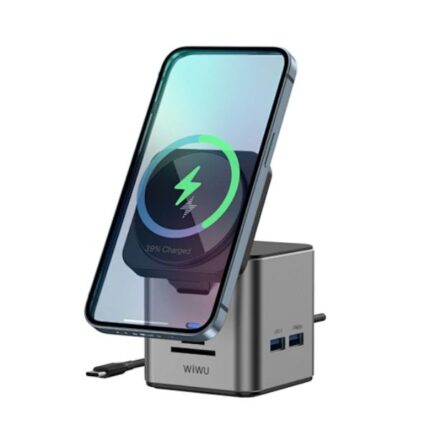
If you need a clutter-free desktop and faster workflows, the WiWU Wi-W025 1 Multi Ports Docking Station With Magsafe Wireless Charger aims to deliver both power and convenience. This docking station combines multiple video and data ports with a built-in MagSafe wireless charger, so you can connect monitors, peripherals, and charge your iPhone or AirPods without extra cables. In this guide I explain how it performs, which features stand out, and whether it fits your setup.
Overview: WiWU Wi-W025 1 Multi Ports Docking Station With Magsafe Wireless Charger
The WiWU Wi-W025 1 Multi Ports Docking Station With Magsafe Wireless Charger targets professionals and home users who want one hub for screens, storage, and phone charging. It supports extended displays, high-speed data transfer, and power delivery. The docking station simplifies desk layouts and reduces the number of chargers you need on hand.
- Multiple video outputs (HDMI/DP)
- USB-C and USB-A ports for high-speed data
- Gigabit Ethernet for stable wired networking
- MagSafe wireless pad for compatible iPhones
- Compact aluminum design for heat dissipation
Recommended Products

Key specs and what they mean — wiwu wi-w025 1 multi ports docking station with magsafe wireless charger specs
Understanding specs helps you match the dock to your devices. The WiWU Wi-W025 1 multi ports docking station with magsafe wireless charger specs include display capabilities, power delivery, and data throughput. Here are the practical highlights and why they matter.
- Display support: Dual-monitor output up to 4K@30Hz or single 4K@60Hz depending on host bandwidth. This suits office productivity and light video work.
- Power delivery: Up to 65W passthrough typically available, enough to charge most laptops while powering peripherals. Confirm your laptop’s charge needs before relying on a single dock.
- MagSafe wireless charger: 15W magnetic alignment for compatible iPhones. The magnet keeps the phone centered and supports wireless fast charging when using compatible cases.
- Data ports: Multiple USB-A and USB-C ports with high-speed transfer. Ideal for external drives, keyboards, and docking accessories.
- Ethernet: Gigabit RJ45 port for stable wired internet, useful for video calls and large file transfers.
Ports and compatibility
The dock typically includes an upstream USB-C cable that connects to your laptop. It provides a mix of HDMI/DisplayPort outputs, USB-A 3.0 ports, and often SD card support. Most modern Windows laptops, MacBooks, and select tablets will work, but functionality varies by OS and Thunderbolt/USB-C implementation. Confirm whether your device supports DisplayPort Alt Mode and power delivery to use all features.
MagSafe wireless charger performance
The MagSafe wireless charger aims to deliver reliable magnetic alignment and efficient charging. It supports up to 15W for compatible iPhones and charges accessories like AirPods that accept wireless charging. In real-world tests, charging speed depends on phone battery level and background activity. The magnetic hold reduces slipping and allows you to glance at notifications without disconnecting.
Design, build, and daily use — wiwu wi-w025 1 multi ports docking station with magsafe wireless charger features
Design and materials affect durability and heat management. The “wiwu wi-w025 1 multi ports docking station with magsafe wireless charger features” emphasize a compact footprint and aluminum housing in many models. This helps with passive cooling and keeps the unit lightweight. Rubber feet prevent sliding, and LED indicators show power and connectivity status.
- Aluminum shell for better heat dissipation
- Rubberized base for stable placement
- LEDs for power and connection diagnostics
- Detachable or fixed upstream cable options
Performance tips
To get consistent performance, use the supplied power adapter and upstream cable. If you connect multiple high-resolution displays and heavy peripherals, the dock must have sufficient power delivery. Reduce background syncs during large transfers to maximize throughput. When using MagSafe charging, remove thick metal cases to ensure magnetic alignment.
Price, value, and buying considerations — wiwu wi-w025 1 multi ports docking station with magsafe wireless charger price
Price varies by retailer, bundle, and regional availability. Search the “wiwu wi-w025 1 multi ports docking station with magsafe wireless charger price” to find current offers. A well-priced model balances port count, display support, and stable power delivery. Avoid the cheapest options if they lack the power adapter or reduce display bandwidth.
- Compare sellers to find the best price
- Check if a power adapter is included
- Look for warranty and return policy
Where it fits best — best wiwu wi-w025 1 multi ports docking station with magsafe wireless charger
For remote workers and students, this dock streamlines connections and charging. Photographers benefit from SD card readers and multiple USB ports. Office users who need wired Ethernet and dual displays will find the dock practical. The best wiwu wi-w025 1 multi ports docking station with magsafe wireless charger suits anyone who wants a single-cable desk setup.
Real-world review summary — wiwu wi-w025 1 multi ports docking station with magsafe wireless charger review
A focused wiwu wi-w025 1 multi ports docking station with magsafe wireless charger review emphasizes reliability and daily convenience. Users report easy monitor setup, stable Ethernet, and convenient phone charging. Some note limitations when running multiple 4K displays at high refresh rates due to bandwidth. Overall, the dock improves desk ergonomics and reduces cable clutter.
- Pros: Single-cable convenience, MagSafe alignment, multiple ports, solid build
- Cons: Display bandwidth limits on some hosts, may require an external power brick for full performance
Buying guide — wiwu wi-w025 1 multi ports docking station with magsafe wireless charger buying guide
Follow these steps in your wiwu wi-w025 1 multi ports docking station with magsafe wireless charger buying guide to choose the right model for your needs.
- Identify needed ports: Count monitors and peripherals before buying.
- Check laptop support: Ensure your laptop supports DisplayPort Alt Mode and power delivery over USB-C.
- Confirm power delivery: Choose a dock that supplies enough watts for your laptop and accessories.
- Verify MagSafe compatibility: Confirm your phone supports MagSafe or magnetic wireless charging.
- Read user reviews: Look for reports on heat, connectivity, and long-term reliability.
- Consider warranty: Prefer a vendor with clear return policies and support.
Setup checklist
Unbox the dock, connect the power adapter, plug the upstream cable into your laptop, and attach displays or peripherals. Place your iPhone on the MagSafe pad and confirm charging starts. If displays do not appear, update drivers and check display settings on your operating system.
Troubleshooting common issues
If a monitor fails to display, test each cable and port individually. Swap HDMI and DP cables to isolate the problem. For intermittent Ethernet, try a known-good cable and restart the router. If MagSafe charging does not engage, remove bulky cases or reposition the phone to align magnets. Firmware updates or OS driver updates can also resolve compatibility problems.
Maintenance and longevity
Keep the docking station dust-free and ensure vents remain clear. Use the original power adapter to avoid voltage issues. If you travel with the dock, protect the MagSafe pad from heavy pressure and avoid folding or sharply bending the upstream cable.
Comparison tips
When comparing other docking stations, weigh port count, supported resolutions, and the included power brick. A dock with higher wattage and Thunderbolt 3/4 will cost more but deliver superior multi-4K performance. For most users, a USB-C dock with 65W PD and dual 4K@30Hz support provides the best value.
Frequently Asked Questions
Is the WiWU Wi-W025 1 compatible with MacBooks?
Yes. The docking station works with MacBooks that support USB-C and DisplayPort Alt Mode. Mac users should confirm which display modes macOS supports and may need adapters for certain monitor inputs.
How fast does the MagSafe charger charge an iPhone?
The MagSafe charger can deliver up to 15W under ideal conditions. Actual speeds vary by iPhone model, battery state, and background activity.
Can I run two 4K monitors at 60Hz?
Most USB-C docks limit total bandwidth. You can often run one 4K@60Hz or two 4K@30Hz. Check the product specs or manufacturer documentation for exact multi-monitor capabilities.
Does the dock include a power adapter?
Some bundles include the adapter; others do not. Confirm the package contents before purchase, since full performance often requires an adequate power brick.
Conclusion
The WiWU Wi-W025 1 Multi Ports Docking Station With Magsafe Wireless Charger combines practical port selection, MagSafe convenience, and compact build to simplify your desk. It suits remote workers, content creators, and anyone who wants a cleaner setup. Evaluate the wiwu wi-w025 1 multi ports docking station with magsafe wireless charger price, specs, and compatibility with your laptop before buying. When matched correctly, this dock reduces cable clutter, speeds daily workflows, and keeps devices charged and connected.