
UGREEN Revodok CM478 USB-C Multifunction 5-in-1 Docking Station

The UGREEN Revodok CM478 USB-C Multifunction 5-in-1 Docking Station solves connectivity problems for laptops, tablets, and phones. If you need extra ports, reliable video output, and fast data transfer, this dock offers a practical, compact solution. This review covers real-world performance, key features, specs, price considerations, and a buying guide to help you decide.
UGREEN Revodok CM478 USB-C Multifunction 5-in-1 Docking Station: Features and Specs
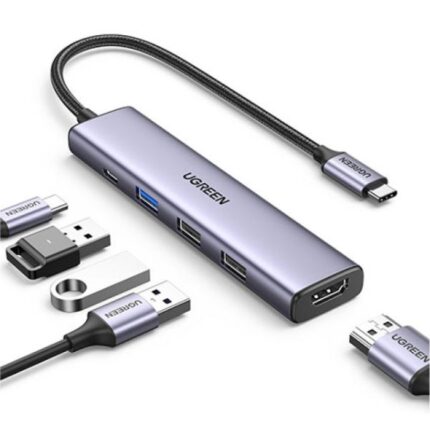
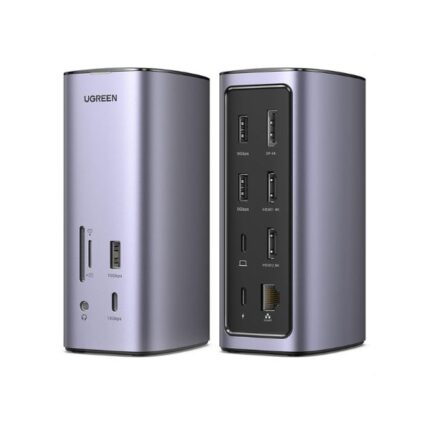
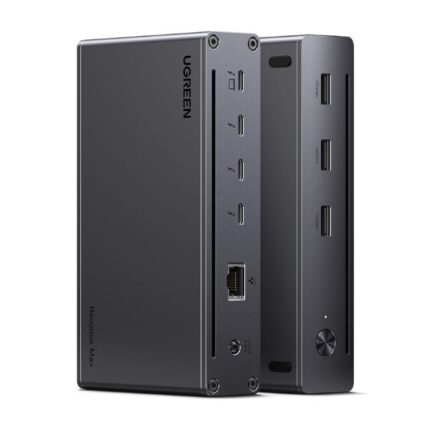
The CM478 packs five useful ports into a small chassis. It supports HDMI video output, fast charging through USB-C PD passthrough, and two USB-A ports for peripherals. It also offers a Gigabit Ethernet port for stable wired networking. These features suit remote work, presentations, and home offices.
- HDMI 4K@30Hz or 1080p@60Hz video output
- USB-C Power Delivery passthrough (up to 60W typical)
- Two USB-A 3.0 ports for data transfer
- Gigabit Ethernet RJ45 for wired connection
- Compact, plug-and-play design
Recommended Products

Design, Build, and Portability
The dock uses a sturdy plastic shell with a matte finish. It stays cool during normal use. The short integrated USB-C cable reduces clutter. You can toss the dock in a laptop bag without adding much weight. This makes the Revodok CM478 ideal for travel and co-working days.
Performance and Real-World Use
Video output works reliably for single-monitor setups. HDMI supports up to 4K at 30Hz on many laptops. It performs best with 1080p displays at 60Hz for smooth scrolling. USB-A ports move files quickly when you connect external drives. Ethernet provides a faster and more consistent connection than Wi-Fi in crowded environments.
- Streaming video and presentations work without lag at 1080p.
- Large file transfers benefit from USB 3.0 speeds.
- Power delivery keeps your laptop charged while you use ports.
Compatibility and Setup
The Revodok CM478 supports Windows, macOS, ChromeOS, and many iPad models with USB-C. Most setups require no drivers. Plug the dock into the laptop’s USB-C port. Connect your monitor, peripherals, and power adapter as needed. If you use dual monitors, check your laptop’s native USB-C alternate mode support before buying.
UGREEN Revodok CM478 USB-C Multifunction 5-in-1 Docking Station Review: Pros and Cons
This review focuses on practical benefits and trade-offs. The dock excels at expanding a single USB-C port into essential connections. It offers solid performance at a reasonable price. It lacks multiple video outputs for multi-monitor setups. Heavy docking station users may need a more feature-rich hub with additional USB ports or higher PD wattage.
- Pros: Compact size, reliable HDMI, Gigabit Ethernet, USB-C PD passthrough
- Cons: Single video output, PD wattage may limit high-power laptops, no SD card slot
UGREEN Revodok CM478 USB-C Multifunction 5-in-1 Docking Station Price and Value
Price varies with retailers and promotions. You can typically find the dock at an affordable mid-range price. The dock delivers strong value if you need a portable solution for one external display and wired networking. If price is a major factor, compare it with similar hubs to ensure it includes the ports you use most.
- Look for seasonal sales to lower the price.
- Bundle deals often include the required power adapter.
- Check warranty and return policies for peace of mind.
How the Dock Handles Power Delivery and Charging
The USB-C PD passthrough charges many laptops while using other ports. Typical PD passthrough tops near 60W, which suits ultrabooks and many midrange laptops. High-performance gaming or workstation laptops may need their original chargers for full performance. If you want faster charging, verify the dock’s exact PD rating before purchase.
Best Practices for Setup and Troubleshooting
Follow these steps for smooth setup and to avoid common issues.
- Use a high-quality USB-C cable and the correct power adapter if the dock does not include one.
- Connect the power adapter before connecting high-draw peripherals.
- Update your laptop’s USB-C and graphics drivers if the video output does not work.
- Test the dock on another computer to rule out host device issues.
UGREEN Revodok CM478 USB-C Multifunction 5-in-1 Docking Station Specs Deep Dive
Understanding the specs helps you match the dock to your needs. The HDMI port supports common resolutions and color formats. USB-A ports conform to USB 3.0 standards and transfer at up to 5 Gbps under ideal conditions. Gigabit Ethernet offers up to 1 Gbps when connected to a compatible network. The PD passthrough rating determines how fast your laptop charges while using the dock.
- HDMI: Up to 4K@30Hz or 1080p@60Hz depending on host support
- USB-A: USB 3.0 data transfer speeds (up to 5 Gbps)
- Ethernet: Gigabit RJ45 (1000 Mbps)
- USB-C PD: Check product listing for exact wattage
Comparisons: Best UGREEN Revodok CM478 USB-C Multifunction 5-in-1 Docking Station Alternatives
Some users need extra features. If you want dual-monitor support, consider larger docks that support MST or multiple HDMI/DisplayPort outputs. For photographers, a hub with an SD card reader may be better. If you require higher PD wattage, look for docks that supply 85W or 100W PD. Weigh your needs against the Revodok CM478’s compact design and price.
- Choose a multi-video dock for dual-monitor setups.
- Pick a hub with card readers for frequent media transfers.
- Opt for higher PD if you have a power-hungry laptop.
UGREEN Revodok CM478 USB-C Multifunction 5-in-1 Docking Station Buying Guide
Use this buying guide to decide if the CM478 fits your setup. Identify must-have ports before shopping. Confirm your laptop supports USB-C video output. Assess the power adapter wattage you need. Look for reliable customer support and clear warranty terms. Reading user reviews can reveal common real-world issues and workarounds.
- Check host device compatibility for video and PD.
- Prioritize the ports you use daily.
- Compare prices and read return policies.
- Look for firmware updates or driver notes from UGREEN.
Frequently Asked Questions
Does the UGREEN Revodok CM478 USB-C Multifunction 5-in-1 Docking Station support dual monitors?
The CM478 typically supports a single external display. For dual monitors, choose a dock with two video outputs or a docking station that supports DisplayPort MST and your laptop’s GPU.
What power delivery wattage does the UGREEN Revodok CM478 USB-C Multifunction 5-in-1 Docking Station provide?
Wattage varies by product batch and retailer listing. Many CM478 units offer PD passthrough around 60W. Confirm the exact PD rating on the product page before buying if high-watt charging is essential.
Is the UGREEN Revodok CM478 compatible with macOS and iPadOS?
Yes. The dock works with macOS and iPadOS devices that support USB-C video output and power delivery. Some features depend on the host device’s capabilities and software settings.
Will I need drivers to use the Ethernet port?
Most modern systems recognize the dock’s Ethernet interface automatically. If your system does not, download drivers from the UGREEN support site or your operating system’s update service.
How do I pick the best UGREEN Revodok CM478 USB-C Multifunction 5-in-1 Docking Station for my setup?
Match the dock’s ports to your routine tasks. Choose a higher PD rating for larger laptops. Consider a model with more ports if you rely on many peripherals. Read user reviews for reliability and compatibility notes.
Conclusion
The UGREEN Revodok CM478 USB-C Multifunction 5-in-1 Docking Station offers a balanced mix of portability, essential ports, and performance for most users. It fits remote work, travel, and small home-office setups well. Check compatibility, PD wattage, and price to ensure it meets your needs. This dock provides a convenient way to expand one USB-C port into HDMI, Ethernet, and USB connections with minimal fuss.