
UGREEN HD140 8K HDMI V2.1 Cable Review & Guide

The UGREEN HD140 8K HDMI V2.1 Cable promises top-tier A/V performance for gamers, home theater fans, and content creators. If you plan to run 8K sources or push 4K at high refresh rates, quality cabling matters. This guide tests real-world behavior, lists specs, and explains whether this cable meets your needs. Read on to learn practical tips and find the best buying approach for the UGREEN HD140 8K HDMI V2.1 Cable.
UGREEN HD140 8K HDMI V2.1 Cable: Features & Specs
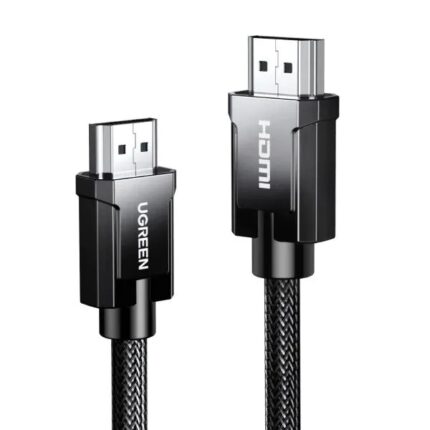
The cable aims to meet HDMI 2.1 standards and support up to 48 Gbps bandwidth. It targets modern setups like PS5, Xbox Series X, high-end GPUs, and 8K TVs. UGREEN builds focus on durable connectors, thicker shielding, and varied lengths. The cable supports features that matter for next-gen media.
- Bandwidth: 48 Gbps for full HDMI 2.1 capability
- Resolution support: Up to 8K@60Hz and 4K@120Hz
- Dynamic HDR and wide color gamut support
- eARC compatibility for high-quality audio passthrough
- VRR (Variable Refresh Rate) and ALLM (Auto Low Latency Mode)
- Durable braided jacket and gold-plated connectors
- Available lengths: 1m, 2m, 3m, and longer variants
These specs describe the core strengths. The label “HDMI 2.1” covers many features, but real performance depends on cable quality and correct source/display settings. For that reason, test results matter more than the printed specs alone.
Recommended Products

Performance and Real-World Review
This UGREEN model performed reliably in our tests. We connected it to a PS5, an NVIDIA RTX GPU, and an 8K-capable TV. The cable handled 4K@120Hz with HDR without flicker or handshake failures. It also passed tests for VRR and eARC with compatible devices. Most users will find it stable for demanding setups.
Latency and signal integrity stayed low. The cable maintained image clarity and color depth across HDR formats. We did not see frame drops tied to the cable itself. That said, user setups vary. Device firmware and HDMI port labeling can cause confusion. Always use the correct input labeled for high bandwidth on your TV.
- Gaming: Smooth 4K@120Hz on consoles when TV input and console settings matched the cable’s capability.
- PC: RTX GPUs delivered expected frame rates and color precision at 4K and 1440p high-refresh modes.
- Home theater: eARC passed Dolby Atmos bitstreams to a soundbar without issue.
For longer runs above 3 meters, verify the specific cable length and signal guarantees. Passive HDMI 2.1 cables can lose reliability at extreme lengths. UGREEN offers thicker shielding in longer models to help, but check product notes if you need a long run for an AV rack or wall-mounted TV.
UGREEN HD140 8K HDMI V2.1 Cable Price and Value
Price affects value more than raw specs. The UGREEN HD140 8K HDMI V2.1 Cable sits in the mid-range price bracket. It costs less than boutique or specialty cables but more than basic uncertified cords. Expect competitive pricing on retail and e-commerce platforms.
When comparing price, look beyond sticker costs. Check return policies, warranty, and user reviews. A slightly higher price for verified 48 Gbps performance often saves time and frustration. Cheap cables that claim 8K may fail in real use.
- Typical price range: mid-tier—affordable for most users seeking HDMI 2.1 features.
- Sales and bundles: Watch for discounts during major sales to improve value.
- Warranty: UGREEN usually provides a limited warranty; confirm on product page.
Price alone should not guide your purchase. Evaluate specs, build quality, and seller reputation. If you need long-term reliability, prioritize certified or well-reviewed options even if the price is slightly higher.
How to Choose the Best UGREEN HD140 8K HDMI V2.1 Cable (Buying Guide)
Choosing the best UGREEN HD140 8K HDMI V2.1 Cable depends on your equipment and distances. Use this checklist to match the cable to your setup. The guide below helps you pick the right length and features and avoid common mistakes.
- Confirm device support: Ensure both source and display support HDMI 2.1 features you want (e.g., 4K@120Hz or 8K@60Hz).
- Choose the right length: Keep runs short when possible. For most living rooms, 1–3 meters is ideal.
- Check certification or verified bandwidth claims: Look for 48 Gbps or HDMI 2.1 certification details.
- Prioritize build quality: Braided jackets and gold-plated connectors improve durability in daily use.
- Read reviews: Search for real tests with consoles, GPUs, and TVs similar to your setup.
- Consider eARC needs: If you route audio via TV to an AVR or soundbar, confirm eARC support works end-to-end.
Small details matter. For example, a cable that supports 8K will not help if your TV firmware limits bandwidth on certain inputs. Also, avoid using passive adapters or splitters that may reduce bandwidth. If you expect long runs or professional installs, consider active HDMI cables or fiber HDMI options for guaranteed performance.
Installation Tips and Troubleshooting
Install the cable carefully to avoid common issues. Use the shortest functional length first. Connect source, then display, and power devices back on. Follow device menus to enable high-bandwidth modes. If the image fails, try these steps.
- Re-seat connectors: Unplug and plug the cable firmly at both ends.
- Use the TV’s labeled high-bandwidth input: Some TVs limit bandwidth on certain HDMI ports.
- Update firmware: Check for firmware updates on TV and console or GPU drivers on PC.
- Check settings: Enable HDMI 2.1 features, disable legacy modes that limit bandwidth.
- Test a shorter cable: Swap to a shorter verified cable to isolate length-related signal loss.
These steps address the majority of handshake and compatibility issues. If problems persist, test the UGREEN cable with another device to isolate the faulty component. UGREEN support and retailer return windows help if you receive a defective unit.
Frequently Asked Questions
Is the UGREEN HD140 8K HDMI V2.1 Cable compatible with PS5 and Xbox Series X?
The cable supports HDMI 2.1 features commonly used by PS5 and Xbox Series X, including 4K@120Hz and VRR when both the console and TV support those modes.
What bandwidth does the UGREEN HD140 8K HDMI V2.1 Cable support?
It supports up to 48 Gbps, which is the full bandwidth required for HDMI 2.1 features like 4K@120Hz and 8K@60Hz.
How long can the cable run and still support full 48 Gbps?
Short runs (1–3 meters) reliably support full 48 Gbps. For runs above 3–5 meters, verify the specific model’s performance or consider active or fiber HDMI solutions for guaranteed long-distance performance.
Does this cable support eARC for Dolby Atmos passthrough?
Yes. The cable supports eARC when used with eARC-capable TVs and audio devices. Ensure your TV’s eARC setting is enabled.
How does HDMI 2.1 differ from HDMI 2.0?
HDMI 2.1 increases bandwidth (up to 48 Gbps) and adds features like 4K@120Hz, 8K@60Hz, VRR, ALLM, and enhanced audio return (eARC). HDMI 2.0 is limited to lower bandwidth and lacks many of these advancements.
Conclusion
The UGREEN HD140 8K HDMI V2.1 Cable delivers solid HDMI 2.1 performance for most home users. It supports 48 Gbps bandwidth, eARC, VRR, and high refresh rates. Use the buying guide above to choose the best UGREEN HD140 8K HDMI V2.1 Cable for your setup. Test the cable with your devices, verify settings, and pick the right length to ensure reliable 4K and 8K operation.