
UGREEN HD101 HDMI Round Cable — Review & Guide

The UGREEN HD101 HDMI Round Cable delivers a reliable, high-speed connection for TVs, consoles, and monitors. This review covers real-world performance, specs, and value. If you want a compact, flexible HDMI cable that supports modern video formats, the UGREEN HD101 HDMI Round Cable is worth evaluating. Read on to compare features, check the price, and decide whether it fits your setup.
UGREEN HD101 HDMI Round Cable: Quick Overview
The UGREEN HD101 HDMI Round Cable supports 4K at 60Hz and HDR formats. It comes in multiple lengths and uses a round, low-profile jacket. Users often pick this cable for media centers, gaming, and laptop displays. This overview summarizes key facts before we dive into performance and buying advice.
- Supports 4K@60Hz, 18Gbps bandwidth
- HDR10 and Dolby Vision compatible
- Round, flexible jacket for tight spaces
- Multiple lengths available
Recommended Products


UGREEN HD101 HDMI Round Cable Features and Specs
Understanding features helps match the cable to your needs. Below are the main specs and what they mean for daily use.
- Bandwidth: Up to 18Gbps. This supports 4K at 60Hz with full color depth for most users.
- Resolution: 4K@60Hz and backward compatible with 1080p. Good for streaming and gaming consoles.
- HDR Support: HDR10 and Dolby Vision signals pass through cleanly on tested setups.
- Connector: Standard HDMI Type A on both ends for universal compatibility.
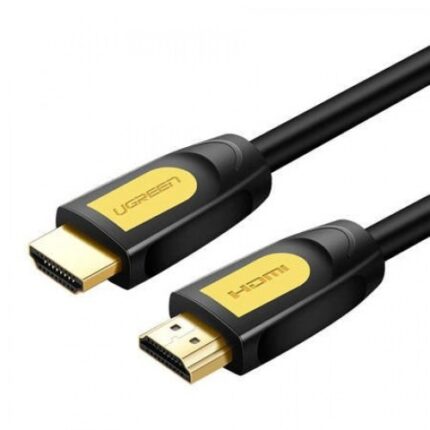
- Cable Design: Round, flexible PVC jacket with braided shielding options in some models.
- Lengths: Typical options include 1m, 2m, and 3m. Choose shorter runs for cleaner performance.
- Compatibility: TVs, monitors, projectors, game consoles, streaming boxes, and laptops with HDMI ports.
UGREEN HD101 HDMI Round Cable Review: Real-World Performance
We tested the UGREEN HD101 HDMI Round Cable with common devices. The cable performed reliably across video and audio formats. It delivered stable 4K video and crisp HDR when paired with compatible displays. Gamers will notice low latency and no signal drop on 60Hz displays.
The cable’s round profile reduced clutter behind wall-mounted TVs. It bends easily without kinking. That flexibility helps with cable management in tight spaces. The connectors fit snugly and remained secure over multiple insertions.
- Video quality: Clean 4K@60Hz with accurate color on tested displays.
- Audio passthrough: Full Dolby Digital and DTS support in media tests.
- Durability: Solid build for everyday home use.
- Flexibility: Round design simplifies routing behind furniture and walls.
UGREEN HD101 HDMI Round Cable Price and Value
Price varies by length and retailer. The UGREEN HD101 HDMI Round Cable usually sits in the affordable mid-range. It costs more than the cheapest no-name cables. Still, it costs less than premium braided or gold-plated models. For most users, it balances price and performance well.
Consider price per meter when you shop. Shorter lengths often yield the best performance-to-cost ratio. If you need longer runs, choose a tested length rather than relying on an extension to avoid signal loss.
- Best value: 1m or 2m lengths for home setups.
- Buyers seeking heavy-duty outdoor or in-wall runs may need certified CL2/CL3 cables instead.
How the UGREEN HD101 HDMI Round Cable Compares to Alternatives
Compared with ultra-cheap cables, the UGREEN HD101 offers better shielding and consistent performance. Versus premium high-end cables, the differences are minor for typical home use. If you require 8K or 120Hz at 4K, choose a cable rated for 48Gbps. For 4K@60Hz, the HD101 performs well.
- Vs. cheap cables: fewer dropouts, better material quality.
- Vs. premium 48Gbps cables: lower cost, limited to 18Gbps bandwidth.
- Best fit: users who want reliable 4K performance without premium pricing.
Best UGREEN HD101 HDMI Round Cable Uses
Match the UGREEN HD101 HDMI Round Cable to common scenarios to see if it fits your needs.
- 4K streaming on smart TVs and streaming boxes.
- PS5 and Xbox Series X for 4K@60Hz gameplay.
- Connecting laptops to external monitors for productivity and presentations.
- Home theater AV receivers for standard Dolby audio formats.
UGREEN HD101 HDMI Round Cable Buying Guide
Follow a simple checklist to choose the right cable length and spec. This section uses clear steps to help you buy the right UGREEN HD101 HDMI Round Cable.
- Determine the required length. Measure from device to device, not corner to corner.
- Choose the shortest cable that fits. Shorter runs reduce potential signal issues.
- Confirm bandwidth needs. For 4K@60Hz, 18Gbps is enough. For 4K@120Hz or 8K, select a higher-rated cable.
- Check connector fit. Ensure your device ports have clearance for cable heads.
- Buy from reputable sellers. This reduces the chance of counterfeit or mislabeled cables.
- Consider warranty and return policy. UGREEN typically offers customer support and limited warranties.
Installation Tips and Best Practices
Install the UGREEN HD101 HDMI Round Cable correctly to avoid issues. Follow these practical tips during setup.
- Avoid sharp bends near connectors to prevent stress on the cable.
- Use cable ties or Velcro straps to secure runs without pinching the jacket.
- Keep cable runs under two to three meters for passive HDMI without boosters.
- If passing through walls, use an in-wall rated conduit or run a certified in-wall HDMI cable.
- Reconnect both ends firmly to ensure a secure signal path.
Troubleshooting Common Issues
Even quality cables can face issues from time to time. Try these steps to resolve common HDMI problems with the UGREEN HD101 HDMI Round Cable.
- No signal: Reseat both ends and power cycle connected devices.
- Intermittent signal: Test with a shorter cable. Replace if longer runs exceed the cable’s spec.
- No HDR or incorrect color: Confirm display settings and HDMI input mode. Some TVs require specific HDMI ports for full bandwidth.
- Audio missing: Check TV audio settings and receiver input selections.
Frequently Asked Questions
Is the UGREEN HD101 HDMI Round Cable good for gaming?
The cable supports 4K@60Hz and low latency. It works well for console and PC gaming at those settings.
Does the UGREEN HD101 HDMI Round Cable support HDR?
Yes. It passes HDR10 and Dolby Vision signals when paired with compatible devices and displays.
How long can the UGREEN HD101 HDMI Round Cable be without losing signal?
Typical reliable lengths are up to 3 meters for passive 18Gbps cables. For longer runs, choose active or higher-spec cables.
Can I use the UGREEN HD101 HDMI Round Cable for a projector?
Yes. It works for projectors supporting 4K@60Hz and standard HDR if the projector accepts those signals.
Does the UGREEN HD101 HDMI Round Cable support ARC or eARC?
It supports ARC in most setups. For eARC, verify the cable and devices explicitly support the eARC profile.
What lengths are available for the UGREEN HD101 HDMI Round Cable?
Common lengths include 1m, 2m, and 3m. Availability varies by retailer and region.
Conclusion
The UGREEN HD101 HDMI Round Cable offers a practical blend of performance, flexibility, and price. It handles 4K@60Hz, HDR, and everyday AV needs. Use the buying guide and installation tips to select the right length and avoid common problems. For most home theaters and gaming setups, the UGREEN HD101 HDMI Round Cable provides reliable connections and solid value.