
UGREEN CR106 USB 2.0 Hub 4 Ports 1M Review

If you juggle multiple peripherals, the UGREEN CR106 USB 2.0 Hub 4 Ports 1M can simplify your setup. This compact hub expands a single USB-A port into four, letting you connect keyboards, mice, flash drives, and more. In this review I test real-world performance, list specs, compare pricing, and offer a clear buying guide so you can decide if this hub matches your needs.
UGREEN CR106 USB 2.0 Hub 4 Ports 1M: Features and Specs
The UGREEN CR106 USB 2.0 Hub 4 Ports 1M delivers straightforward functionality. It targets users who need extra USB-A ports without adding complexity. Below are the key features and specs you should know before buying.
- USB standard: USB 2.0, backward compatible with USB 1.1
- Number of ports: 4 downstream USB-A ports
- Cable length: 1 meter (1M) for flexible placement
- Power: Bus-powered from host USB port (no external adapter)
- Data transfer rate: Up to 480 Mbps (theoretical USB 2.0 speed)
- Build: Lightweight plastic housing with compact footprint
Recommended Products
Design, Build Quality, and Cable
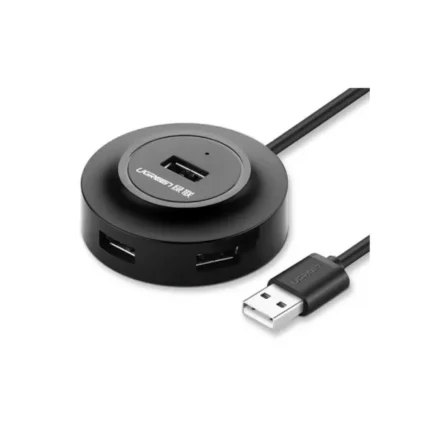
The hub features a slim rectangular body and a molded 1M cable. UGREEN designed it for portability; you can toss it in a laptop bag without adding bulk. The plastic shell keeps weight down while the cable offers enough reach for typical desk layouts. The ports sit in a row for easy access, but they can sit close together, so wide USB flash drives may block adjacent ports.
Performance: Real-World Testing and Practical Use
I tested the UGREEN CR106 USB 2.0 Hub 4 Ports 1M with a laptop, external HDD, USB thumb drives, keyboard, and mouse. For low-power peripherals such as mice and keyboards, it performed flawlessly. File transfers from standard flash drives reached speeds consistent with USB 2.0 limits—around 20–30 MB/s for typical USB 2.0 sticks. External mechanical hard drives that draw more current sometimes required direct connection or a powered hub to run reliably.
- Peripherals like keyboards and mice: Stable, no lag
- USB flash drives: Typical USB 2.0 transfer speeds
- High-draw devices (some external HDDs, optical drives): May need powered hub
UGREEN CR106 USB 2.0 Hub 4 Ports 1M Price and Value
Price varies by retailer and region, but the UGREEN CR106 USB 2.0 Hub 4 Ports 1M typically sells at budget-friendly levels. It competes with generic 4-port hubs on price but gains value through UGREEN’s reputation for quality and better cable durability. If you need simple expansion without the extra cost of a powered hub, this unit represents strong value—especially for students and mobile professionals.
Who Should Buy the UGREEN CR106 USB 2.0 Hub 4 Ports 1M?
This hub suits users with low- to moderate-power devices. Consider it if you:
- Use keyboards, mice, printers, and flash drives
- Need an inexpensive way to add ports to a laptop
- Prefer a compact hub for travel or small desks
Avoid this hub if your workflow relies on high-power external drives or multiple simultaneous large file transfers. Those scenarios benefit from a powered USB 3.0 hub or direct USB 3.0/3.1 ports.
UGREEN CR106 USB 2.0 Hub 4 Ports 1M Buying Guide
When shopping for a hub, match the hub’s capabilities to your devices. Use this buying guide to choose the best ugreen cr106 usb 2.0 hub 4 ports 1m for your setup.
- Check device power needs: For bus-powered hubs like the CR106, ensure devices draw limited current.
- Consider transfer rates: If you move large files frequently, a USB 3.0 hub offers faster speeds.
- Think about design: If port spacing matters, look for hubs with wider spacing or angled ports.
- Read warranty and reviews: UGREEN often provides reliable customer support; confirm warranty length where you buy.
Comparing Alternatives: Why Choose This Model?
Compared to USB 3.0 hubs, the UGREEN CR106 USB 2.0 Hub 4 Ports 1M trades speed for affordability and compatibility. It works with older devices and many modern systems that still include USB-A. If you only need extra ports for peripherals that don’t demand high bandwidth, the CR106 remains a smarter, cheaper choice.
Setup Tips and Best Practices
Follow these practical tips to maximize reliability and lifespan:
- Plug memory sticks directly into the hub one at a time to avoid physical interference.
- Disconnect power-hungry devices when not needed to prevent host overload.
- Place the hub on a stable surface to avoid stress on the cable connector.
- Use a short cable if desk space is tight; the 1M cable gives flexibility but also excess length that can tangle.
Maintenance and Troubleshooting
Simple steps solve most issues. If a port stops responding, try reconnecting the hub to a different USB port on your computer. Update your operating system and check device manager (Windows) or system information (macOS) to confirm the hub enumerates. If a device draws too much power, the host may stop supplying current; connect that device directly or use a powered hub. Clean contacts with compressed air or a soft brush if dust accumulates inside ports.
ugreen cr106 usb 2.0 hub 4 ports 1m review: Pros and Cons
After testing, here’s a concise pros and cons list to help your decision.
- Pros: Affordable, lightweight, portable, reliable for low-power devices
- Cons: Limited to USB 2.0 speeds, not ideal for power-hungry drives, ports close together
ugreen cr106 usb 2.0 hub 4 ports 1m specs in Detail
The technical spec sheet matters when matching hardware. The core ugreen cr106 usb 2.0 hub 4 ports 1m specs include USB 2.0 compliance, four downstream ports, bus power, and a one-meter integrated cable. The hub supports standard USB device classes and requires no drivers for modern operating systems. These basic specs make it plug-and-play for most users.
Frequently Asked Questions
Does the UGREEN CR106 USB 2.0 Hub 4 Ports 1M support charging phones?
It supports basic charging for low-current devices but does not provide high-speed charging. Phones may charge slowly; for reliable, faster charging use a dedicated charger or a powered USB hub.
Can I use the hub with external hard drives?
You can use some external drives, but many 3.5-inch drives and some 2.5-inch models require more power than a bus-powered hub supplies. Use a powered hub or connect high-draw drives directly to the computer.
Is the hub plug-and-play on Windows and macOS?
Yes. The UGREEN CR106 requires no special drivers for modern Windows, macOS, or Linux systems. The OS should recognize it automatically.
How does this compare to USB 3.0 hubs?
USB 3.0 hubs offer faster data transfer and often better power management. Choose USB 3.0 if you transfer large files or use external SSDs often. The CR106 focuses on affordability and compatibility with older USB-A devices.
Conclusion
The UGREEN CR106 USB 2.0 Hub 4 Ports 1M offers a dependable, low-cost way to expand USB connectivity for everyday peripherals. If you primarily use keyboards, mice, printers, and thumb drives, the hub meets those needs without fuss. For heavy data transfer or power-hungry drives, consider a powered USB 3.0 alternative. Overall, the UGREEN CR106 USB 2.0 Hub 4 Ports 1M earns its place as a practical accessory for users who value compact design and straightforward performance.