
Ugreen CM555 Revodok Pro 12-in-1 4k HDMI Universal Docking Station

The Ugreen CM555 Revodok Pro 12-in-1 4k HDMI Universal Docking Station aims to simplify multi-device workflows with one compact hub. If you juggle a laptop, external monitor, storage drives, and peripherals, this dock promises to reduce cable clutter and expand connectivity. This review covers performance, real-world use, specs, price considerations, and a buying guide to help you decide if the Ugreen CM555 Revodok Pro 12-in-1 4k HDMI Universal Docking Station fits your setup.
Ugreen CM555 Revodok Pro 12-in-1 4k HDMI Universal Docking Station review
Design and build feel solid and purposeful. The aluminum housing aids heat dissipation and matches most laptops. The dock remains compact. You can set it on a desk without sacrificing space. Setup takes a single USB-C cable to your laptop. Drivers usually install automatically or require a minor manual step for older systems.
- Simple plug-and-play for most modern laptops
- Solid construction with effective thermal design
In testing, video performance proved reliable. The HDMI port supports 4k at 30Hz or 60Hz depending on your host and cable. The DisplayPort alternative can give you more flexibility for dual-monitor setups. Data transfer speeds matched expectations for USB 3.0 ports. Ethernet provided stable wired networking for transfers and low-latency tasks. Battery passthrough worked with many chargers, though peak laptop charging rates vary by model.
Recommended Products
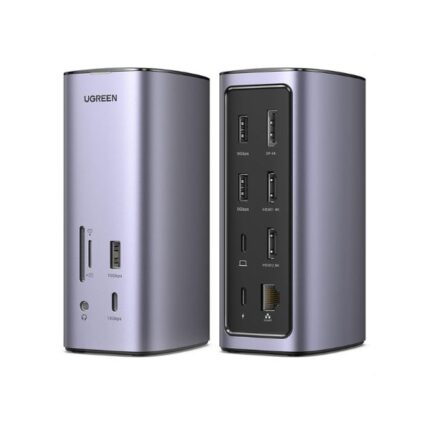

Ugreen CM555 Revodok Pro 12-in-1 4k HDMI Universal Docking Station features
The feature set targets power users and hybrid workers. Ugreen packed the dock with ports to replace multiple dongles. You will find options that serve external displays, peripherals, storage, and networked devices.
- 4k HDMI output for crisp external displays
- Multiple USB-A and USB-C ports for peripherals and storage
- Gigabit Ethernet for reliable wired connections
- SD and microSD card readers for photographers and content creators
- PD passthrough to keep your laptop charged while connected
These features make the dock versatile. For content creators, the card readers reduce transfer steps. Office users get fast Ethernet and multiple USB ports for keyboards, mice, and webcams. One practical example: connect a laptop, an external monitor via HDMI, a wired keyboard and mouse, and still have room for an external SSD and Ethernet — all with a single cable connection.
Ugreen CM555 Revodok Pro 12-in-1 4k HDMI Universal Docking Station specs
The specs determine compatibility and performance. Below are the key technical details you should check before buying:
- Ports: 1x HDMI (4k), 1x DisplayPort, multiple USB-A (3.0), 1x USB-C PD input/output, SD/microSD readers, Gigabit Ethernet
- Video: 4k@30/60Hz support depending on host GPU and cable
- Data: USB 3.0 ports with up to 5 Gbps transfer
- Charging: Power Delivery passthrough up to manufacturer-specified wattage
- Compatibility: Windows, macOS, some Linux distributions, and chromebooks with appropriate USB-C Alt Mode support
Confirm your laptop supports USB-C DisplayPort Alternate Mode and sufficient PD wattage for full functionality. If your laptop lacks Alt Mode, display output may not work and you will only get data and Ethernet connectivity.
Ugreen CM555 Revodok Pro 12-in-1 4k HDMI Universal Docking Station price
Price varies by retailer and region. The dock typically positions itself as a mid-range to premium accessory. You will often find seasonal discounts, bundle deals, or refurbished units at lower cost. Compare prices and check included warranty and return policies.
- Look for verified sellers to ensure warranty coverage
- Consider bundled cables or power adapters when evaluating total cost
Value depends on how many ports you need and whether you require full PD charging and 4k output support. If you rely heavily on multiple external devices, the dock can replace several single-purpose adapters and justify its price. For occasional users, a smaller hub might offer better value.
Best use cases and who should buy the Ugreen CM555 Revodok Pro
The dock suits several user profiles. Remote workers who need an external monitor, wired internet, and multiple USB devices will find it especially helpful. Creative professionals who use SD cards, external drives, and high-resolution monitors can streamline their desktop. IT admins can deploy it as a simple docking solution for hot-desk setups.
- Remote employees needing a desktop-like setup at home
- Photographers and video editors requiring SD card slots and fast transfers
- Students who want a compact hub for campus and dorm use
If you travel frequently, the dock’s size and single-cable workflow reduce setup time in hotels and conferences. If your laptop is older and lacks USB-C Alt Mode, check compatibility first. The dock will function as a USB peripheral hub in that case but not as a display adapter.
Ugreen CM555 Revodok Pro 12-in-1 4k HDMI Universal Docking Station buying guide
Follow this checklist before purchasing to ensure you get the expected performance and compatibility.
- Confirm USB-C Alt Mode on your laptop for video output
- Verify PD wattage needed to charge your laptop and match it to the dock’s passthrough capability
- Check supported video resolutions and refresh rates for your monitor
- Inspect port types and counts against your peripherals list
- Read user reviews and watch real-world tests for thermal and reliability insights
Actionable tip: test the dock with the same USB-C cable and power brick you use daily. Different cables and chargers produce different results. Always use a cable rated for high wattage and data if you want full functionality.
Comparisons and alternatives
When comparing the Ugreen CM555 Revodok Pro to alternative docks, consider these factors: port selection, charging wattage, supported video outputs, and price. Some docks emphasize ultra-fast charging, while others prioritize multiple display outputs or more USB ports.
- Choose a dock with more DisplayPort/HDMI outputs if you run multi-monitor arrays
- Pick higher PD wattage docks for gaming laptops that need 100W or more
- Consider brand support and firmware update availability for long-term compatibility
For example, if you need dual-4k@60Hz displays, verify whether the dock and your laptop GPU support MST or separate signal lanes. The Ugreen CM555 Revodok Pro handles common single-monitor setups well, but very high-end dual-display demands may require a dock tailored for that purpose.
Frequently Asked Questions
Does the Ugreen CM555 Revodok Pro support 4k monitors at 60Hz?
It can support 4k at 60Hz depending on your laptop’s USB-C Alt Mode and the specific port used. Check your laptop’s GPU output and use high-quality HDMI/DP cables.
Can I charge my laptop through the dock?
Yes. The dock supports Power Delivery passthrough. The actual charging speed depends on the dock’s PD rating and your laptop’s power requirements.
Is the dock compatible with macOS and Windows?
Yes. It works with macOS and Windows. Full video support requires USB-C Alt Mode, which most modern devices provide. Some features may need driver updates on older systems.
Does the dock include a power adapter?
Check the product listing. Some bundles include a PD adapter, while others require you to supply your own. Using a compatible high-wattage adapter ensures optimal charging.
Will it work with older USB-A laptops?
Only as a USB hub. Without USB-C Alt Mode, the dock cannot output video through HDMI or DisplayPort on USB-A machines.
How fast are the data transfer ports?
USB-A ports typically use USB 3.0 speeds up to 5 Gbps. For faster external SSD performance, ensure you connect to the correct high-speed port and use quality cables.
Conclusion
The Ugreen CM555 Revodok Pro 12-in-1 4k HDMI Universal Docking Station offers a balanced mix of ports, solid build, and practical features for most users. It improves desk organization, supports common video and charging needs, and streamlines multi-device setups. Verify USB-C Alt Mode and PD wattage for your laptop before buying. If you need a dependable, full-featured hub, the Ugreen CM555 Revodok Pro 12-in-1 4k HDMI Universal Docking Station is a strong candidate for productivity and creative workflows.