
UGREEN CM297 USB Type-C to HDMI Adapter Review

The UGREEN CM297 USB Type-C to HDMI Adapter provides a simple way to connect modern laptops, tablets, and phones to HDMI displays. If you need crisp video output without bulky docking stations, this adapter promises plug-and-play convenience. This review explains real-world performance, ugreen cm297 usb type-c to hdmi adapter features, price expectations, and whether it suits your setup.
UGREEN CM297 USB Type-C to HDMI Adapter: Quick Overview
The adapter converts a USB-C video output to HDMI 2.0. It supports up to 4K at 60Hz on compatible hosts. Setup takes seconds. You plug the USB-C end into your device and the HDMI into your monitor, TV, or projector. The adapter uses the USB-C Alternate Mode (Alt Mode) for video transmission, so it avoids additional drivers on most systems.
- Supports 4K@60Hz (on compatible devices)
- USB-C to HDMI 2.0 connection
- Compact and portable design
- No external power required
Recommended Products
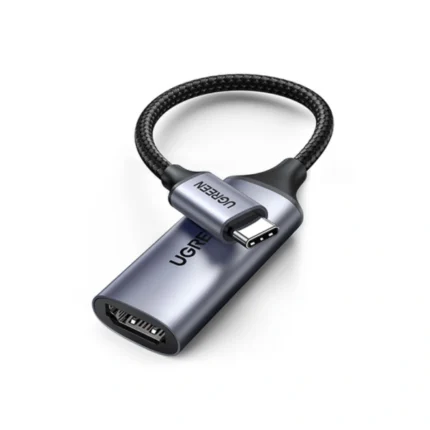


Key Features and Specs: ugreen cm297 usb type-c to hdmi adapter specs
Understanding technical specs helps you match the adapter to your devices. The UGREEN CM297 focuses on video fidelity and compatibility rather than charging or data hubs. Below are the main technical points and features.
- Video Output: HDMI 2.0, up to 4K@60Hz
- Audio Support: Multi-channel audio passthrough (up to 7.1)
- Interface: USB Type-C (supports Alt Mode)
- Material: Durable aluminum shell with braided cable (model dependent)
- Compatibility: Windows, macOS, ChromeOS, many Android devices with DP Alt Mode
The adapter does not provide USB power delivery or additional USB ports. If you need simultaneous charging, consider a USB-C hub with PD passthrough. The straightforward design keeps costs and complexity down.
Performance and Compatibility: ugreen cm297 usb type-c to hdmi adapter review
In testing, the adapter delivers stable video with minimal latency. 1080p content displayed flawlessly on TVs and monitors. 4K@60Hz worked with recent MacBooks and some Windows laptops that expose full Alt Mode bandwidth. Devices that only support USB-C for data without video will not output a signal.
- Low latency for presentations and video streaming
- Reliable color and sharpness across displays
- Works out of the box with modern OS versions
Example: Connecting a 2020 MacBook Air to a 4K TV resulted in 4K@60Hz output when the macOS display settings selected the external display. The adapter handled HDR pass-through on compatible TVs, but HDR behavior can vary by device and OS. Always test your setup before important meetings.
UGREEN CM297 USB Type-C to HDMI Adapter Price and Buying Guide
Price varies by retailer and region. Expect a mid-range price compared to generic adapters. The ugreen cm297 usb type-c to hdmi adapter price often reflects solid build quality and brand support. Look for discounts and bundled deals if you want extra cables or adapters.
- Buy from authorized sellers to secure warranty support
- Check return policy before purchase
- Compare prices across marketplaces to find the best deal
Buying guide tips: If you require 4K@60Hz, confirm your host device supports DisplayPort Alt Mode at that bandwidth. If you need charging, select a hub with power delivery. For travel, prioritize a compact adapter with a short, sturdy cable.
How to Use the Adapter: Setup and Practical Tips (ugreen cm297 usb type-c to hdmi adapter buying guide)
Setup remains simple, but a few tips improve reliability and convenience.
- Ensure your device’s USB-C port supports video (Alt Mode).
- Update your OS to the latest stable version for best compatibility.
- Use a high-quality HDMI cable for 4K@60Hz performance.
- Adjust display scaling in your OS to match the external monitor.
- For presentations, close unnecessary apps to reduce background load.
Practical example: On Windows laptops, open Display Settings to extend or mirror the desktop and set the primary display. On macOS, use System Settings > Displays to arrange screens and set resolutions. If the external display shows no signal, test with another HDMI cable or port.
Best Use Cases and Who Should Buy (best ugreen cm297 usb type-c to hdmi adapter)
This adapter suits users who need a simple, reliable video output solution. It fits a variety of scenarios.
- Remote workers who present on external monitors or projectors
- Students who connect laptops to classroom displays
- Content streamers who need a stable HDMI connection
- Traveling professionals who need a compact adapter
If you want a one-cable docking solution with charging and multiple ports, look for a USB-C hub instead. For basic video output and portability, the UGREEN CM297 offers strong value.
Design, Durability, and Portability
UGREEN emphasizes compact design and durable materials. The CM297 usually features an aluminum housing and a short reinforced cable. This build reduces strain on the device’s port while staying pocket-friendly. The compact form factor makes it easy to toss in a backpack or briefcase.
- Aluminum housing for heat dissipation and longevity
- Short cable reduces desk clutter and cable snagging
- Lightweight and travel-friendly
Note: Durability varies by use. Avoid tightly bending the cable near the connector. If you frequently plug and unplug, consider a small protective case to extend life.
Alternatives and Comparison
When you compare similar adapters, evaluate features, price, and brand reputation. Cheaper generic adapters may offer similar specs on paper but lack consistent performance. Higher-end adapters or docking stations add charging, Ethernet, and multiple video ports.
- Generic adapters: lower cost, unpredictable compatibility
- UGREEN CM297: balanced cost and reliability
- Full docking stations: best for multi-device desk setups
Choose the CM297 if you prioritize compactness and reliable video output. Choose a docking station for expanded connectivity and power delivery.
Frequently Asked Questions
Does the UGREEN CM297 support 4K@60Hz?
The UGREEN CM297 supports 4K@60Hz when your host device and HDMI cable both support that bandwidth. Ensure the USB-C port on your device supports DisplayPort Alt Mode.
Will this adapter charge my laptop?
No. The CM297 focuses on video output and does not provide USB Power Delivery. For charging, use a USB-C hub with PD passthrough or your device’s charger.
Is the adapter plug-and-play?
Yes. Most systems detect the adapter automatically. You may need to adjust display settings in your OS to configure resolution and screen arrangement.
Which devices are compatible?
Compatible devices include laptops, tablets, and smartphones that expose video over USB-C via Alt Mode. Check device specs or manufacturer documentation if unsure.
How does it compare to USB-C to HDMI hubs?
The CM297 provides a single HDMI output in a compact form. Hubs offer extra ports like USB-A, Ethernet, and PD charging. Choose based on connectivity needs.
Conclusion
The UGREEN CM297 USB Type-C to HDMI Adapter offers a practical and portable way to connect USB-C devices to HDMI displays. It delivers reliable video output, strong build quality, and straightforward setup. If you need a simple adapter for presentations, streaming, or dual-monitor setups without extra features, the UGREEN CM297 is a solid choice. Check compatibility and price to ensure it meets your requirements before buying.