
TP-Link TL-WR820N 300Mbps WiFi Router

The TP-Link TL-WR820N 300Mbps WiFi Router offers affordable, reliable wireless for small homes and apartments. This router targets basic web use, streaming, and light gaming. If you need a budget-friendly unit that covers simple needs, this router deserves a look. The TP-Link TL-WR820N 300Mbps WiFi Router combines straightforward setup, decent coverage, and basic security. Below, you will find an in-depth look at features, specs, setup tips, performance expectations, and buying guidance.
TP-Link TL-WR820N 300Mbps WiFi Router: Key Features
The router focuses on core functions without unnecessary extras. It delivers up to 300Mbps on the 2.4GHz band. It supports WPA/WPA2 encryption for network security. The web interface and Tether mobile app simplify setup and management. Parental controls and guest network features help you control access. The small form factor fits tight spaces.
- 300Mbps wireless on 2.4GHz for basic internet use
- Easy setup with TP-Link Tether app or web UI
- WPA/WPA2 encryption and firewall protection
- Guest network and basic parental controls
- Compact design and wall-mount option
Recommended Products
৳ 1,145.00
৳ 1,000.00


Design and Build: Practical and Compact
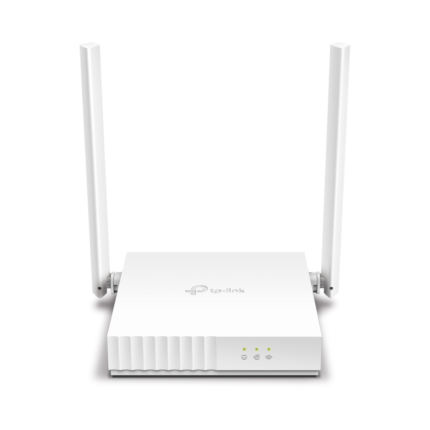
The TL-WR820N uses a compact plastic shell. It looks clean and unobtrusive on a shelf. Two detachable external antennas improve range and signal stability. The LED panel shows power, internet, and WiFi status clearly. Ports include one WAN and two LAN Ethernet ports. That layout suits small home networks with a couple of wired devices.
tp-link tl-wr820n 300mbps wifi router review: Real-World Performance
In everyday use the router handles browsing, video calls, and HD streaming well. Performance drops with multiple heavy devices. Expect slower speeds for high-bandwidth tasks like 4K streaming or multiple simultaneous downloads. The single-band 2.4GHz design increases range but reduces top speeds compared to dual-band models. Still, the router provides stable connections in small to medium apartments.
- Web browsing and streaming: smooth for most users
- Light gaming: playable with modest latency
- Heavy multitasking: limited by single-band throughput
tp-link tl-wr820n 300mbps wifi router specs
Below are the key specifications you need to know before buying. These specs define the router’s strengths and limitations.
- Wireless Standard: IEEE 802.11n/g/b
- Max Speed: Up to 300Mbps on 2.4GHz
- Antennas: 2 detachable external antennas
- Ports: 1 WAN, 2 LAN (10/100Mbps)
- Security: WPA/WPA2, SPI firewall
- Management: TP-Link Tether app, web-based UI
- Dimensions: Compact, wall-mountable design
Setup and Usability: Quick Start Guide
TP-Link emphasizes simplicity. Setup takes about 10 minutes for most users. Use the Tether app for guided steps. You can also configure via the web interface. Both methods walk you through creating SSID and password. Changing DNS, updating firmware, and enabling parental controls remain straightforward.
- Unbox and connect the router to your modem
- Power on and connect via WiFi or Ethernet
- Open the Tether app or the web setup page
- Follow setup prompts to name and secure your network
- Check for firmware updates and apply them
Security Features and Network Control
The router supports WPA/WPA2 encryption to secure wireless traffic. The SPI firewall protects against common threats. You can create a guest network to isolate visitors. Parental controls let you block websites and set time limits. For most home users these tools suffice. Advanced users may miss VPN passthrough or enterprise-level controls.
tp-link tl-wr820n 300mbps wifi router price and value
This model targets budget buyers. Prices vary by region and retailer. You can typically find it among the lowest-cost new routers. The low price delivers fair value when you need basic coverage and reliable performance. If you require higher speeds or multi-device support, consider a dual-band or AC-class router. For cost-conscious buyers, the TL-WR820N offers solid baseline performance at a low cost.
Who Should Buy This Router? Buying Guidance
Use this router if you have modest needs. It works well for single users or small families. Choose it for light streaming, web use, and smart home devices. Avoid it if you stream 4K to several devices or host demanding online games regularly. Consider alternatives if you need gigabit Ethernet, dual-band WiFi, or mesh expansion options.
- Good for: Basic home use and budget setups
- Not ideal for: Heavy multitasking or large homes
- Consider alternatives for: High-speed gaming and 4K streaming
Best tp-link tl-wr820n 300mbps wifi router: Tips to Maximize Performance
You can improve real-world performance with minor adjustments. Place the router centrally and elevated. Avoid metal obstacles and thick walls. Use the highest channel width supported by your environment. Update firmware regularly. Limit background downloads during peak use to reduce congestion. Consider a WiFi extender or mesh node for larger homes.
- Place centrally for best coverage
- Avoid interference from other electronics
- Update firmware for stability and security
- Use a wired connection for bandwidth-critical devices
Comparison: Where This Router Fits
Compare this model to other TP-Link units and budget routers. The TL-WR820N sits below AC750 or AC1200 models in speed. It beats basic plug-in hotspots for steady WiFi. It lacks the advanced features of higher-tier routers. Still, it wins on price and straightforward management. If you need long-range multi-floor coverage, a different solution will work better.
Frequently Asked Questions
Is the TP-Link TL-WR820N good for gaming? The router handles light gaming with acceptable latency. Serious competitive gaming may require a faster dual-band router or wired connection.
Can it stream Netflix and YouTube in HD? Yes. The router supports HD streaming on a few devices. Multiple simultaneous 4K streams may exceed its capacity.
Does it support VPN? It supports basic VPN passthrough but lacks built-in VPN server features. Use a dedicated VPN router or client if you need full VPN functionality.
How many devices can it support? It supports typical home numbers of devices. Performance falls as the number of active high-bandwidth devices increases. For heavy multi-device homes, choose a higher-capacity router.
Is the TP-Link Tether app necessary? No. The app simplifies setup and management. You can also use the web interface to configure all key settings.
What is the tp-link tl-wr820n 300mbps wifi router price range? Price varies by market. Expect budget-range pricing. Look for sales and bundled offers to lower costs.
Conclusion
The TP-Link TL-WR820N 300Mbps WiFi Router delivers practical, affordable WiFi for users with modest needs. It offers easy setup, basic security, and reliable 2.4GHz coverage in small homes. If you seek simple performance without frills, this router represents good value. For high-demand households, consider stepping up to a dual-band or gigabit router. Use the buying guide above to match the TP-Link TL-WR820N 300Mbps WiFi Router to your needs before purchase.