
TP-Link Deco M4 AC1200 Dual-Band Mesh Router Review

If you want reliable home Wi‑Fi without complexity, the TP-Link Deco M4 AC1200 Dual-Band Mesh Router deserves a close look. This mesh system targets households that need consistent coverage and simple management. The Deco M4 promises easy setup, strong signals for multiple devices, and built‑in parental controls. In this review I explain real-world performance, list key specs, compare price and value, and provide a practical buying guide so you can decide quickly.
TP-Link Deco M4 AC1200 Dual-Band Mesh Router Review
The TP-Link Deco M4 AC1200 Dual-Band Mesh Router review focuses on three practical questions: How fast is it? How wide is its coverage? How easy is it to use? In most homes the Deco M4 answers these positively. Setup takes minutes with the Deco app. The system uses mesh to eliminate dead spots. It supports 1200Mbps combined AC speeds across 2.4GHz and 5GHz bands. Expect stable streaming and smooth video calls for typical family usage.
- Simple installation via mobile app
- Mesh coverage up to 5,500 sq ft with a 3-pack
- Basic parental controls and QoS
- Affordable compared to higher-end mesh systems
Recommended Products

Design, Build, and Hardware
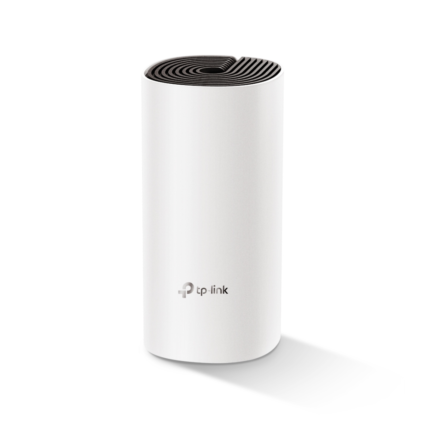
The Deco M4 units look compact and modern. Each node stays small and sits on a shelf without drawing attention. TP‑Link uses internal antennas to keep the exterior clean. The hardware includes one Gigabit WAN and one Gigabit LAN port per unit. You can use an extra port on one unit for a wired device. The lack of multiple LAN ports per node limits wired expansion. Still, the build quality feels solid for the price class.
tp-link deco m4 ac1200 dual-band mesh router features
The Deco M4 packs useful features aimed at home users. The feature set targets families, remote workers, and basic smart home setups. TP‑Link prioritizes simplicity and steady performance rather than bleeding‑edge options. Key features include:
- Seamless roaming with a single network name
- Adaptive routing for balanced traffic
- Parental controls to manage content and screen time
- QoS to prioritize video calls or gaming
- Guest network to protect your main network
- Integration with Alexa for simple voice control
tp-link deco m4 ac1200 dual-band mesh router specs
Understanding the specs helps set expectations. The Deco M4 is an AC1200-class dual‑band system. It combines roughly 300Mbps on 2.4GHz and 867Mbps on 5GHz under ideal conditions. These numbers represent theoretical throughput. Real speeds depend on ISP plan, interference, and device capabilities.
- Wi‑Fi standard: IEEE 802.11ac/n/g/b/a
- Dual‑band: 2.4GHz + 5GHz
- Antennas: Internal
- Ports: 1 Gigabit WAN, 1 Gigabit LAN per node
- Coverage: Up to 5,500 sq ft (3-pack)
- Security: WPA2, SPI firewall
- Processor and RAM: Modest consumer‑grade hardware
Performance: Speed, Coverage, and Real-World Results
In homes with 100–300 Mbps internet plans, the Deco M4 performs well. It handles multiple HD streams and several smart devices without visible slowdowns. The mesh network reduces dead zones when you place nodes strategically. For large brick homes or heavy 4K streaming across many rooms, higher-end mesh systems deliver more headroom.
- Ideal for 2–4 bedroom homes
- Good for HD streaming, video calls, and light gaming
- Struggles only in extreme multi‑Gbps or dense interference scenarios
Setup and User Experience
Setup ranks among the Deco M4’s strongest points. The Deco app walks you through placement and connection in clear steps. The app confirms signal strength as you place each node. Users can name devices, apply parental rules, and run speed tests from the interface. Firmware updates are automatic or scheduled. Advanced users may find some settings limited, but most homeowners appreciate the simplicity.
- App-guided setup in under 10 minutes
- One SSID for seamless roaming
- Remote management via TP‑Link account
tp-link deco m4 ac1200 dual-band mesh router price
Price is a decisive factor for many buyers. The Deco M4 targets budget-conscious shoppers. Retailers frequently sell a 2‑pack or 3‑pack bundle. The 3‑pack often provides the best cost per square foot. Compare current deals because prices fluctuate during sales. If you need premium throughput or many wired ports, consider higher‑tier alternatives, but expect to pay significantly more.
Security and Parental Controls
Security features cover typical home risks. The system uses WPA2 encryption and basic firewall protection. Parental controls let you block content categories and schedule device access. You can pause the internet for specific devices. The controls work well for managing screen time for children. Power users who want advanced filtering or logging may need a dedicated device or router firmware.
Who Should Buy the TP-Link Deco M4?
The Deco M4 fits specific buyer profiles. It serves families who value ease of setup and consistent coverage. It suits renters who cannot run Ethernet between rooms. It also works for small home offices with moderate bandwidth needs. Avoid it if you require multi‑Gbps backhaul, advanced QoS settings, or many wired ports for many desktop devices.
- Best for 2–4 bedroom homes and apartments
- Good choice for mixed device households (phones, TVs, smart devices)
- Not for users needing enterprise features or extreme throughput
best tp-link deco m4 ac1200 dual-band mesh router: Tips to Maximize Value
To get the best performance from this mesh router, place nodes wisely. Keep nodes away from thick walls and large metal objects. Aim for a clear line of sight when possible. Connect high‑bandwidth devices directly to Ethernet if you can. Use the Deco app to run speed tests after installation, and move nodes to improve weaker areas.
- Place primary node near the modem and central to the home
- Use one node per floor in multi‑story houses
- Update firmware after setup for stability improvements
tp-link deco m4 ac1200 dual-band mesh router buying guide
When choosing the Deco M4, weigh your coverage needs, internet speed, and budget. Match the pack size to your home size. Check whether your ISP modem supports bridge mode if you already use a router. If you plan to expand with wired backhaul or many wired devices, consider a mesh system with more LAN ports. Otherwise, the Deco M4 offers strong value for the mainstream user.
- Choose a 2‑pack for small flats, a 3‑pack for larger homes
- Confirm ISP speed to ensure the router matches your plan
- Look for sales to lower the effective price
Pros and Cons
- Pros: affordable, easy setup, reliable mesh coverage, parental controls
- Cons: limited advanced settings, few LAN ports, modest hardware for heavy uses
Frequently Asked Questions
How many devices can the Deco M4 handle?
The Deco M4 supports dozens of connected devices in normal home use. It balances traffic well, but performance depends on each device’s demands and your internet plan.
Can I use the Deco M4 with my existing router?
Yes. You can set the Deco M4 to Access Point mode to extend a current router network. For the best mesh experience use the Deco as the primary network device, or enable bridge mode on your modem/router if supported.
Conclusion
The TP-Link Deco M4 AC1200 Dual-Band Mesh Router offers a strong blend of simplicity, coverage, and value. It solves common home Wi‑Fi problems with fast setup, seamless roaming, and parental controls. If you need reliable mesh Wi‑Fi for streaming, remote work, and smart devices, the Deco M4 delivers at an affordable price. Review your home size and wired needs first, then match the right pack size to maximize performance and value.