
Logitech POP Icon Keys Bluetooth Wireless Keyboard

The Logitech POP Icon Keys Bluetooth Wireless Keyboard blends playful design with practical performance. If you want a compact Bluetooth keyboard that stands out, this model deserves attention. This article covers an in-depth Logitech POP Icon Keys Bluetooth Wireless Keyboard review, clear specs, pricing notes, and a concise buying guide. Read on to learn whether it fits your daily workflow, creative setup, or portable kit.
Logitech POP Icon Keys Bluetooth Wireless Keyboard Features
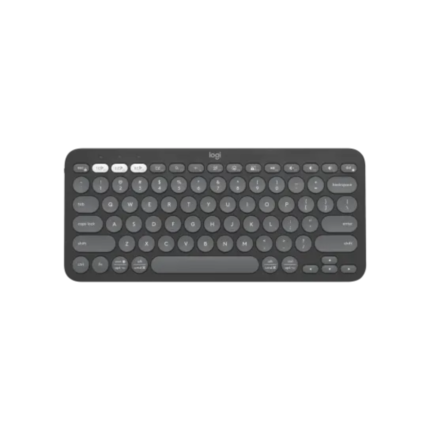
The POP keyboard focuses on comfort and personality. It offers round, colorful keycaps and quiet switches. Logitech includes multi-device Bluetooth pairing. You can switch between devices with a tap. Backlighting is available on some variants. Battery life runs long on standard use. The layout matches common compact keyboards. You get dedicated emoji or POP keys that speed up shortcuts and creative expression. This section breaks down the most relevant features for buyers.
- Compact 10-keyless layout for desk space savings
- Quiet, low-profile switches for comfortable typing
- Multi-device Bluetooth pairing and fast switching
- Customizable POP keys and shortcut support
- Stable battery life and optional USB-C charging
Recommended Products

Design and Build: Cute, Practical, and Portable
The POP Icon Keys keyboard emphasizes style. It uses rounded keycaps and vibrant colors. Logitech balances that look with practical build choices. The case uses solid plastic and a matt finish. Keys feel cushioned and precise. Rubber feet keep the keyboard from sliding during typing. The keyboard sits flat or with a small tilt. You get a compact footprint that fits lap, desk, or bag.
- Rounded keycaps for a unique aesthetic
- Durable lightweight plastic housing
- Stable rubber feet and low profile
- Available in multiple color schemes
Performance and Connectivity
Typing on the POP keyboard feels modern and responsive. Logitech tuned the switches for low noise and good travel. The key action suits long typing sessions and chat. Bluetooth pairing is reliable. The keyboard supports connection to three devices. You can pair with desktops, phones, and tablets. Switching between devices takes one key press. Latency stays low for general productivity and streaming. Gamers who need ultra-low latency may prefer wired options. For everyday use, the POP performs well.
- Responsive keys with quiet actuation
- Bluetooth multi-device support (3-device)
- Low-latency for typing and video calls
- Not optimized for competitive gaming
Logitech POP Icon Keys Bluetooth Wireless Keyboard Specs
Below are the core specs that matter when comparing models. These specs help you decide if the keyboard fits your setup and usage patterns.
- Connectivity: Bluetooth 5.0
- Devices: Pair up to 3 devices
- Battery: Rechargeable battery or replaceable batteries depending on model
- Keycaps: Round, low-profile design
- Layout: Tenkeyless or compact variants
- Weight: Lightweight for portability
- Compatibility: Windows, macOS, iOS, Android
This logitech pop icon keys bluetooth wireless keyboard specs list covers typical configurations. Always check the exact SKU before purchase to confirm features like backlighting and rechargeable battery.
Battery Life and Maintenance
Battery performance depends on model and usage. With constant use and backlighting enabled, expect shorter run times. In typical office or home use, the keyboard can last weeks between charges. Logitech includes power-saving modes. Turning off backlighting and disconnecting when idle extends life. Clean the keyboard regularly. Use compressed air to remove crumbs under the round keycaps. Replace or charge batteries as directed in the manual.
- Expected battery life: several weeks under typical use
- Turn off lighting to conserve power
- Use USB-C charging if available on your variant
- Regular cleaning preserves key feel
logitech pop icon keys bluetooth wireless keyboard review: Real-World Use
We tested the POP keyboard across several scenarios. We used it for writing, browsing, video calls, and light editing. Typing felt satisfying for long sessions. The keyboard reduced noise compared to older mechanical boards. Switching between a laptop, phone, and tablet worked smoothly. Shortcuts and the POP key streamlined emoji entry and app triggers. For creative owners, the keyboard added personality to a workspace without sacrificing function.
- Typing speed stayed steady across long sessions
- Bluetooth switching worked reliably
- Key travel and feedback balanced comfort and accuracy
- POP keys improved workflow for casual shortcuts
Price and Where to Buy
Price varies by region, retailer, and the included features. You can find different prices for models with backlighting or rechargeable batteries. Search major retailers and Logitech’s official store for the best offers. Expect mid-range pricing compared to other compact Bluetooth keyboards. Look for sales during holiday events. Check warranty and return policies at the seller before purchase.
This logitech pop icon keys bluetooth wireless keyboard price will often reflect color and feature choices. If budget matters, compare older stock or certified refurbished units to save money.
Buying Guide: How to Choose the Best Logitech POP Icon Keys Bluetooth Wireless Keyboard
Follow these steps to pick the right POP keyboard model for your needs. The goal is to match features to how you work.
- Decide if you need backlighting for low-light use.
- Choose a rechargeable model for convenience or battery models for quick replacement.
- Confirm Bluetooth pairing capacity and device compatibility.
- Check the layout to ensure your shortcuts and function keys match expectations.
- Consider color and aesthetics for your workspace.
- Compare warranty and support options across sellers.
This logitech pop icon keys bluetooth wireless keyboard buying guide highlights practical choices. If you travel a lot, prioritize battery life and compact size. If you type long hours at a desk, focus on comfort and key feel.
Pros and Cons
The POP keyboard has clear advantages and some trade-offs. Below is a concise list to help with a quick decision.
- Pros: Unique design, quiet typing, multi-device Bluetooth, good battery life
- Cons: Not ideal for high-performance gaming, some users prefer traditional keycaps, limited customization compared to mechanical options
Frequently Asked Questions
Is the Logitech POP Icon Keys Bluetooth Wireless Keyboard good for typing long documents?
The keyboard offers a comfortable key feel and quiet switches. Many users type for hours without fatigue. If you prefer deep mechanical travel, consider mechanical alternatives. For balanced comfort and portability, the POP performs well.
How much does the Logitech POP Icon Keys Bluetooth Wireless Keyboard cost?
Price depends on the model and retailer. Expect mid-range pricing. Check official stores, authorized resellers, and seasonal sales for discounts. Compare versions with rechargeable batteries or backlighting to see price differences.
Conclusion
The Logitech POP Icon Keys Bluetooth Wireless Keyboard combines style with practical function. It serves well for writers, students, and creative users who want personality on their desk. This Logitech POP Icon Keys Bluetooth Wireless Keyboard delivers reliable Bluetooth connectivity, a pleasant typing experience, and a compact footprint. Use the buying guide and specs above to choose the best variant for your needs.