
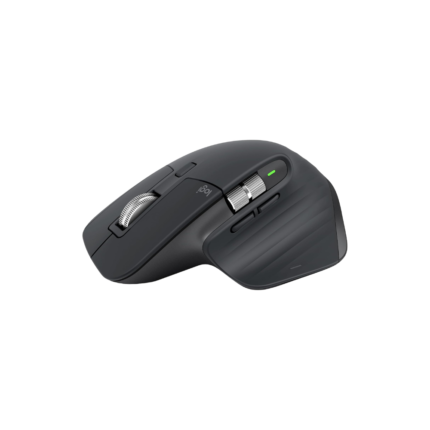
Logitech MX MASTER 3S High-performance Wireless Mouse

The Logitech MX MASTER 3S High-performance Wireless Mouse targets professionals who need precision, comfort, and long battery life. This mouse combines refined ergonomics with advanced sensors and programmable controls. If you want a reliable daily driver for design, coding, or multitasking, this model deserves attention. Read on for a clear review, specs, features, price guidance, and a practical buying guide to help you decide.
Logitech MX MASTER 3S High-performance Wireless Mouse features
Logitech designed the MX MASTER 3S to improve productivity. The standout features balance speed and control. The near-silent clicks reduce noise without sacrificing feedback. The upgraded sensor tracks on more surfaces with up to 8000 DPI sensitivity. You get an electromagnetic MagSpeed wheel that shifts between ratchet and free-spin modes instantly. The ergonomic shape supports your palm and reduces wrist strain during extended use.
- Precision sensor up to 8000 DPI
- MagSpeed electromagnetic scroll wheel
- Silent click technology
- Customizable buttons and gestures
- USB-C fast charging with long battery life
Recommended Products


Key specs and technical details
Understanding the specs helps you match the mouse to your workflow. The core specs offer a balance of power and efficiency.
- Sensor: Logitech proprietary high-precision sensor with up to 8000 DPI
- Connectivity: Bluetooth and Logitech Unifying Receiver (USB)
- Battery life: Up to 70 days on a full charge under typical use
- Recharge: USB-C quick charge—three minutes gives hours of use
- Buttons: 7 programmable buttons and gesture support
- Compatibility: Windows, macOS, Linux (basic functions), iPadOS (limited)
Performance and user experience — logitech mx master 3s high-performance wireless mouse review
Daily use proves the MX MASTER 3S performs well. The sensor keeps pointer movement smooth across tasks. Graphic designers will appreciate pixel-perfect tracking. Developers find the programmable buttons speed up common actions. Content creators benefit from the fast scroll wheel when navigating long timelines.
- Tracking: Stable and precise on glass and textured surfaces
- Comfort: Contoured shape supports the hand for long sessions
- Speed: MagSpeed wheel moves through pages quickly with little effort
- Customization: Logitech Options+ software lets you map macros per app
How it compares: is it the best logitech mx master 3s high-performance wireless mouse?
Compared to similar Logitech models, the 3S improves click quietness and sensor performance. It competes well with other premium mice on comfort and battery life. If you need the absolute lightest mouse for gaming, you may prefer another model. For productivity and multi-device workflows, the MX MASTER 3S ranks among the best choices.
Price and value — logitech mx master 3s high-performance wireless mouse price
Price varies by retailer and region. The MX MASTER 3S sits in the upper mid-range for wireless mice. Expect to pay a premium for the advanced features and durable build. Watch for discounts during major sales events to improve value. Consider total cost of ownership: long battery life and robust software extend usability and reduce replacement frequency.
- Typical MSRP range: premium segment pricing
- Look for bundles and seasonal promotions
- Refurbished units can lower cost with minimal trade-offs
Practical buying tips — logitech mx master 3s high-performance wireless mouse buying guide
Use this buying guide to match the mouse to your needs. Focus on ergonomics, connectivity, and software support. Test grip style and hand size if possible. Check compatibility with your primary OS and essential apps. Read targeted reviews if you use niche software like CAD or DAWs.
- Try before buying if you value comfort highly
- Verify that your OS supports Logitech Options+ for full customization
- Consider warranty and return policies from the seller
- Compare price against older MX Master models for marginal feature gains
Setup, customization, and tips for power users
Setup takes minutes. Connect via Bluetooth or the included Unifying Receiver. Install Logitech Options+ to customize buttons, gestures, and DPI settings. Create application-specific profiles for shortcuts, and export them for backup. Use the flow feature to move the cursor between multiple computers with seamless file copy and paste.
- Tip: Assign the thumb wheel to horizontal scrolling in design apps
- Tip: Reduce DPI for fine editing and raise it for fast navigation
- Tip: Create gesture shortcuts to switch desktops or trigger macros
Durability, warranty, and long-term reliability
The MX MASTER 3S uses premium materials and solid construction. The scroll wheel and buttons hold up under heavy daily use. Logitech typically provides a one- to two-year warranty depending on region and seller. Keep the firmware updated to ensure optimal performance and security.
- Average lifespan: multiple years for average daily use
- Maintenance: clean sensor and scroll wheel periodically
- Support: Logitech offers firmware updates and customer support
Pros and cons
Weighing strengths against drawbacks helps you decide quickly.
- Pros: Excellent ergonomics, precise sensor, long battery life, quiet clicks
- Cons: Premium price, heavier than gaming ultralight mice, some features need software
Frequently Asked Questions
Is the Logitech MX MASTER 3S High-performance Wireless Mouse good for left-handed users?
The mouse uses a right-hand ergonomic design. Left-handed users should test it in person or consider ambidextrous models.
How long does the battery last?
Typical battery life runs up to 70 days on a single charge under average use. Quick charging via USB-C gives hours of use in minutes.
Does it work on glass surfaces?
Yes. The upgraded sensor tracks on many glass and glossy surfaces. For best results, use a hard mouse pad if tracking seems inconsistent.
Can I use it with multiple computers?
Yes. Pair up to three devices and switch between them. Use Logitech Flow to control multiple computers seamlessly and transfer files between them.
Is it suitable for gaming?
It handles casual gaming well, but it targets productivity. Competitive gamers might prefer dedicated gaming mice with lighter weight and higher polling rates.
Where can I find logitech mx master 3s high-performance wireless mouse review and price info?
Search trusted tech review sites and authorized retailers. Look for hands-on reviews and price comparisons to get current deals.
Conclusion
The Logitech MX MASTER 3S High-performance Wireless Mouse delivers a compelling mix of comfort, precision, and useful features. It suits professionals who spend long hours at the desk and value customizable controls. Reviewers cite its quiet clicks and reliable sensor as key benefits. If you need an ergonomic, multi-device mouse that enhances productivity, the MX MASTER 3S is a strong option. Use the buying guide and price tips above to choose the best logitech mx master 3s high-performance wireless mouse for your workflow.