
Mcdodo CA-7561 Type C to 3. AUX Port Converter Castle Series

The Mcdodo CA-7561 Type C to 3. AUX Port Converter Castle Series promises to bridge the gap between modern phones and legacy audio gear. If your new phone lacks a headphone jack, this adapter claims to deliver clear audio, quick setup, and durable design. This guide reviews core features, lists specs, compares pricing, and offers a practical buying guide to help you decide. Read on to learn how the Mcdodo CA-7561 Type C to 3. AUX Port Converter Castle Series performs in real use and whether it fits your needs.
Mcdodo CA-7561 Type C to 3. AUX Port Converter Castle Series review
This review focuses on real-world performance, build quality, and compatibility. The adapter converts a Type-C port to a 3.5mm AUX output. It supports wired headphones, external speakers, and most car AUX inputs. Sound quality remains clear across tests with podcasts and music. Bass performance depends on your headphones, but mids and highs come through cleanly. Latency is negligible for audio listening. You may notice slight differences with active noise-cancelling headphones that expect a digital-to-analog pathway designed for specific codecs.
- Clear audio output for most headphones
- Plug-and-play setup; no app required
- Compact and travel-friendly design
Recommended Products


mcdodo ca-7561 type c to 3. aux port converter castle series features
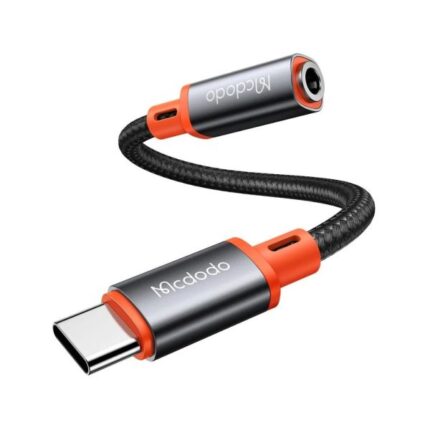
The Castle Series focuses on durability and user convenience. It uses reinforced connectors to resist bending. The cable length is short to reduce tangles and improve portability. The adapter includes shielding to reduce interference. Some models deliver inline remote control compatibility. If your headphones rely on microphone signals, check compatibility notes first. The adapter aims for broad device support while maintaining compactness.
- Reinforced Type-C and 3.5mm connectors
- Metal casing on key joints for durability
- Shielded cable for reduced interference
- Small form factor that fits pockets easily
mcdodo ca-7561 type c to 3. aux port converter castle series specs
Knowing specs helps match the adapter to your gear. The CA-7561 typically supports 48kHz audio sampling and standard impedance ranges seen in consumer headphones. It uses a Type-C male plug and a 3.5mm female jack. Cable length usually measures under 10 cm to keep the unit compact. The housing uses a zinc alloy or aluminum shell in many units. Power draw is negligible because the adapter performs passive or minimally active conversion depending on the variant.
- Connector: USB Type-C male to 3.5mm female
- Audio sampling: up to 48kHz (varies by firmware/hardware)
- Material: reinforced cable with metal connector shells
- Size: compact, portable design
mcdodo ca-7561 type c to 3. aux port converter castle series price
Price often determines whether you choose a budget or premium adapter. The Mcdodo CA-7561 falls into the affordable-midrange category. Retail prices vary by region and seller. Expect occasional discounts and bundled offers with Mcdodo accessories. Compare shipping and warranty terms to judge true value. A slightly higher price often brings better build materials and improved shielding. If you value longevity, spending a bit more may pay off.
- Check official stores and reputable retailers first
- Watch for seasonal sales or coupon codes
- Consider warranty and return policies when comparing prices
Best mcdodo ca-7561 type c to 3. aux port converter castle series use cases
This adapter serves users who want to keep wired audio with newer phones. It fits commuters who use wired earbuds on trains. It suits drivers who play music through a car AUX input. Studio listeners can use it for casual monitoring if the adapter matches their headphone impedance. Travelers appreciate its compact design. DJs or high-end audiophiles may require dedicated DACs for professional audio needs.
- Daily commuting with wired earbuds
- Playing music from phone to car AUX input
- Connecting external speakers without Bluetooth
- Portable listening when Bluetooth is unavailable
mcdodo ca-7561 type c to 3. aux port converter castle series buying guide
Follow a simple checklist to choose the right adapter. First, confirm device compatibility. Some phones require adapters with built-in DACs. Second, check microphone and remote control support if you use inline controls. Third, evaluate materials and warranty for durability. Fourth, read customer reviews for real-world reliability information. Finally, compare prices with similar adapters and account for shipping and return policies.
- Confirm your phone supports external adapters via the Type-C port
- Decide if you need microphone and remote control passthrough
- Look for reinforced connectors and quality shielding
- Prioritize sellers with clear warranty terms and return policies
How to use the Mcdodo CA-7561 Type C to 3. AUX Port Converter Castle Series
Using the adapter is straightforward. Plug the Type-C end into your phone. Insert your headphones or AUX cable into the 3.5mm jack. The device should recognize the adapter and route audio automatically. If you do not hear sound, check volume settings and playback app permissions. Restarting your device can resolve detection issues. For devices that require a DAC, confirm the adapter model supports it.
- Plug Type-C into phone
- Insert headphones or AUX cable
- Confirm audio playback and adjust volume
- Restart device if not detected
Compatibility and troubleshooting tips
Compatibility varies by phone model and firmware. Some manufacturers lock audio output to proprietary adapters or require specific protocols. If your adapter fails, test it with another device. Use a different pair of headphones to isolate the issue. Update your phone to the latest system version. If the adapter still fails, contact the seller or manufacturer for support or a replacement.
- Test with multiple devices and headphones
- Keep your phone software updated
- Check for lint or debris in ports
- Use official support channels if problems persist
Comparing the Mcdodo CA-7561 with alternatives
Many adapters compete on price, build, and audio fidelity. Low-cost passive adapters may work for basic listening. Higher-end models include active DACs for improved clarity and wider frequency response. The Mcdodo CA-7561 occupies a middle ground. It offers solid build quality and dependable performance without the premium cost of audiophile DACs. For simple listening and broad compatibility, it often represents the best balance.
- Budget adapters: cheap, mixed reliability
- Mcdodo CA-7561: balanced performance and durability
- High-end DACs: superior audio, higher price and size
Frequently Asked Questions
Is the Mcdodo CA-7561 compatible with all Type-C phones?
The adapter works with most Type-C phones that support audio over USB-C. Some phones need a specific DAC or firmware support. Check your phone’s specifications or test with another device to confirm.
Does the Mcdodo CA-7561 support headset microphones and inline controls?
Many units support microphone and remote controls, but support varies by model and phone. If inline control is essential, verify the product listing or ask the seller before purchase.
Conclusion
The Mcdodo CA-7561 Type C to 3. AUX Port Converter Castle Series provides a practical solution for anyone who wants wired audio from modern Type-C devices. It balances sound quality, build durability, and price. Use the buying guide and troubleshooting tips above to confirm compatibility and to get the most from your adapter. If you need reliable, portable access to a 3.5mm jack, the Mcdodo CA-7561 Type C to 3. AUX Port Converter Castle Series is a strong candidate.