
Baseus Slim Laptop Kickstand Desktop Dissipation Stand Holder Review

In today’s fast-paced digital world, laptops serve as our primary tools for work, creativity, and entertainment. However, prolonged use often brings challenges like uncomfortable neck and wrist positioning, coupled with the inevitable issue of device overheating. The innovative Baseus Slim Laptop Kickstand Desktop Dissipation Stand Holder directly addresses these common concerns. This indispensable accessory promises to transform your interaction with your laptop, providing both an ergonomic lift and crucial heat dissipation. We delve into how this sleek stand can improve your daily computing experience, making it more comfortable, efficient, and enjoyable from the moment you set it up.
Unpacking the Baseus Slim Laptop Kickstand Desktop Dissipation Stand Holder: Features and Benefits
The Baseus Slim Laptop Kickstand Desktop Dissipation Stand Holder stands out through a combination of thoughtful design and practical functionality. Understanding its core features reveals why it has become a favorite among remote workers, students, and professionals alike.
Ergonomic Design for Enhanced Comfort
One of the primary advantages of this stand lies in its ability to elevate your laptop screen to a more comfortable viewing height. This simple adjustment significantly reduces strain on your neck and back, promoting a healthier posture during long work sessions. Users often report a noticeable decrease in discomfort after switching to an elevated setup.
- Adjustable Angles: Provides multiple height settings, allowing you to customize the angle for optimal viewing and typing comfort. This flexibility ensures it adapts to various desks and chairs.
- Improved Posture: By raising your screen, it brings your eye level closer to the top of your monitor, aligning your spine naturally. This actively prevents the common “tech neck” syndrome.
- Reduced Wrist Strain: When paired with an external keyboard and mouse, the stand frees up your wrists from awkward angles, leading to a more natural and relaxed typing experience.
Efficient Heat Dissipation for Laptop Longevity
Overheating represents a silent killer of laptop performance and lifespan. When a laptop runs too hot, its internal components degrade faster, leading to slower processing, unexpected shutdowns, and eventually, hardware failure. The Baseus stand actively combats this.
- Open Design: It creates an open space beneath your laptop, allowing for unobstructed airflow. This natural convection helps dissipate heat much more effectively than when your laptop sits directly on a desk surface.
- Thermal Pads/Silicone Grips: Many designs incorporate strategically placed silicone pads. These not only prevent your laptop from slipping but also act as thermal conductors, drawing heat away from the device and preventing direct contact with a heat-trapping surface.
- Enhanced Performance: A cooler laptop performs better. By managing heat, the stand helps your CPU and GPU operate at their optimal temperatures, preventing thermal throttling and maintaining peak performance throughout demanding tasks.
Portable and Lightweight Construction
Modern professionals require accessories that complement their mobile lifestyle. The Baseus Slim Laptop Kickstand Desktop Dissipation Stand Holder excels in portability.
- Ultra-Thin Profile: Its slim design makes it incredibly easy to slip into a laptop bag or backpack without adding significant bulk. This proves ideal for those who frequently move between offices, coffee shops, or home workspaces.
- Lightweight Materials: Constructed from durable yet light materials, it adds minimal weight to your carry, making it a truly travel-friendly accessory.
- Easy Setup and Takedown: The intuitive design allows for quick deployment and collapse, saving you valuable time when transitioning between locations.
Recommended Products
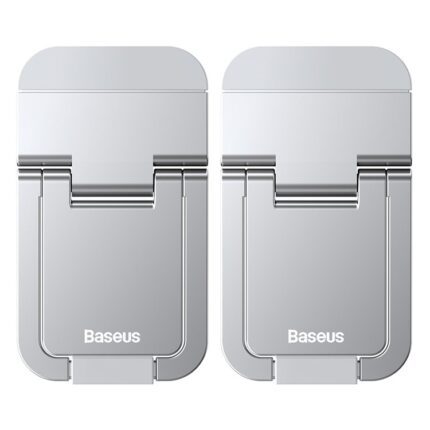


Baseus Slim Laptop Kickstand Desktop Dissipation Stand Holder Specs at a Glance
Understanding the technical specifications helps users make informed decisions. The Baseus Slim Laptop Kickstand Desktop Dissipation Stand Holder specs reveal a product designed for broad compatibility and lasting performance.
- Material: Typically crafted from high-grade aluminum alloy or a durable ABS plastic, ensuring both strength and light weight.
- Compatibility: Designed to accommodate a wide range of laptop sizes, often supporting devices from 11 inches up to 17 inches. Always check specific product details for exact compatibility.
- Adjustability: Offers multiple angle settings, commonly ranging from 15 to 45 degrees, providing versatility for various ergonomic needs.
- Weight Capacity: Capable of supporting substantial laptop weights without compromising stability.
- Dimensions (Folded): Extremely compact when folded, usually measuring just a few millimeters thick and easily fitting alongside a laptop.
- Weight: Often weighs less than 200 grams, making it almost imperceptible in your bag.
Is the Baseus Slim Laptop Kickstand Desktop Dissipation Stand Holder Right for You? A Review
When considering any accessory, a thorough review provides invaluable insight. The Baseus Slim Laptop Kickstand Desktop Dissipation Stand Holder review consistently highlights its practical value and effectiveness, making it a compelling choice for many laptop users.
User Experience and Practicality
Users praise the stand for its simplicity and immediate impact on comfort. Setting it up takes seconds, and the difference in typing posture and screen height is immediately noticeable. The stand remains stable even with larger laptops, providing a secure platform for work.
- Stable Platform: Despite its slim profile, the stand offers excellent stability, preventing wobble during typing or screen interaction.
- Improved Workflow: An elevated screen allows for better multitasking when using an external monitor, creating a more cohesive dual-screen setup.
- Aesthetics: Its minimalist design often complements modern laptops and desktop setups, adding a touch of sophistication rather than clutter.
Addressing Key Concerns
Some users occasionally voice minor concerns, primarily regarding the initial adjustment period to the new typing angle if they are not using an external keyboard. However, this concern typically dissipates as users adapt or opt for a separate keyboard, which is highly recommended for optimal ergonomics with any laptop stand.
- Typing Angle: For users who type directly on their laptop keyboard, the elevated angle might feel different initially. An external keyboard is the ideal companion for maximum comfort.
- Portability vs. Sturdiness: While incredibly portable, its lightweight nature means it might not offer the same “heavy-duty” feel as some bulkier, permanent desktop stands. However, for its category, its sturdiness is exceptional.
Maximizing Your Workspace: Best Practices with the Baseus Slim Stand
To fully capitalize on the benefits of the Baseus Slim Laptop Kickstand Desktop Dissipation Stand Holder, consider incorporating these best practices into your workspace routine.
Pair with External Peripherals
The most significant ergonomic benefits emerge when you use the stand in conjunction with an external keyboard and mouse. This setup allows you to keep your wrists straight and your arms relaxed, maximizing comfort and productivity.
- External Keyboard: Choose a keyboard that fits your preference – mechanical, ergonomic, or compact – to complete your ergonomic setup.
- External Mouse: A comfortable mouse reduces wrist strain and provides greater precision than a trackpad.
Positioning for Optimal Viewing
Adjust the stand so the top of your laptop screen aligns with your eye level. This prevents you from craning your neck downwards, a common cause of neck pain.
- Arm’s Length Distance: Maintain a comfortable distance from the screen, roughly an arm’s length away, to reduce eye strain.
- Glare Reduction: Adjust your screen angle to minimize reflections from overhead lights or windows.
Baseus Slim Laptop Kickstand Desktop Dissipation Stand Holder Price and Where to Buy
The Baseus Slim Laptop Kickstand Desktop Dissipation Stand Holder price point represents excellent value, considering its dual benefits of ergonomics and cooling. Pricing can vary based on the retailer, ongoing promotions, and specific model variations, but it generally falls within an accessible range for most consumers.
Pricing Considerations
Expect to find the stand priced competitively, often significantly less than more complex or motorized laptop stands. Its affordability makes it an attractive entry point for improving workspace ergonomics without a significant investment.
- Value for Money: The combination of improved comfort, enhanced laptop longevity, and portability offers substantial value for its price.
- Bundled Deals: Look out for bundles that may include other Baseus accessories, potentially offering further savings.
Where to Purchase
You can typically find the Baseus Slim Laptop Kickstand Desktop Dissipation Stand Holder at a variety of online and physical retailers.
- Official Baseus Stores: Directly from the Baseus official website or their branded stores on major e-commerce platforms.
- Major Online Retailers: Platforms like Amazon, eBay, and AliExpress frequently stock Baseus products.
- Electronics Stores: Local electronics retailers may also carry the product.
Always compare prices from different vendors to ensure you secure the best deal. Also, check customer reviews on various platforms to gauge product satisfaction and seller reliability.
Your Ultimate Buying Guide for the Baseus Slim Laptop Kickstand
When considering the Baseus Slim Laptop Kickstand Desktop Dissipation Stand Holder buying guide, several factors influence your final decision. Making an informed choice ensures the stand perfectly meets your specific needs.
Compatibility with Your Laptop
First and foremost, confirm the stand’s compatibility with your specific laptop size. While most Baseus stands accommodate a broad range (11-17 inches), always double-check the product specifications to ensure a snug and stable fit for your device.
- Screen Size: Verify that your laptop’s screen size falls within the recommended range.
- Weight: Ensure your laptop’s weight does not exceed the stand’s maximum capacity for optimal stability.
Material and Build Quality
The material impacts both the stand’s durability and its aesthetic. Aluminum alloy offers superior heat dissipation and a premium feel, while high-quality ABS plastic provides a lighter, often more affordable alternative.
- Aluminum Alloy: Excellent for heat transfer, durable, and generally offers a sleek, modern look.
- ABS Plastic: Lightweight, robust, and often more budget-friendly.
Adjustability Needs
Consider how many angle adjustments you require. More options provide greater flexibility for various ergonomic setups and user preferences.
- Fixed vs. Multi-Angle: Decide if a single, comfortable angle suffices or if you need multiple positions for different tasks or environments.
- Height Range: Ensure the stand can elevate your laptop to your desired eye level.
Portability Requirements
If you travel frequently or move your workspace often, the stand’s folded dimensions and weight become crucial. The “slim” aspect of this Baseus stand inherently makes it a strong contender for portability.
- Folded Size: Check how compact it becomes for easy storage and transport.
- Weight: Lighter stands are more convenient for daily carrying.
Budget Considerations
While the Baseus Slim Laptop Kickstand is generally affordable, establish your budget. Different models within the Baseus lineup or similar products from competitors might offer varying features at slightly different price points.
- Price vs. Features: Balance your desired features against your budget to find the best value.
- Long-Term Investment: View the stand as an investment in your health and your laptop’s longevity.
Frequently Asked Questions
What makes the Baseus Slim Laptop Kickstand different from other laptop stands?
The Baseus Slim Laptop Kickstand Desktop Dissipation Stand Holder distinguishes itself with its ultra-slim, portable design coupled with effective heat dissipation properties, making it ideal for both desktop use and travel. It focuses on combining ergonomic lift with cooling in a minimalist form factor.
Can I type directly on my laptop while it’s on the Baseus stand?
Yes, you can type directly on your laptop. However, for optimal ergonomics and to fully leverage the benefits of the stand, we highly recommend using an external keyboard and mouse. This allows for a more natural wrist position and further reduces strain.
Is the Baseus stand compatible with all laptop brands?
The Baseus Slim Laptop Kickstand is designed for universal compatibility with most laptop brands, typically supporting devices ranging from 11 to 17 inches. Always refer to the specific product’s specifications to confirm compatibility with your laptop’s exact dimensions and weight.
How much does the Baseus Slim Laptop Kickstand improve heat dissipation?
By elevating the laptop and creating an open space beneath it, the Baseus stand significantly improves airflow, which is crucial for heat dissipation. While specific temperature drops vary depending on the laptop model and usage, users commonly report a noticeable reduction in operating temperatures, enhancing both performance and component lifespan.
Conclusion
Investing in the Baseus Slim Laptop Kickstand Desktop Dissipation Stand Holder represents a smart decision for anyone seeking to enhance their computing comfort and extend their laptop’s life. This elegantly designed accessory offers a powerful combination of ergonomic benefits, superior heat management, and unparalleled portability. It transforms an ordinary workspace into a more comfortable and efficient environment, whether at home, in the office, or on the go. By elevating your screen and promoting crucial airflow, this stand addresses core challenges faced by modern laptop users. Make the switch to a healthier, more productive computing experience with this essential Baseus stand.