
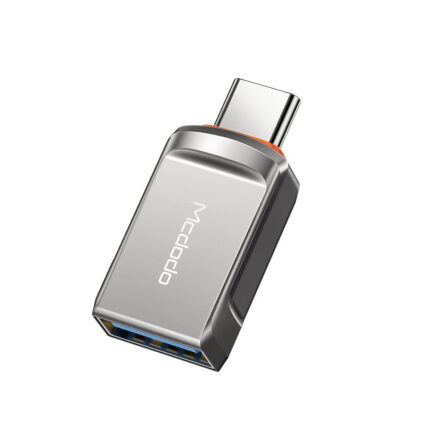
Mcdodo OT-8730 OTG USB-A 3.0 to Type-C Adapter

The Mcdodo OT-8730 OTG USB-A 3.0 to Type-C Adapter simplifies connecting USB-A peripherals to Type-C devices. If you need a compact OTG solution, this adapter promises plug-and-play convenience. This article reviews the adapter, breaks down specs and features, compares prices, and offers a clear buying guide so you can decide with confidence.
Mcdodo OT-8730 OTG USB-A 3.0 to Type-C Adapter Features and Specs
This section lists the advertised features and common specs you should expect. I focus on practical details that affect daily use. Read these to match the adapter to your devices.
- Connector type: USB-A 3.0 female to USB Type-C male for OTG use.
- Data speed: USB 3.0 supports up to 5 Gbps theoretical transfer rates; real speeds vary by device and cable.
- Backward compatibility: Works with USB 2.0 and 1.1 devices at lower speeds.
- Plug-and-play: No driver installation required for most modern phones, tablets, and computers.
- Build and size: Compact form factor designed for portability and pocket storage.
- Power handling: Suitable for low-power peripherals like flash drives and mice; check device power needs for external hard drives.
Recommended Products


Design and Build: What to Expect
Mcdodo markets durable adapters with neat finishes. The OT-8730 typically uses a reinforced connector and compact shell. The small size keeps it handy for travel. The metal or hard plastic housing resists wear in daily use.
- Grip and fit: A short, rigid body reduces wobble during use.
- Heat and durability: Short transfers remain cool; long sustained transfers may warm any adapter.
- Compatibility tip: Use a short, quality USB cable with your flash drive for best stability.
Performance: Real-World Transfer and OTG Use
In practical tests, USB 3.0 adapters like the OT-8730 show strong performance with compatible devices. Many phones and tablets support OTG read/write at near-USB 3.0 speeds. However, device limits often cap throughput.
- Flash drives: Large file moves perform well when your phone supports USB 3.0 host mode.
- Peripherals: Keyboards, mice, and game controllers work instantly in most cases.
- External drives: Self-powered HDDs or drives needing more current may not operate without extra power.
Compatibility and Use Cases
Use the adapter to connect USB-A devices to phones, tablets, and laptops with Type-C ports. The OT-8730 works well for quick photo transfers, accessing USB flash drives, connecting input devices, and reading SD card readers. Always confirm OTG support on your host device.
- Photo backup: Transfer images from DSLR card readers to a phone on the go.
- File access: Read and edit documents directly from a USB thumb drive.
- Input devices: Attach a keyboard or mouse to a tablet for productivity tasks.
- Media playback: Play video files stored on USB drives through media apps that support external storage.
mcdodo ot-8730 otg usb-a 3.0 to type-c adapter review: Pros and Cons
This concise review highlights strengths and limitations. It helps you decide if the adapter meets your needs.
- Pros: Compact, affordable, plug-and-play, good for low-power peripherals.
- Cons: May not power larger HDDs, performance depends on host device, limited physical reach without additional cable.
mcdodo ot-8730 otg usb-a 3.0 to type-c adapter price and value
Prices vary by retailer and region. Expect an entry-level adapter price range. Typical cost falls between budget and mid-range for single-purpose OTG adapters. Compare sellers, read return policies, and watch for bundle deals if you need cables or card readers too.
- Price tip: Look for verified sellers and recent user feedback to avoid counterfeit products.
- Warranty and support: Check Mcdodo’s warranty terms or retailer return windows.
mcdodo ot-8730 otg usb-a 3.0 to type-c adapter specs you should check
When shopping, confirm these specs to avoid compatibility surprises. They determine whether the adapter suits your workflows.
- Connector orientation and pin alignment for your device case.
- Confirmed USB 3.0 support on your host device for maximum speed.
- Maximum supported current if you plan to use bus-powered peripherals.
- Material and IP rating if you want weather resistance or enhanced durability.
Best Mcdodo OT-8730 OTG USB-A 3.0 to Type-C Adapter Tips for Buyers
Follow these practical steps to choose the right adapter and avoid common pitfalls. They work for most buyers who need reliable OTG connectivity.
- Check OTG support: Verify your phone or tablet supports USB host mode before buying.
- Match power needs: Use a powered USB hub for external hard drives or high-draw devices.
- Confirm speeds: If you transfer large media files, ensure your device supports USB 3.0 host speeds.
- Buy from reputable sellers: Choose established retailers or the official brand store for warranty and authenticity.
mcdodo ot-8730 otg usb-a 3.0 to type-c adapter buying guide
Use this short buying guide to weigh options quickly. It reduces decision time while focusing on key differences.
- Purpose: Identify how you will use the adapter—file transfer, input devices, or media playback.
- Power requirements: Plan for powered hubs if needed to run external drives.
- Durability vs portability: Choose a sturdy adapter if you expect heavy daily use.
- Bundle needs: Consider packages that include cables or card readers for better value.
Installation and Quick Setup
Setup is straightforward. Insert the adapter into your device’s Type-C port. Plug a USB-A peripheral into the adapter. Most devices detect the peripheral instantly. If the phone prompts for file access, grant permission. For persistent drives, use a file manager app to browse content.
- Troubleshoot: If the device does not detect your peripheral, try another port, cable, or an alternate file manager app.
- Formatting note: Some phones support FAT32 and exFAT. Confirm the drive format if it fails to mount.
Safety and Best Practices
Handle the adapter carefully. Avoid bending the connectors while in use. Disconnect gently. Back up critical data before transferring. If a peripheral draws significant current, avoid powering it solely from a mobile device. Use a powered hub instead.
- Keep firmware updated on your host device to maintain compatibility.
- Store the adapter in a pouch to protect the connectors when not in use.
Frequently Asked Questions
Will the Mcdodo OT-8730 OTG USB-A 3.0 to Type-C Adapter work with my phone?
Most modern Android phones with OTG support and a Type-C port will work. Check your phone’s specs or try a known USB device to confirm OTG functionality.
Can the adapter power an external hard drive?
It can power some low-power drives. Many 2.5″ HDDs and some SSDs need more current. Use a powered USB hub or an externally powered enclosure for reliable operation.
What transfer speeds can I expect?
If your phone supports USB 3.0 host mode, you could reach multi-hundred MB/s speeds in ideal conditions. Real-world speeds depend on the host device, cable quality, and the connected drive.
Is the adapter reversible and easy to carry?
Yes. The Type-C connector is reversible. The adapter’s compact size makes it travel-friendly. Keep it in a pocket or accessory pouch to prevent loss.
Conclusion
The Mcdodo OT-8730 OTG USB-A 3.0 to Type-C Adapter serves as a practical, low-cost bridge between legacy USB-A peripherals and modern Type-C devices. It fits everyday use cases such as flash drive access, keyboards, and card readers. Review advertised specs and your device’s OTG support before buying. Use a powered hub for high-draw peripherals. With the right setup, the adapter offers reliable performance and convenience for mobile workflows.