
Anker Webcam PowerConf C300: The Ultimate Hybrid Work Tool

In today’s dynamic work landscape, effective communication relies more than ever on superior video conferencing tools. The Anker Webcam PowerConf C300 emerges as a standout solution, specifically engineered to meet the demanding needs of hybrid professionals. This comprehensive guide delves into every aspect of this powerful device, offering an in-depth look at its capabilities, helping you understand why it could be the ultimate upgrade for your virtual interactions. From its crystal-clear video to its intelligent audio, the PowerConf C300 aims to transform your online presence, ensuring you always look and sound your best.
Anker Webcam PowerConf C300 Review: A Deep Dive into Performance
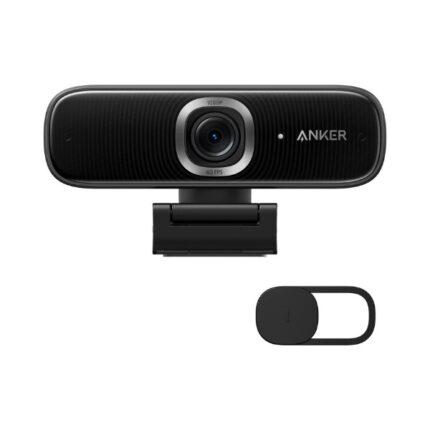
The PowerConf C300 isn’t just another webcam; it represents Anker’s commitment to innovation in the rapidly evolving world of remote and hybrid work. Upon first inspection, the device immediately conveys a sense of quality and robust construction. Its compact design features a durable, matte-black finish that blends seamlessly into any professional setup, whether perched atop a monitor or mounted on a tripod. The integrated privacy cover is a thoughtful addition, providing peace of mind when the camera is not in use, a detail often overlooked by competitors.
Key Anker Webcam PowerConf C300 Features That Impress
What truly sets the PowerConf C300 apart is its suite of advanced features designed to optimize your video conferencing experience. Anker packed this compact device with technology typically found in higher-end, enterprise-grade solutions. Understanding these features illuminates why so many professionals consider this webcam a crucial investment.
- Full HD 1080p/60fps Video: Delivers incredibly smooth and sharp visuals, making your presentations and discussions appear vibrant and professional. The higher frame rate reduces motion blur, crucial for dynamic speakers.
- Advanced AI Framing: This intelligent feature automatically keeps you centered in the frame, even if you move around. It uses facial recognition and motion tracking to ensure you are always the focus, mimicking a professional camera operator.
- Stereo Microphones with Active Noise Cancellation: Equipped with dual microphones, the C300 captures your voice clearly while actively filtering out background distractions like keyboard clicks, barking dogs, or general room noise, ensuring your message comes across without interference.
- Low-Light Correction: Anker’s advanced light correction technology automatically adjusts exposure and contrast in challenging lighting conditions, ensuring you remain well-lit and visible even in dimly lit rooms.
- Adjustable Field of View (FOV): Customize your shot with three distinct FOV options (78°, 90°, and 115°). Use the narrower view for personal calls, the standard for small groups, or the wide-angle for showcasing a whiteboard or a larger meeting space.
- Integrated Privacy Cover: A physical slide cover offers a simple yet effective way to ensure privacy, giving you complete control over when your camera is active.
- Anker Work Software: Unlock the full potential of your C300 with the intuitive Anker Work desktop application. This software allows fine-tuning of video settings, firmware updates, and personalization of AI features, enhancing user control.
Recommended Products

Anker Webcam PowerConf C300 Specs at a Glance
For those who delve into the technical specifications, the Anker Webcam PowerConf C300 holds its own against top-tier webcams. Its robust hardware underpins its impressive performance, offering reliability and consistent quality.
- Video Resolution: 1080p at 60fps / 720p at 60fps
- Sensor: Full HD CMOS Sensor
- Field of View: 78°, 90°, 115° (Adjustable)
- Autofocus: Yes
- Microphones: Dual stereo microphones with AI noise reduction
- Connectivity: USB-A (USB-C adapter included)
- Compatibility: Windows, macOS, Chrome OS, major conferencing platforms (Zoom, Teams, Skype, Google Meet, etc.)
- Dimensions: 98.6 x 30.5 x 30.5 mm (without mount)
- Weight: 104 g
Performance in Action: Video and Audio Quality
The true test of any webcam lies in its real-world performance. The PowerConf C300 excels, delivering consistently high-quality video and audio that elevates your virtual interactions.
Video clarity is exceptional, with sharp details and accurate color reproduction. Whether you’re presenting a detailed graph or simply chatting with colleagues, the image remains crisp and free from artifacts. Even in less-than-ideal lighting, the C300’s automatic low-light correction intelligently brightens your image without introducing excessive noise, a common pitfall for many webcams. The ability to switch between different fields of view offers incredible flexibility, allowing you to tailor your presence to the specific context of each meeting.
Audio performance is equally impressive. The dual stereo microphones, combined with Anker’s intelligent noise reduction algorithms, effectively isolate your voice from ambient sounds. This means fewer interruptions and clearer communication, which is invaluable in a busy home or office environment. Colleagues report hearing voices with distinct clarity, even when someone is typing or moving papers nearby. This makes the PowerConf C300 a powerful tool for maintaining professionalism.
Ease of Use and Software Experience
Setting up the Anker PowerConf C300 is remarkably simple. It operates as a true plug-and-play device. Connect it to your computer via USB, and most operating systems recognize it instantly, making it ready for use with your preferred video conferencing application within seconds. The included USB-C adapter ensures compatibility with a wide range of modern laptops and desktops.
For those who desire more control, the Anker Work software provides an intuitive interface for customizing various settings. Within the application, you can adjust brightness, contrast, saturation, and white balance. You can also fine-tune the AI framing behavior, select your preferred field of view, and even update the webcam’s firmware to access the latest features and improvements. This software enhances the user experience, transforming the C300 from a simple peripheral into a highly adaptable tool.
Anker Webcam PowerConf C300 Price and Value
When considering the Anker Webcam PowerConf C300 price, it positions itself firmly in the mid-to-high range of consumer webcams, yet it offers features often reserved for much more expensive professional-grade equipment. Its competitive pricing, coupled with its robust feature set and superior performance, makes it an excellent value proposition for anyone serious about their online presence. Businesses and individuals seeking to enhance their virtual communication without breaking the bank will find the C300 an incredibly appealing option. Its durability and long-term reliability further justify the investment, proving to be a cost-effective solution over time.
Is the Anker PowerConf C300 the Best Anker Webcam for You?
Deciding if the PowerConf C300 is the best Anker webcam PowerConf C300 for your needs depends on your specific requirements. If you frequently participate in video calls, presentations, or online meetings and prioritize excellent video quality, clear audio, and intelligent features like AI framing and adjustable FOV, then the C300 stands out. It caters exceptionally well to remote workers, educators, content creators, and anyone who demands consistent, professional performance from their webcam. Its versatility makes it suitable for a wide array of applications, distinguishing it from other options on the market.
Anker Webcam PowerConf C300 Buying Guide: What to Consider
Making an informed decision about purchasing a webcam involves evaluating several factors to ensure it aligns with your specific use case. This Anker Webcam PowerConf C300 buying guide helps you navigate those considerations.
- Your Primary Use Case: Are you using it for daily office meetings, streaming, or online teaching? The C300’s high resolution and advanced audio are beneficial across all these scenarios, but its AI framing particularly shines in dynamic meeting environments.
- Lighting Conditions: If your workspace has inconsistent or poor lighting, the C300’s low-light correction capabilities become a significant advantage, ensuring you always appear clear and well-exposed.
- Room Acoustics: For noisy environments, the C300’s active noise cancellation for microphones is a game-changer, dramatically improving the clarity of your voice for listeners.
- Field of View Needs: Consider how much of your background you want to show. The C300’s adjustable FOV allows you to frame yourself perfectly, whether you’re alone or presenting with others.
- Software Customization: If you appreciate fine-tuning your settings and keeping your device updated, the Anker Work software adds substantial value.
- Budget: While not the cheapest option, the C300 offers a compelling balance of price and premium features, making it a smart long-term investment.
Frequently Asked Questions
How do I update the firmware on my Anker PowerConf C300?
You can easily update the firmware using the Anker Work desktop application. Simply connect your C300, open the software, and it will notify you if an update is available, guiding you through the process.
Is the Anker PowerConf C300 compatible with both Mac and Windows?
Yes, the Anker Webcam PowerConf C300 is fully compatible with both Windows and macOS operating systems, as well as Chrome OS. Its plug-and-play nature ensures seamless integration.
Does the PowerConf C300 work with popular video conferencing platforms like Zoom and Microsoft Teams?
Absolutely. The C300 is designed to be universally compatible with all major video conferencing platforms, including Zoom, Microsoft Teams, Google Meet, Skype, Webex, and many others, functioning just like any standard USB webcam.
What is the maximum resolution and frame rate of the Anker C300?
The Anker PowerConf C300 delivers video at a maximum resolution of 1080p at 60 frames per second, ensuring smooth, high-definition video quality for all your calls and recordings.
Conclusion
The Anker Webcam PowerConf C300 stands out as an exceptional choice for anyone serious about elevating their virtual presence. Its potent combination of 1080p/60fps video, intelligent AI framing, superior audio with noise reduction, and flexible field of view options makes it an indispensable tool for the modern professional. Whether you’re collaborating with colleagues, teaching online, or streaming content, the C300 provides the clarity, reliability, and advanced features needed to make a strong impact. This webcam truly delivers on its promise, offering a comprehensive solution that meets the diverse demands of today’s hybrid work environment.