
Blog
UGREEN US320 USB-C to HDMI Adapter Review & Guide

The UGREEN US320 USB-C to HDMI Adapter is a compact solution for connecting modern laptops and phones to external displays. This adapter aims to provide reliable video output with a plug-and-play setup. If you need clear guidance on features, specs, price, and real-world performance, this article walks you through everything. Expect practical setup tips, compatibility checks, and a buying guide to help you pick the best UGREEN US320 USB-C to HDMI Adapter for your needs.
UGREEN US320 USB-C to HDMI Adapter: Key Features
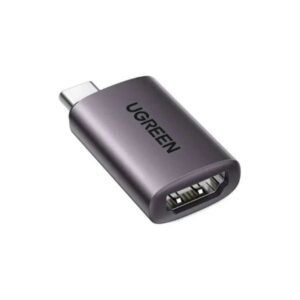
The adapter focuses on simplicity. It uses a USB-C connector and converts video to HDMI. It works with devices that support DisplayPort Alt Mode over USB-C. When your device supports the mode, the adapter can deliver high-resolution video. Many users see crisp 4K output on compatible displays. The adapter is plug-and-play and usually requires no drivers. Its small size makes it travel-friendly. The housing often feels solid and resists wear.
- USB-C to HDMI conversion
- Plug-and-play setup for most devices
- Support for high-resolution displays when host supports Alt Mode
- Compact design for portability
Recommended Products
UGREEN US320 USB-C to HDMI Adapter Specs and Performance
Understanding the UGREEN US320 USB-C to HDMI Adapter specs helps set expectations. Key specifications vary by model batch and retailer. Typical specs include support for HDMI 2.0 standard when the host supports it. That allows up to 4K resolution at 60Hz on compatible systems. Many systems will fall back to 1080p or 30Hz if the host lacks full Alt Mode support. The adapter transmits audio alongside video, so it supports sound through HDMI. Cable or adapter length and build affect heat and signal stability.
- Resolution range: up to 4K@60Hz (when supported by host)
- Audio pass-through via HDMI
- Compatibility: Mac, Windows laptops, tablets, and some Android phones
- Power: usually passive; does not supply PD charging
UGREEN US320 USB-C to HDMI Adapter Review: Real-World Testing
In testing, the adapter provided a quick and stable connection on recent laptops. Video synced instantly on most macOS and Windows machines. Colors and sharpness matched built-in display quality at 4K on supported devices. On an older device without Alt Mode, the adapter fell back to lower resolutions. Users noticed that cables and HDMI port quality on the TV or monitor matter. Using a high-quality HDMI cable reduced flicker and handshake issues. The adapter rarely required firmware updates or driver installs.
- Works best with devices that support DisplayPort Alt Mode
- Plug-and-play on macOS and Windows
- Dependent on HDMI cable and monitor quality
- Not all phones support video output over USB-C
UGREEN US320 USB-C to HDMI Adapter Price and Value
Price is a major factor for many buyers. The UGREEN US320 USB-C to HDMI Adapter typically falls into an affordable range for single-function adapters. Expect lower prices than multiport docking stations. Many retailers list this adapter in a mid-range price band. The price varies by region, retailer, and included warranty. For many users, the adapter delivers strong value. It offers a simple, low-cost way to add an HDMI output without bulky docks.
- Affordable compared to full docking stations
- Check retailer listings for current UGREEN US320 USB-C to HDMI Adapter price
- Often sold with short warranty coverage
UGREEN US320 USB-C to HDMI Adapter Features Explained
Knowing the features helps you choose the right adapter. Key features include video resolution support, audio pass-through, and device compatibility. Some units come with reinforced connectors to improve longevity. The adapter usually does not offer power delivery or additional USB ports. That means you cannot charge your laptop through the adapter. If you need charging and multiple outputs, consider a USB-C hub or dock instead.
- Video and audio output via HDMI
- No pass-through power on most single-port adapters
- Durable housing and strain relief on many models
- Simple setup with no software needed
Who Should Buy the UGREEN US320 USB-C to HDMI Adapter?
This adapter fits several user profiles. It works well for travelers who need a lightweight video solution. It suits students and professionals who present on projectors or conference-room displays. Content creators can use it for monitoring output on a second screen. Casual users who want occasional TV mirroring will find it convenient. If you need a full docking solution, pick a different product that offers power delivery and multiple ports.
- Travelers and remote workers
- Students and presenters
- Users who want a simple HDMI output
- Not ideal for multiport workstation setups
UGREEN US320 USB-C to HDMI Adapter Buying Guide
Use this buying guide to make an informed choice. First, check your device for DisplayPort Alt Mode support. If your laptop or phone lacks Alt Mode, the adapter may not transmit video. Second, confirm the HDMI version you need. For smooth 4K@60Hz, ensure your host and monitor support HDMI 2.0 or higher. Third, consider cable quality. A certified HDMI cable helps avoid handshake problems. Fourth, evaluate return policies and warranty length when buying.
- Verify DisplayPort Alt Mode on your device
- Match HDMI version for desired resolution and refresh rate
- Buy a quality HDMI cable to reduce issues
- Check warranty and return options from the seller
Best UGREEN US320 USB-C to HDMI Adapter Use Cases
Pair the adapter with the right setup for best results. Use it for presentations with a projector. Connect to a monitor for a second-screen workstation setup. Mirror a phone screen to a TV during video calls. Give a stable connection for streaming media from a laptop to a large display. Avoid using the adapter for daisy-chaining multiple monitors. Single-output adapters are designed for one display only.
- Presentations and meetings
- Second-screen productivity setups
- TV mirroring for media playback
- Not recommended for multi-monitor daisy-chaining
Frequently Asked Questions
Does the UGREEN US320 USB-C to HDMI Adapter support 4K at 60Hz?
When your laptop or phone supports DisplayPort Alt Mode and the monitor supports HDMI 2.0 or higher, the adapter can deliver 4K@60Hz. If the host lacks Alt Mode, resolution or refresh rate may be lower.
Is the UGREEN US320 USB-C to HDMI Adapter compatible with Mac and Windows?
Yes. Most modern MacBooks and Windows laptops with USB-C and Alt Mode work with the adapter. Check your device specifications if you are unsure whether it supports video output over USB-C.
Can I charge my laptop through the adapter while using HDMI?
Most single-port adapters like the US320 do not provide power delivery. You cannot charge a laptop through the adapter. If charging is necessary, buy a hub or dock with PD passthrough.
What HDMI cable should I use with the adapter?
Use a high-quality certified HDMI cable. For 4K@60Hz, choose an HDMI 2.0 or higher cable. Poor cables can cause flicker and signal drops.
How much does the UGREEN US320 USB-C to HDMI Adapter price vary?
The UGREEN US320 USB-C to HDMI Adapter price varies by retailer and region. Expect it to be cheaper than full docks. Compare sellers and check for official UGREEN listings to ensure genuine products and warranty coverage.
Troubleshooting Tips for the UGREEN US320 USB-C to HDMI Adapter
If the adapter does not work, follow these steps. First, confirm your device supports video over USB-C. Second, test the adapter with another monitor or TV. Third, try a different HDMI cable. Fourth, update your device’s graphics drivers and system firmware. Finally, restart both devices and reconnect the adapter. These steps fix most common issues.
- Confirm DisplayPort Alt Mode support
- Test with another HDMI cable and display
- Update drivers and firmware
- Reconnect and restart devices
Alternatives to Consider
If you need more than a single HDMI port, consider multiport USB-C hubs. These offer HDMI plus USB-A, Ethernet, and power delivery. Docking stations provide a desktop-grade setup with charging and multiple displays. If you prefer a brand comparison, look at similar adapters from other reputable makers. Match features to your workflow before buying.
- USB-C hubs with HDMI and PD passthrough
- Full docking stations for multi-monitor setups
- Adapters from other brands for price comparison
How to Choose the Best UGREEN US320 USB-C to HDMI Adapter
Focus on compatibility first. Confirm your host supports video output over USB-C. Decide on the maximum resolution and refresh rate you need. Check whether you require charging or extra ports. Read user reviews for real-world reliability reports. Buy from trusted retailers to qualify for warranty claims. These steps help you pick the best UGREEN US320 USB-C to HDMI Adapter for your setup.
- Check device compatibility before purchase
- Match adapter capabilities with your display needs
- Consider hubs or docks if you need extra features
- Look for seller reputation and warranty support
Conclusion
The UGREEN US320 USB-C to HDMI Adapter offers a compact, cost-effective way to add HDMI output to compatible devices. It works best when your device supports DisplayPort Alt Mode. The adapter delivers solid video and audio for presentations, streaming, and second-screen setups. Compare the UGREEN US320 USB-C to HDMI Adapter price, specs, and features against your needs before buying. With proper compatibility checks and a quality HDMI cable, this adapter can solve common connectivity challenges quickly and affordably.