
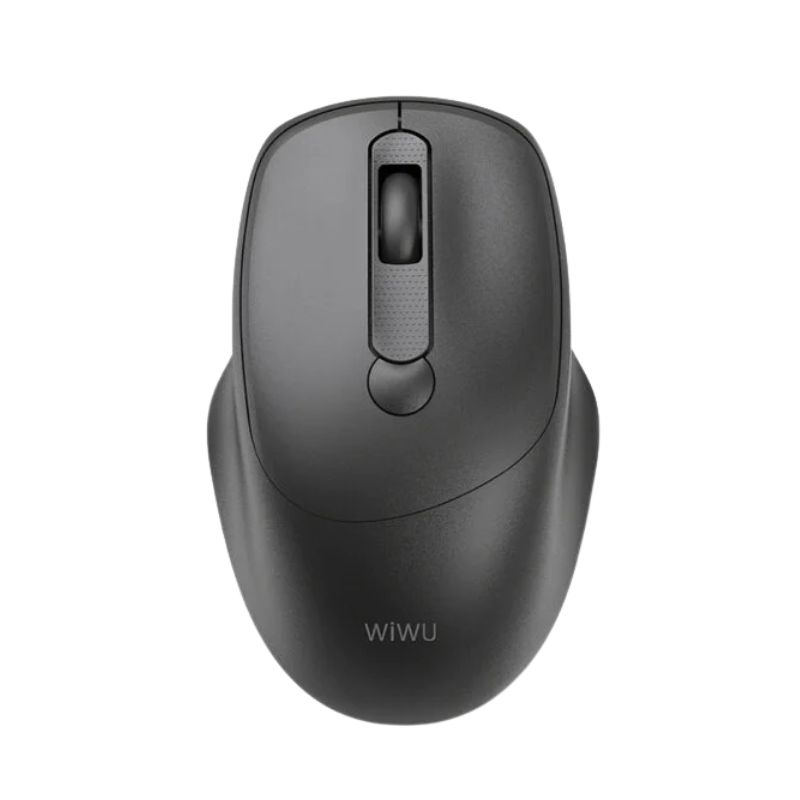
WiWU WM113 Wimice 2.4G Wireless Mouse
৳ 1,100.00
WiWU WM113 Wimice 2.4G Wireless Mouse
The WiWU WM113 Wimice 2.4G Wireless Mouse delivers smooth everyday control for work, study, and casual use. It combines stable wireless performance with a simple plug-and-play setup, making it an easy upgrade from wired mice. This mouse focuses on accuracy, comfort, and reliability without adding unnecessary complexity. Users who spend long hours on laptops or desktops will appreciate its responsive tracking and clutter-free workspace. The 2.4G wireless connection maintains consistent signal strength, even in busy office or home environments. WiWU designed this model for users who value dependable performance, clean design, and wide compatibility across devices. Whether you manage spreadsheets, browse the web, or handle creative tasks, the WiWU WM113 Wimice 2.4G Wireless Mouse supports smooth navigation and precise cursor control with minimal effort.
Key highlights
- 2.4G wireless connectivity for stable performance
- Plug-and-play USB receiver for fast setup
- Responsive optical tracking for daily tasks
- Suitable for office, home, and mobile use
- Designed for comfort during extended use
Core Performance / Functionality
The WiWU WM113 Wimice 2.4G Wireless Mouse focuses on reliable performance and accurate control. Its optical sensor delivers smooth cursor movement across common surfaces, supporting productivity and precision. The wireless connection reduces lag and dropouts, helping users stay focused during work sessions. The mouse responds quickly to clicks and movements, which improves efficiency in multitasking environments. Users can rely on consistent tracking for document editing, presentations, and general navigation. The efficient power usage also supports longer use between battery changes, making it practical for daily routines.
Performance features
- Stable 2.4G wireless signal with low interference
- Accurate optical sensor for smooth tracking
- Responsive buttons for consistent clicking
- Efficient power consumption for daily use
- Reliable performance for work and casual tasks
Design, Build & Portability
WiWU designed the WM113 Wimice 2.4G Wireless Mouse with a balanced shape that fits comfortably in the hand. Its compact form supports both desk use and travel, making it easy to carry in a laptop bag. The surface finish provides a secure grip while maintaining a clean, professional look. The buttons align naturally with finger placement, which reduces strain during long working hours. A lightweight build allows effortless movement, especially for users who switch between locations or devices throughout the day.
Design advantages
- Ergonomic shape for comfortable daily use
- Lightweight structure for easy portability
- Compact size ideal for laptops and travel
- Durable build for regular handling
- Clean, professional appearance
Safety, Compatibility & Use
The WiWU WM113 Wimice 2.4G Wireless Mouse supports safe and simple use across multiple devices. The plug-and-play USB receiver eliminates complex installation steps and reduces setup errors. Users can connect the mouse quickly without installing drivers. The wireless design keeps workspaces organized and minimizes cable clutter. Broad compatibility ensures smooth operation with most operating systems, making it suitable for offices, schools, and home environments. Proper power management also helps maintain stable performance over time.
Usage and compatibility
- Compatible with Windows, macOS, and other common systems
- Plug-and-play setup with USB receiver
- No driver installation required
- Wireless design for a cleaner workspace
- Suitable for office, home, and educational use
Is This the Right Choice for You?
The WiWU WM113 Wimice 2.4G Wireless Mouse suits users who want dependable wireless performance without unnecessary features. It delivers smooth tracking, comfortable handling, and simple setup, which makes it ideal for everyday productivity. Professionals, students, and remote workers can benefit from its balanced design and consistent responsiveness. If you prefer a reliable mouse that works across multiple devices and environments, this model offers solid value. It focuses on function, comfort, and compatibility, making it a practical choice for users who prioritize efficiency and ease of use.
Why choose this mouse
- Reliable wireless performance for daily tasks
- Comfortable design for extended use
- Easy setup with wide device compatibility
- Portable and suitable for multiple environments
- Practical choice for work and study
Frequently Asked Questions (FAQs)
1. How does the WiWU WM113 Wimice 2.4G Wireless Mouse connect to a device?
The WiWU WM113 Wimice 2.4G Wireless Mouse connects through a USB wireless receiver that uses a 2.4G signal. Users only need to insert the receiver into an available USB port on a laptop or desktop. The system recognizes the mouse automatically, which allows immediate use without additional software. This method ensures a stable connection and consistent performance. The wireless range supports comfortable desk use, helping users work without cable restrictions. The simple setup also makes the mouse suitable for users who frequently switch devices.
2. Is the WiWU WM113 Wimice suitable for long working hours?
Yes, this Mouse supports extended use through its ergonomic shape and responsive buttons. The design encourages a natural hand position, which helps reduce discomfort during long sessions. Smooth cursor movement also minimizes repeated adjustments, allowing users to work more efficiently. Office professionals and students can rely on its consistent performance throughout the day. While individual comfort preferences vary, this mouse offers a balanced design that fits most daily productivity needs.
3. Which devices and operating systems support this mouse?
The WiWU WM113 Wimice 2.4G Wireless Mouse works with most common operating systems, including Windows and macOS. It also supports other systems that accept standard USB input. Users can connect it to desktops, laptops, and compatible workstations without driver installation. This wide compatibility makes it a flexible choice for shared workspaces or multi-device users. The mouse maintains stable performance across supported systems, which helps ensure a smooth and consistent experience.
4. Does the mouse require software or drivers to function?
This Wireless Mouse does not require any additional software or drivers. The plug-and-play design allows users to start using it immediately after connecting the USB receiver. This feature reduces setup time and avoids compatibility issues caused by missing drivers. Users who prefer simple and reliable peripherals will appreciate this straightforward approach. It also makes the mouse ideal for office environments where quick deployment matters.
5. Is the WiWU WM113 Wimice 2.4G Wireless Mouse good for travel?
Yes, this Wireless Mouse suits travel and mobile work. Its compact size and lightweight build allow easy storage in laptop bags or backpacks. The wireless design removes the need to manage cables, which adds convenience during travel. Users who work in different locations can rely on quick setup and consistent performance. This portability makes the mouse a practical companion for professionals, students, and remote workers who stay on the move.
Only logged in customers who have purchased this product may leave a review.





Reviews
There are no reviews yet