

Ugreen CM136 5-in-1 USB-C to HDMI Multifunctional Hub (50209)
৳ 2,975.00
Ugreen CM136 5-in-1 USB-C to HDMI Multifunctional Hub (50209)
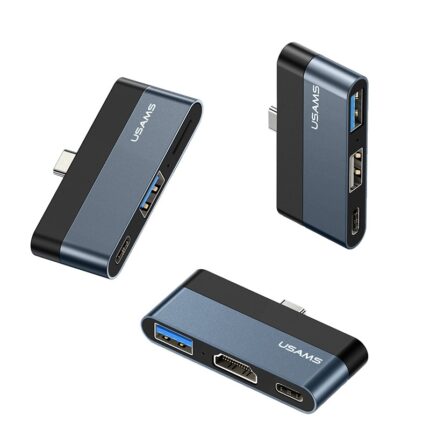
The Ugreen CM136 5-in-1 USB-C to HDMI Multifunctional Hub (50209) offers a practical solution for users who want to expand a single USB-C port into multiple essential connections. Designed for modern laptops, tablets, and smartphones, this hub supports daily productivity, entertainment, and professional workflows. It allows you to connect an external display, transfer data, and power your device at the same time, all through one compact accessory. Whether you work from home, attend meetings, or travel frequently, this hub simplifies your setup and reduces cable clutter. Ugreen focuses on stable performance and broad compatibility, making this hub suitable for students, professionals, and content creators who rely on USB-C devices.
Key highlights:
- 5-in-1 multifunctional USB-C hub
- HDMI display output support
- Multiple USB ports for accessories
- USB-C Power Delivery pass-through
- Compact, travel-friendly design
Core Performance / Functionality
The Ugreen CM136 5-in-1 USB-C to HDMI Multifunctional Hub delivers reliable, everyday performance for multitasking users. It supports HDMI video output for presentations, movies, and extended desktop use. The USB ports handle fast data transfers for keyboards, mice, flash drives, and other peripherals. With USB-C Power Delivery pass-through, you can charge your laptop while using all other functions. This hub helps maintain productivity without interrupting your workflow or forcing you to unplug devices.
Core functions include:
- HDMI output for external monitors or TVs
- USB ports for data transfer and peripherals
- USB-C Power Delivery for simultaneous charging
- Single-cable solution for multiple connections
- Stable performance for work and media use
Design, Build & Portability
Ugreen designed the CM136 hub with portability and durability in mind. The compact body fits easily into a laptop bag or pocket, making it ideal for travel and mobile workstations. The solid outer shell protects internal components during daily use. A short, reinforced cable reduces strain on your device’s USB-C port while keeping the setup neat. The minimalist design matches most modern laptops and accessories, making it a clean addition to any desk or workspace.
Design features:
- Compact and lightweight form factor
- Durable outer casing for daily use
- Reinforced USB-C connector cable
- Clean, modern appearance
- Easy to carry for travel and commuting
Safety, Compatibility & Use
The Ugreen CM136 5-in-1 USB-C to HDMI Multifunctional Hub (50209) supports a wide range of USB-C devices, including laptops, tablets, and smartphones that offer DisplayPort Alt Mode. Built-in safety features help protect connected devices from overheating, overcurrent, and voltage fluctuations. Plug-and-play operation allows quick setup without installing drivers. This hub works well for offices, classrooms, and home environments where reliability matters.
Safety and compatibility notes:
- Compatible with USB-C devices supporting video output
- Built-in protection against power and heat issues
- Plug-and-play use without software
- Suitable for work, study, and entertainment
- Designed for stable, long-term use
Is This the Right Choice for You?
If you need a dependable way to expand your USB-C device, the Ugreen CM136 5-in-1 USB-C to HDMI Multifunctional Hub stands as a practical choice. It combines display output, data transfer, and charging support in one compact accessory. The hub suits users who value portability, simple setup, and consistent performance. It works well for professionals who present on external screens, students who connect multiple accessories, and home users who want a cleaner desk setup. This hub focuses on functionality rather than unnecessary extras, which makes it a smart and cost-effective addition to your tech accessories.
Why choose this hub:
- All-in-one connectivity solution
- Reliable performance for daily tasks
- Portable and easy to use
- Clean design with essential features
- Suitable for work, travel, and home use
Frequently Asked Questions (FAQs)
1. What devices work with the Ugreen CM136 hub?
The Ugreen CM136 hub works with most USB-C devices that support DisplayPort Alt Mode. This includes many modern laptops, tablets, and some smartphones. Popular USB-C laptops from major brands usually support this feature, but users should confirm video output support on their specific device. The hub connects easily without drivers, which makes it convenient for both Windows and macOS systems. It also supports various USB-C tablets for productivity setups, provided they allow external display output through USB-C.
2. Does the HDMI port support external monitors and TVs?
Yes, the HDMI port on the Ugreen CM136 hub supports connection to external monitors, projectors, and TVs. Users can extend or mirror their screen for presentations, movies, or multitasking. The hub delivers a stable video signal suitable for office work, streaming, and general media use. It works well for meeting rooms and home entertainment setups. Users should ensure their USB-C device supports video output to use the HDMI function properly.
3. Can I charge my laptop while using the hub?
The Ugreen CM136 hub supports USB-C Power Delivery pass-through charging. This feature allows you to connect your original charger to the hub and power your laptop while using other ports. It helps maintain battery levels during long work sessions or presentations. Charging speed depends on the charger and laptop specifications. This design reduces the need for extra cables and keeps your workspace organized and efficient.
4. Is the hub suitable for travel and daily carrying?
Yes, the compact and lightweight design makes the Ugreen CM136 hub very suitable for travel. It fits easily into laptop bags, backpacks, or even pockets. The durable build helps protect it during daily commuting. Professionals who work from different locations will find it convenient for quick setups. Students and remote workers can also benefit from its portability and simple plug-and-play operation.
5. Does the hub require any software or drivers?
The Ugreen CM136 hub uses a plug-and-play design and does not require additional software or drivers. Users can connect it to a compatible USB-C device and start using it immediately. This makes it ideal for shared workspaces, offices, and classrooms where quick setup matters. The straightforward operation saves time and avoids compatibility issues related to software installation.
Only logged in customers who have purchased this product may leave a review.




Reviews
There are no reviews yet