
Blog
Apple Magic Mouse 3: The Ultimate Review

For Apple enthusiasts and professionals alike, the right peripheral can significantly enhance productivity and user experience. The Apple Magic Mouse 3 continues this tradition, promising seamless integration with macOS and an intuitive multi-touch surface. This latest iteration aims to refine an already iconic design, delivering a blend of elegance and functionality that loyal users have come to expect. From its sleek aesthetics to its updated internal components, the Magic Mouse 3 is designed to cater to a demanding audience looking for precision, comfort, and a truly magical interaction with their Apple devices. This article delves deep into what makes the Apple Magic Mouse 3 a compelling choice for your desktop setup, exploring its features, design, and overall performance.
Apple Magic Mouse 3 Features and Design Innovations
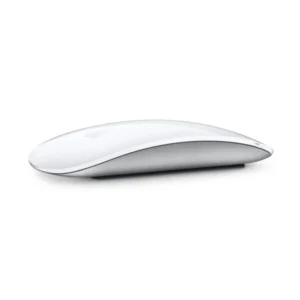
The Apple Magic Mouse 3 maintains the signature minimalist design that has defined its predecessors, characterized by a smooth, unibody acrylic surface. This elegant exterior isn’t just for show; it houses advanced multi-touch technology, allowing users to perform gestures directly on the mouse’s surface. Swiping between web pages, scrolling through documents, and zooming are all effortlessly executed with intuitive finger movements. The design prioritizes comfort and ergonomics, fitting naturally into the hand for extended use.
- Multi-Touch Surface: Navigate with intuitive gestures for a fluid user experience.
- Seamless Pairing: Automatically connects to your Mac, ready to use right out of the box.
- Improved Tracking: Enhanced sensor technology provides precise cursor control on various surfaces.
- Integrated Battery: A built-in, rechargeable battery offers long-lasting power.
Enhanced Performance and Connectivity
Connectivity remains a cornerstone of the Apple Magic Mouse 3 experience. It utilizes Bluetooth technology, ensuring a stable and reliable wireless connection to your Mac. This eliminates the need for dongles, keeping your workspace clutter-free. The mouse boasts improved tracking capabilities, making it highly responsive and accurate, whether you are meticulously editing photos, navigating complex spreadsheets, or simply browsing the web. The combination of its advanced sensor and the smooth multi-touch surface provides an unparalleled level of control and precision.
Recommended Products
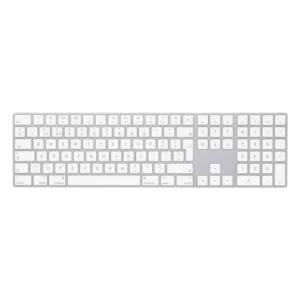
Apple Magic Keyboard with Numeric Keypad
Original price was: ৳ 15,000.00.৳ 12,985.00Current price is: ৳ 12,985.00.
View Details
Apple Magic Mouse 3 Specs: What’s Under the Hood?
Understanding the technical specifications of any device is crucial for making an informed purchasing decision. The Apple Magic Mouse 3 specs reveal a device engineered for efficiency and performance.
- Dimensions: Approximately 2.16 cm (0.85 inches) height, 5.71 cm (2.25 inches) width, 11.35 cm (4.47 inches) depth.
- Weight: Around 0.099 kg (0.22 pounds), contributing to its lightweight and agile feel.
- Connectivity: Bluetooth 3.0 (or newer, typically Bluetooth 5.0 for latest models), ensuring robust wireless connection.
- Charging Port: Lightning port, located on the underside of the mouse, which is a key distinguishing factor and a point of discussion among users.
- System Requirements: macOS 10.11 or later with Bluetooth enabled.
- Battery: Built-in rechargeable lithium-ion battery.
The decision to place the Lightning charging port on the underside of the mouse means you cannot use it while it is charging. While this design choice has faced criticism, Apple argues that the battery life is substantial enough to make this an infrequent inconvenience, often requiring charging only a few times a month for average users. A quick charge can provide hours of use, minimizing downtime.
Apple Magic Mouse 3 Price and Value Proposition
The Apple Magic Mouse 3 price positions it as a premium peripheral in the market. While specific pricing can vary based on region and retailer, it typically falls within the range expected for an Apple accessory. When considering the price, it’s important to look beyond the initial cost and evaluate the overall value proposition.
The value of the Magic Mouse 3 stems from its seamless integration with the Apple ecosystem, its sophisticated multi-touch gestures, and its durable build quality. For users deeply invested in Apple products, the native compatibility and consistent user experience often justify the investment. It eliminates the headaches of third-party drivers or compatibility issues, offering a true plug-and-play experience. Furthermore, the elegant design complements other Apple devices, maintaining a cohesive aesthetic across your workspace.
Is the Apple Magic Mouse 3 Worth the Investment?
For creative professionals, designers, or anyone who values a streamlined workflow and minimalist aesthetic, the Magic Mouse 3 can be a significant productivity tool. Its precise tracking and intuitive gestures can save time and reduce friction during daily tasks. While budget-conscious users might find alternatives, those prioritizing integration, design, and a premium feel will likely find the investment worthwhile. The long-term reliability and the absence of recurring battery costs (due to its rechargeable nature) also add to its overall value.
Apple Magic Mouse 3 Review: Real-World Experience
In practice, the Apple Magic Mouse 3 review often highlights its unique blend of form and function. Users consistently praise its aesthetic appeal and the satisfying tactile feedback of its multi-touch surface. The ability to glide effortlessly through documents or swipe between full-screen apps feels natural and significantly speeds up navigation.
However, the charging port placement remains a perennial point of contention. While some users adapt quickly and simply charge it overnight, others find the downtime frustrating. The ergonomics are generally well-received by users with average-sized hands, though some with larger hands might find its low-profile design less comfortable for extended periods compared to more traditional, contoured mice. Despite this, its lightweight nature and smooth gliding pads ensure minimal friction, making it a joy to use on most surfaces.
For office work, casual browsing, and even light creative tasks, the Magic Mouse 3 performs admirably. Its precision is a boon for tasks requiring fine cursor control. While it’s not designed for hardcore gaming, its responsiveness is more than adequate for the vast majority of everyday computing needs. The battery life is robust, often lasting weeks on a single charge, which helps mitigate the charging port inconvenience.
Best Apple Magic Mouse 3 Alternatives and Buying Guide
When considering the best Apple Magic Mouse 3 for your setup, it’s also wise to glance at potential alternatives, especially if certain aspects like the charging port or ergonomics are concerns. However, if you are looking for an input device that perfectly integrates with macOS, offers multi-touch gestures, and maintains Apple’s signature design language, the Magic Mouse 3 is often unparalleled.
Apple Magic Mouse 3 Buying Guide: Making the Right Choice
Here’s a concise buying guide to help you decide:
- Consider your ecosystem: If you are primarily an Apple user with a Mac, the Magic Mouse 3 offers the best native integration and gesture support.
- Evaluate your usage: For general productivity, web browsing, and creative tasks, it excels. For competitive gaming or highly specialized ergonomic needs, explore other options.
- Ergonomics: Test it if possible. While sleek, its low profile isn’t for everyone.
- Budget: Understand that you are paying for premium design, build quality, and seamless Apple integration.
- Charging: Be aware of the charging port location and assess if it fits into your workflow (e.g., charging overnight).
If you prioritize a consistent Apple experience, a clean aesthetic, and the unique advantages of multi-touch gestures, the Apple Magic Mouse 3 stands out as a top-tier choice. It’s an investment in a peripheral that enhances your daily interaction with your Mac, providing both elegance and efficiency.
Frequently Asked Questions
What is the difference between Magic Mouse 2 and Magic Mouse 3?
While externally similar, the Magic Mouse 3 often refers to the latest iteration included with newer iMacs, sometimes featuring minor internal updates or simply being a rebranded Magic Mouse 2 with a braided USB-C to Lightning cable. The core design and charging port placement remain the same. Some users refer to it as the “Magic Mouse with USB-C to Lightning cable.”
How do I connect the Apple Magic Mouse 3 to my Mac?
Simply turn on the mouse and ensure Bluetooth is enabled on your Mac. Place the mouse near your Mac, and it should appear in the Bluetooth preferences. Click “Connect” to pair it. It often connects automatically upon first activation.
Can I use the Apple Magic Mouse 3 with Windows?
Yes, you can typically pair the Magic Mouse 3 with a Windows PC via Bluetooth. However, multi-touch gestures may not function fully or as intuitively as they do on macOS, and you might need third-party drivers for full functionality.
How long does the battery last on the Apple Magic Mouse 3?
A fully charged Apple Magic Mouse 3 can last for approximately one month or more with typical use. Actual battery life can vary depending on usage patterns and environmental factors.
Is the Apple Magic Mouse 3 good for gaming?
The Apple Magic Mouse 3 is generally not recommended for serious gaming due to its design (low profile, no dedicated gaming buttons) and the potential for a slightly higher input lag compared to wired or dedicated gaming mice. Its strengths lie in productivity and general use.
Conclusion
The Apple Magic Mouse 3 continues to be a distinctive and highly functional peripheral for Mac users. Its iconic design, intuitive multi-touch gestures, and seamless integration into the Apple ecosystem make it a compelling choice for those seeking a premium and efficient input device. While its charging port placement remains a unique design choice, the extensive battery life and overall user experience often outweigh this minor inconvenience for many. For anyone committed to the Apple experience and prioritizing aesthetic coherence, advanced gesture control, and reliable performance, the Apple Magic Mouse 3 represents a valuable addition to their workspace, truly enhancing their interaction with their Mac.